一、ElasticStack概述
1,ElasticStack组件介绍
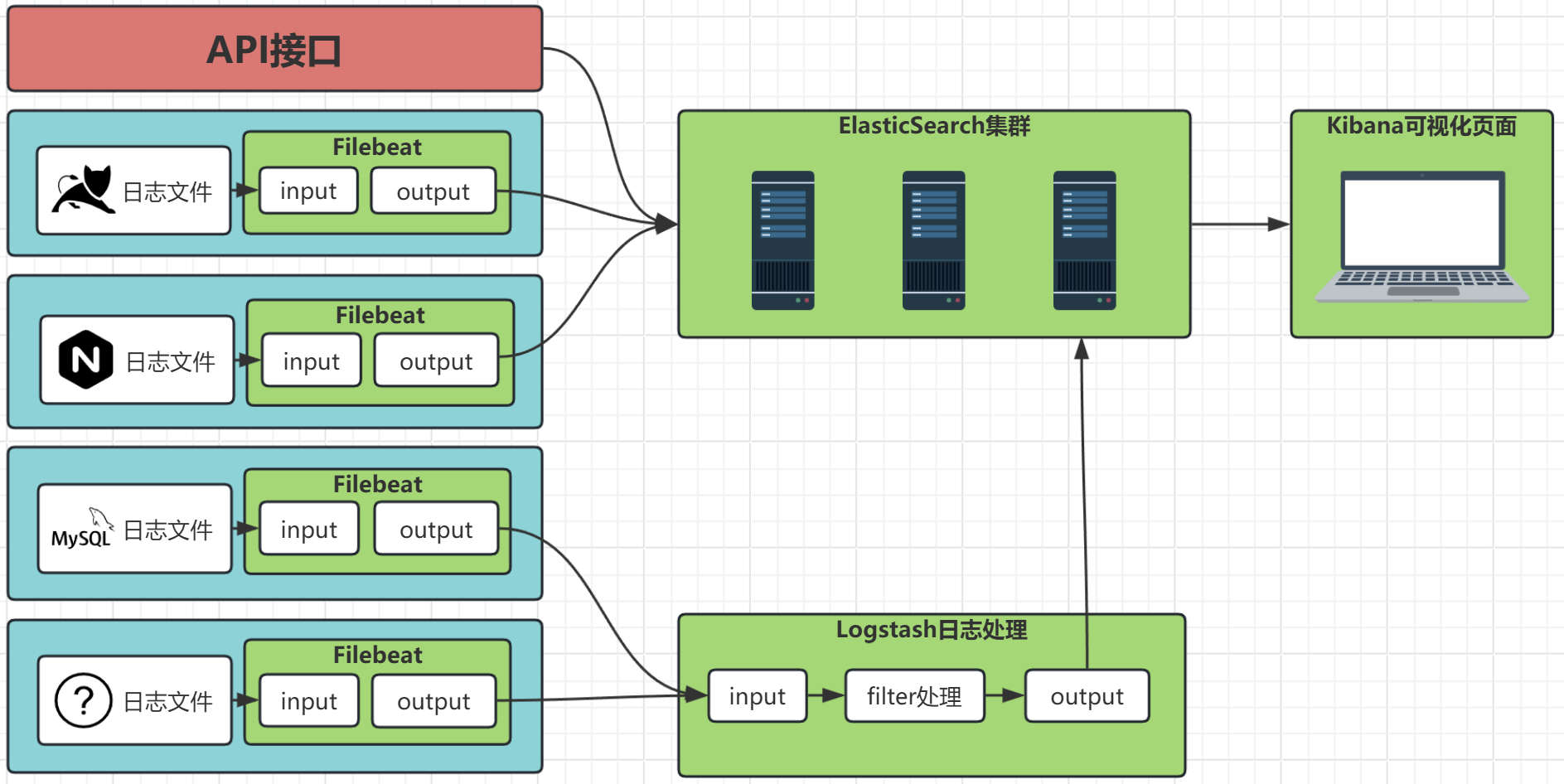
ElasticStack分布式搜索引擎:
- 是Elastic公司开源的一套分布式系统,主要用于企业日志数据的 采集、存储、分析、可视化页面展示;
- ElasticStack提供四大核心组件;
| ElasticStack核心组件 | 中文名 | 作用价值 |
|---|---|---|
| ElasticSearch | 分布式搜索引擎 | 作用功能:【数据存储】【数据索引查询】; 能力:支持【PB级别】的数据扩展,可扩展到上百台服务器架构; |
| Beats | 轻量级数据采集器 | :one:【Filebeat】日志采集器(主讲): :two:【Metricbeat】指标采集器: |
| Logstash | 数据处理管道(器) | 作用功能:将beat采集器采集的数据进行二次加工,再存储至ElasticSearch; |
| Kibana | 可视化数据分析平台 | 免费开源的数据分析与可视化页面展示平台,用于ElasticSearch数据的可视化展示; |
2,数据的流转方式
二、安装部署ElasticSearch
1,环境准备
· 主机准备
| 主机名 | 学习环境配置 | ip地址 |
|---|---|---|
| es01 | 学习环境:2核2g 生产环境:大于2核8g |
10.0.0.101 |
| es02 | 学习环境:2核2g 生产环境:大于2核8g |
10.0.0.102 |
| es03 | 学习环境:2核2g 生产环境:大于2核8g |
10.0.0.103 |
· 主机环境配置
1,内核参数设置
# 设置系统中,单个服务进程可以映射内存区域的最大数量(ES索引查询文件时,需要使用内存映射)
# OpenSearch官方最低要求【262144】
# ElastocSearch官方推荐 v8.16以上版本【1048576】
[root@es01:~]# echo "vm.max_map_count=262144" >> /etc/sysctl.conf
[root@es02:~]# echo "vm.max_map_count=262144" >> /etc/sysctl.conf
[root@es03:~]# echo "vm.max_map_count=262144" >> /etc/sysctl.conf

# 设置系统可以打开的文件描述符的总数;
[root@es01:~]# echo "fs.file-max=6553560" >> /etc/sysctl.conf
[root@es02:~]# echo "fs.file-max=6553560" >> /etc/sysctl.conf
[root@es03:~]# echo "fs.file-max=6553560" >> /etc/sysctl.conf

# 生效内核参数
[root@es01:~]# sysctl -p
[root@es02:~]# sysctl -p
[root@es03:~]# sysctl -p
vm.max_map_count = 262144
fs.file-max = 6553560
2,用户文件最大描述符设置
[root@es01:~]# vim /etc/security/limits.conf
[root@es02:~]# vim /etc/security/limits.conf
[root@es03:~]# vim /etc/security/limits.conf
...
elasticsearch soft nofile 65535
elasticsearch hard nofile 65535
elasticsearch soft memlock unlimited      #锁定物理内存,不使用swap交换分区
elasticsearch hard memlock unlimited      #锁定物理内存,不使用swap交换分区

[root@es01:~]# ulimit -n 65535
[root@es02:~]# ulimit -n 65535
[root@es03:~]# ulimit -n 65535
2,下载安装包
· 官网查看下载地址
# 官网地址:
https://www.elastic.co/
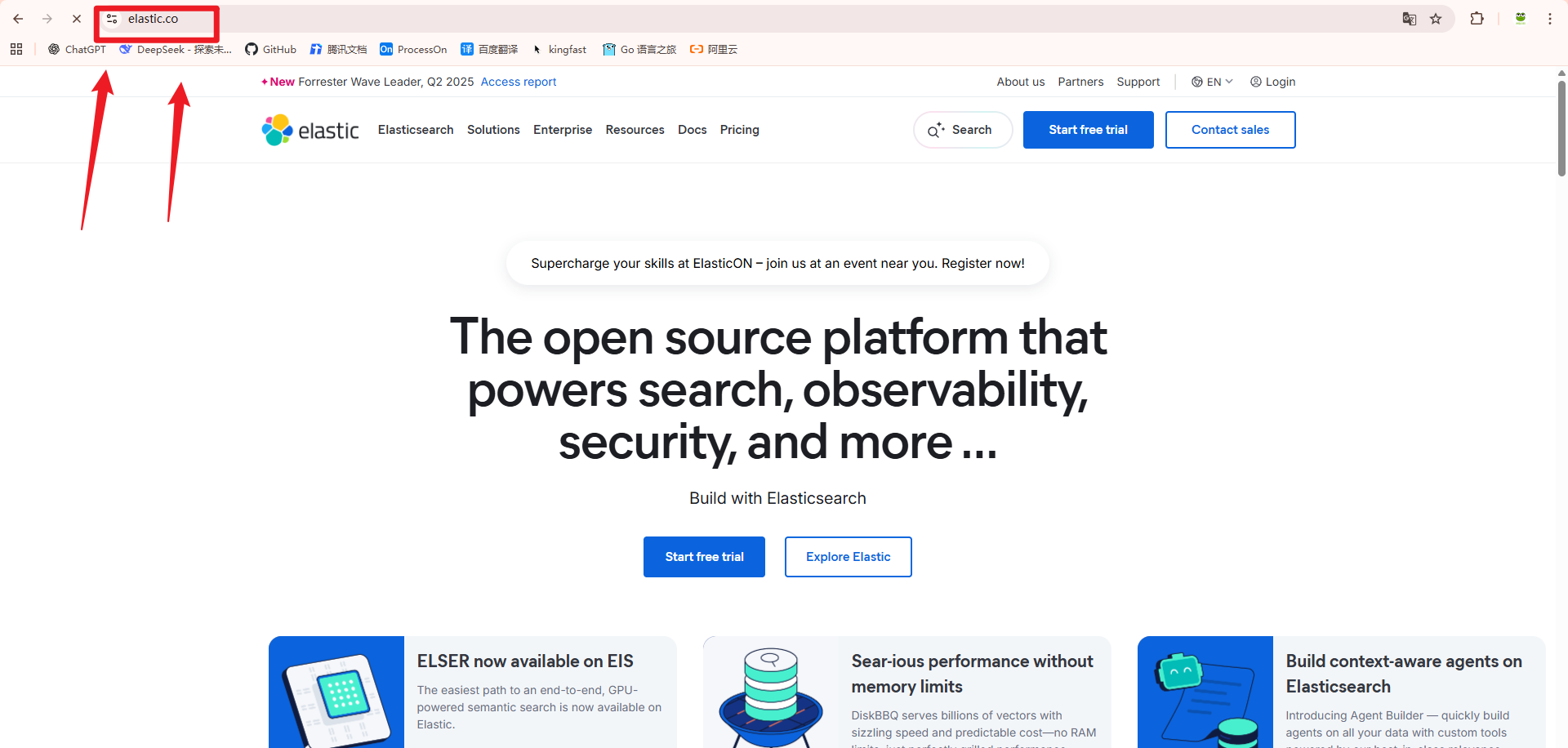
# 点击【Resources】标签
	- 点击【Downloads】进入下载页面
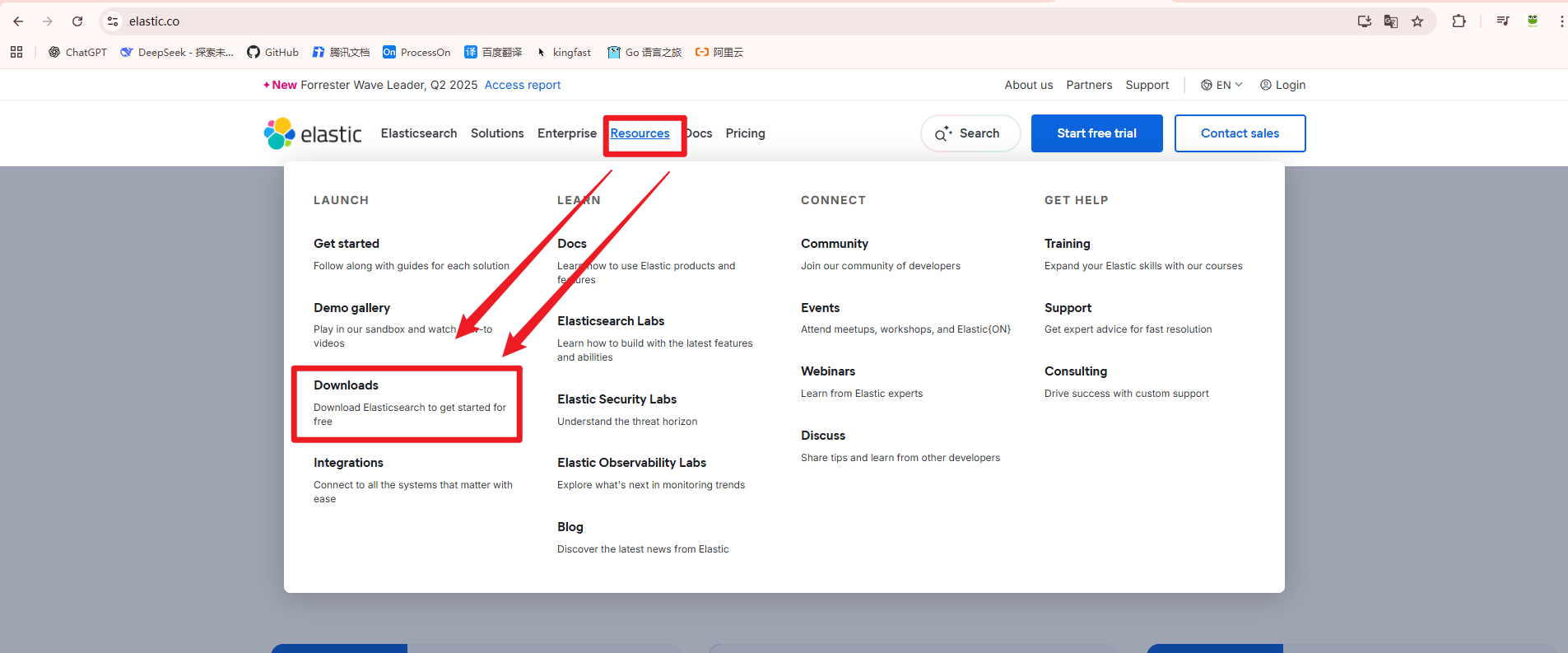
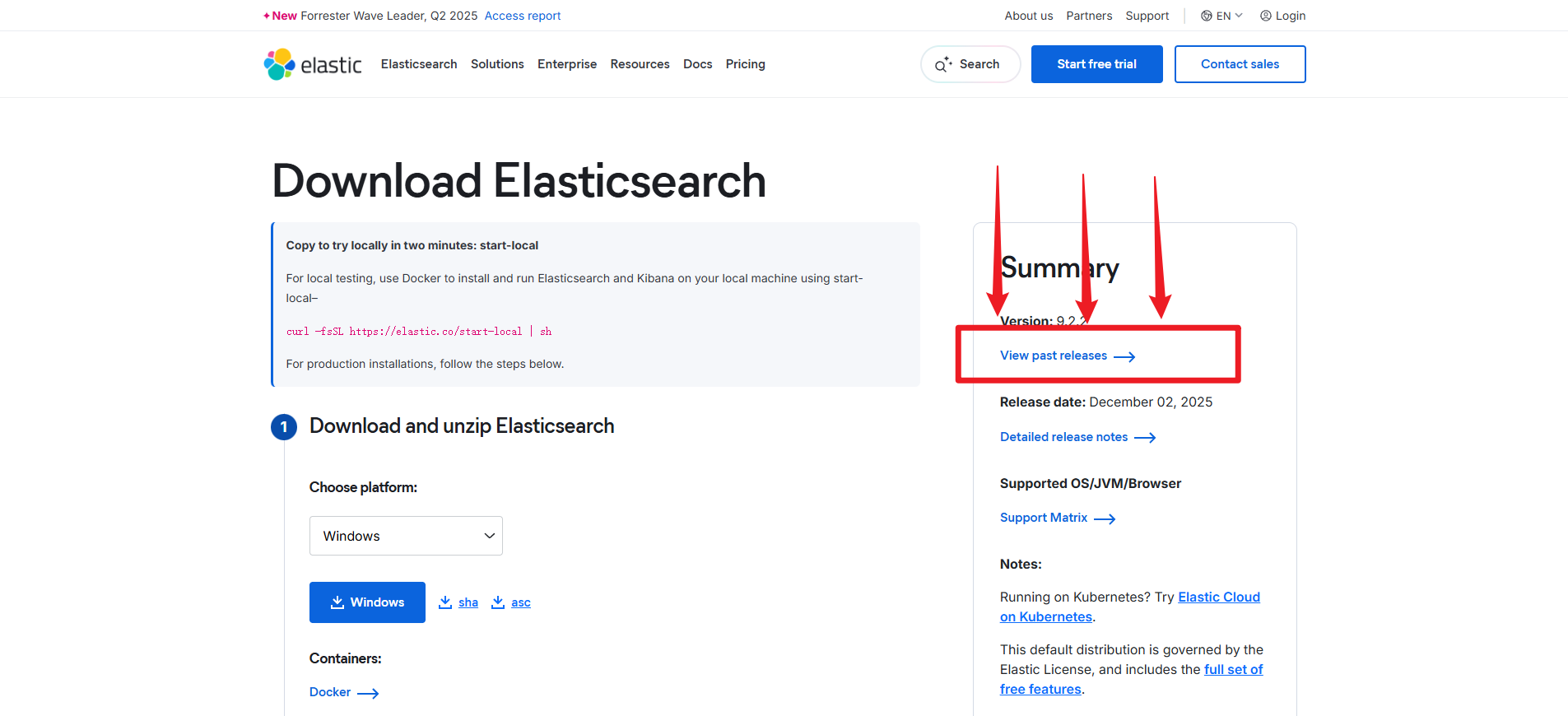
# 点击【Download Elasticsearch】,下载es
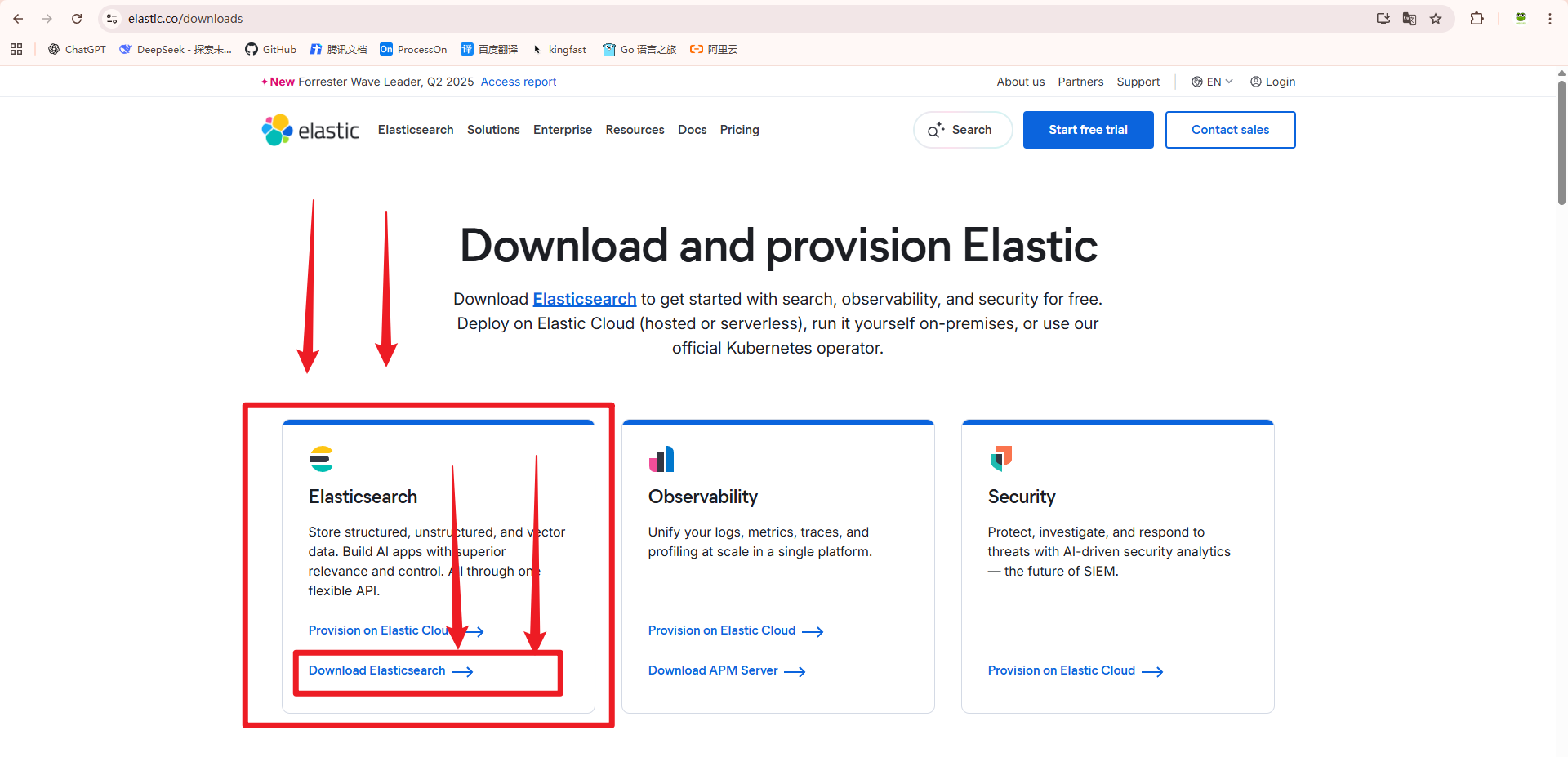
# 进入历史版本选择页面【View past releases】
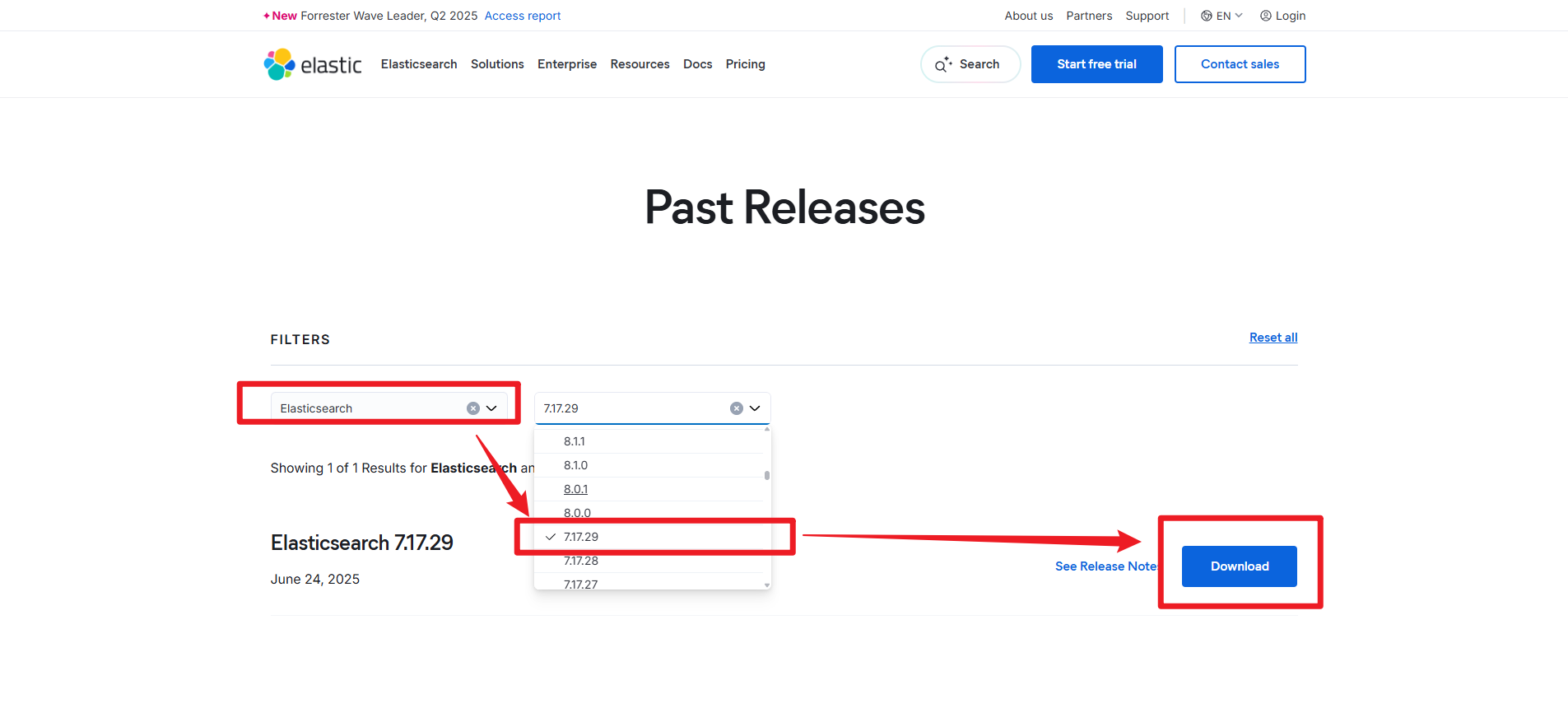
# 选择自己想要下载的版本,点击【Download】
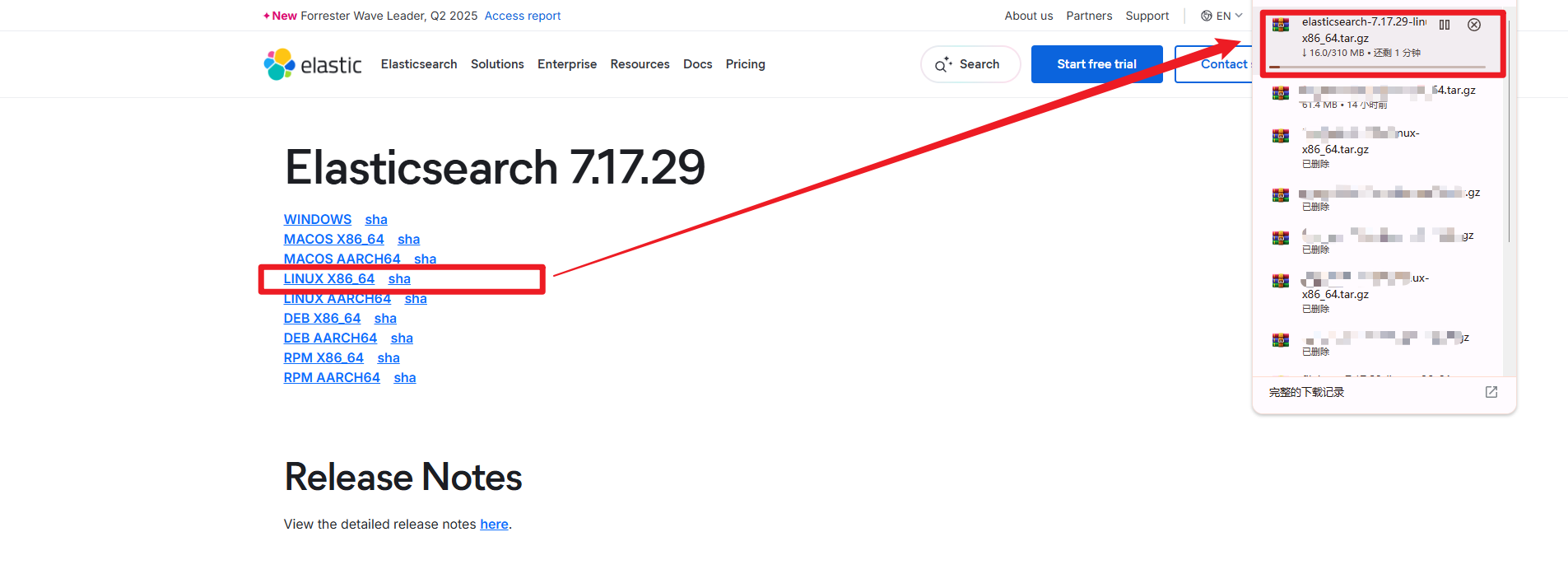
# 选择系统架构类型,开始下载软件版
3,单点部署
· 解压安装包到工具目录
# 上传软件包
[root@es01:~]# rz -E

# 创建工具目录
[root@es01:~]# mkdir -p /tools/es
[root@es01:~]# mkdir -p /tools/es/{data,log}

# 解压安装包到工具目录
[root@es01:~]# tar xf elasticsearch-7.17.29-linux-x86_64.tar.gz -C /tools/es/

# 查看解压目录
[root@es01:~]# ls -l /tools/es/
total 12
drwxr-xr-x 2 root root 4096 Aug  8 12:22 data   # 数据存储目录
drwxr-xr-x 9 root root 4096 Jun 19 09:41 elasticsearch-7.17.29
drwxr-xr-x 2 root root 4096 Aug  8 12:22 log    # 日志存储目录
· 创建管理用户
# 创建虚拟用户
	- 主流linux通用
[root@kibana ~ ]# useradd -r -s /bin/false elasticsearch
	- 红帽系统
[root@kibana ~ ]# useradd -M -s /sbin/nologin elasticsearch

[root@es01:~]# id elasticsearch
uid=1001(elasticsearch) gid=1001(elasticsearch) groups=1001(elasticsearch)
· 生成证书
1,创建证书目录
注意:必须在安装目录的config目录下创建;否则会无法启动
[root@es01:~]# mkdir /tools/es/elasticsearch-7.17.29/config/certs/
2,生成ca证书
# 前往证书目录
[root@es01:~]# cd /tools/es/elasticsearch-7.17.29/config/certs/

# 创建 CA 私钥 (2048位),生成ca证书有效期10年;
[root@es01:certs]# openssl req -x509 -newkey rsa:4096 -sha256 -days 3650 -nodes \
  -subj "/C=CN/ST=Beijing/L=Beijing/O=bakwite/CN=Elasticsearch Root CA" \
  -keyout ca.key -out ca.crt
3,生成ElasticSearch集群通讯证书
# 生成集群节点通讯证书的私钥与请求文件
[root@es01:certs]# openssl req -newkey rsa:4096 -nodes -sha256 \
  -subj "/C=CN/ST=Beijing/L=Beijing/O=bakwite/CN=es-cluster" \
  -addext "subjectAltName=DNS:es01,DNS:es02,DNS:es03,IP:10.0.0.101,IP:10.0.0.102,IP:10.0.0.103,IP:127.0.0.1" \
  -keyout es.key -out es.csr

# 生成集群节点通讯证书
[root@es01:certs]# openssl x509 -req -in es.csr -CA ca.crt -CAkey ca.key -CAcreateserial \
  -days 365 -out es.crt \
  -extfile <(printf "subjectAltName=DNS:es01,DNS:es02,DNS:es03,IP:10.0.0.101,IP:10.0.0.102,IP:10.0.0.103,IP:127.0.0.1")
4,生成ElasticSearch客户端通讯证书
# 生成通用客户端证书(适用于所有客户端)
[root@es01:certs]# openssl req -newkey rsa:4096 -nodes -sha256 \
  -subj "/C=CN/ST=Beijing/L=Beijing/O=bakwite/CN=Es Client" \
  -addext "extendedKeyUsage=clientAuth" \
  -keyout client.key -out client.csr

[root@es01:certs]# openssl x509 -req -in client.csr -CA ca.crt -CAkey ca.key \
  -days 365 -out client.crt \
  -extfile <(printf "extendedKeyUsage=clientAuth")
5,查看证书
[root@es01:/tools/es/cert]# ls -l
total 32
-rw-r--r-- 1 root root 2029 Aug  8 13:59 ca.crt
-rw------- 1 root root 3272 Aug  8 13:59 ca.key
-rw-r--r-- 1 root root 2017 Aug  8 14:15 client.crt
-rw-r--r-- 1 root root 1732 Aug  8 14:15 client.csr
-rw------- 1 root root 3272 Aug  8 14:15 client.key
-rw-r--r-- 1 root root 2061 Aug  8 14:11 es.crt
-rw-r--r-- 1 root root 1777 Aug  8 14:08 es.csr
-rw------- 1 root root 3272 Aug  8 14:08 es.key
· 编辑配置文件
[root@es01:~]# vim /tools/es/elasticsearch-7.17.29/config/elasticsearch.yml
###########[集群配置]#################
# 自定义集群名称
cluster.name: wa-es-cluster
# 本机节点名称
node.name: es01
# 集群主机ip列表【单点模式需要注释掉】
#discovery.seed_hosts: ["10.0.0.101", "10.0.0.102", "10.0.0.103"]
# 初始化集群,参与选举的主机【单点模式需要注释掉】
#cluster.initial_master_nodes: ["es01", "es02", "es03"]

# 集群模式[默认是集群模式(注释掉),单点模式需要启用]
discovery.type: single-node

###########[网络配置]#################
# 服务监听ip地址(用户从那张网卡进来)
network.host: 0.0.0.0
# 服务监听端口
http.port: 9200
# 集群通讯端口
transport.tcp.port: 9300

###########[存储配置]#################
# 数据存储路径\日志存储路径配置
path.data: /tools/es/data/
path.logs: /tools/es/log/

###########[性能配置]#################
# 锁定物理内存,不允许使用交换分区swap
bootstrap.memory_lock: true

###########[安全配置]#################
# 开启安全组件功能
xpack.security.enabled: true
# 节点间通信 (Transport层) ,
xpack.security.transport.ssl.enabled: true
# 验证证书是否过期,但是不验证CN;
xpack.security.transport.ssl.verification_mode: certificate
xpack.security.transport.ssl.certificate: /tools/es/elasticsearch-7.17.29/config/certs/es.crt
xpack.security.transport.ssl.key: /tools/es/elasticsearch-7.17.29/config/certs/es.key
xpack.security.transport.ssl.certificate_authorities: /tools/es/elasticsearch-7.17.29/config/certs/ca.crt
#  HTTP API (REST层) ==========
xpack.security.http.ssl.enabled: true

# 是否要求客户端提供证书进行双向加密,[双向加密;required][单向加密:none]
xpack.security.http.ssl.client_authentication: none
xpack.security.http.ssl.certificate: /tools/es/elasticsearch-7.17.29/config/certs/es.crt
xpack.security.http.ssl.key: /tools/es/elasticsearch-7.17.29/config/certs/es.key
xpack.security.http.ssl.certificate_authorities: /tools/es/elasticsearch-7.17.29/config/certs/ca.crt
· 目录授权
[root@es01:~]# chown -R elasticsearch.elasticsearch /tools/es/
[root@es01:~]# ls -l /tools/es/
total 12
drwxr-xr-x 2 elasticsearch elasticsearch 4096 Aug  8 12:22 data
drwxr-xr-x 9 elasticsearch elasticsearch 4096 Jun 19 09:41 elasticsearch-7.17.29
drwxr-xr-x 2 elasticsearch elasticsearch 4096 Aug  8 12:22 log
· 配置system启动
1,编辑system启动文件
[root@es01:~]# vim /lib/systemd/system/elasticsearch.service
[Unit]
Description=Elasticsearch Service
After=network.target

[Service]
Type=simple
User=elasticsearch
Group=elasticsearch

# 环境变量 - 正确
Environment="ES_HOME=/tools/es/elasticsearch-7.17.29"
Environment="ES_PATH_CONF=/tools/es/elasticsearch-7.17.29/config"
Environment="ES_JAVA_HOME=/tools/es/elasticsearch-7.17.29/jdk"

# 修复:创建PID目录并设置权限
PermissionsStartOnly=true

# 修复:使用标准PID路径
ExecStart=/tools/es/elasticsearch-7.17.29/bin/elasticsearch -p /tools/es/log/elasticsearch.pid

# 修复:停止时清理PID文件
ExecStop=/bin/rm -f /tools/es/log/elasticsearch.pid

# 资源限制
LimitNOFILE=65536
# 锁定物理内存
LimitMEMLOCK=infinity

# 重启策略
Restart=on-failure
RestartSec=60s

[Install]
WantedBy=multi-user.target
2,启动
[root@es01:~]# systemctl daemon-reload
[root@es01:~]# systemctl enable --now elasticsearch.service
[root@es01:~]# systemctl status elasticsearch.service
3,查看端口信息
[root@es01:~]# netstat -tnulp
......
tcp6       0      0 :::9200                 :::*                    LISTEN      131683/java
tcp6       0      0 :::9300                 :::*                    LISTEN      131683/java
......
· 设置所有内置用户的密码
我们统一设置为:123456
# 前往命令路径下
[root@es01:~]# cd /tools/es/elasticsearch-7.17.29/bin/

# 手动设置内置用户的密码:123456
[root@es01:bin]# ./elasticsearch-setup-passwords interactive
......
Please confirm that you would like to continue [y/N]y

Enter password for [elastic]:
Reenter password for [elastic]:
Enter password for [apm_system]:
Reenter password for [apm_system]:
Enter password for [kibana_system]:
Reenter password for [kibana_system]:
Enter password for [logstash_system]:
Reenter password for [logstash_system]:
Enter password for [beats_system]:
Reenter password for [beats_system]:
Enter password for [remote_monitoring_user]:
Reenter password for [remote_monitoring_user]:
Changed password for user [apm_system]
Changed password for user [kibana_system]
Changed password for user [kibana]
Changed password for user [logstash_system]
Changed password for user [beats_system]
Changed password for user [remote_monitoring_user]
Changed password for user [elastic]
· 测试访问elasticserach
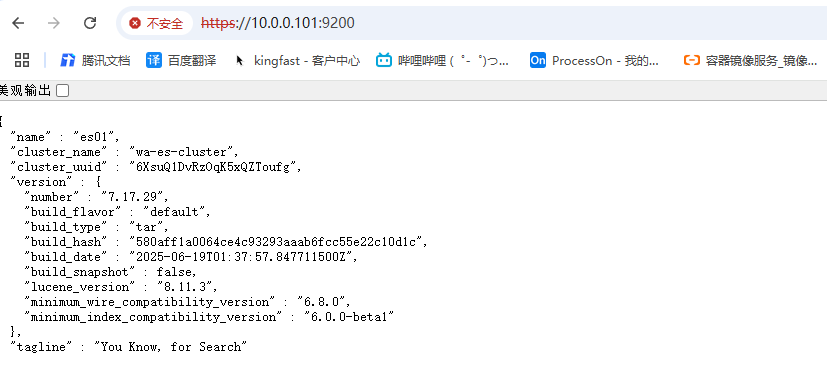
1,浏览器测试访问
https://10.0.0.101:9200/

# 输入用户名和密码
elastic
123456
2,curl命令测试访问
# 使用 API 测试登录
[root@es01:~]# curl -u elastic:123456 --cacert /tools/es/elasticsearch-7.17.29/config/certs/ca.crt  -X GET https://10.0.0.101:9200
	- 或者不验证证书【-k】
[root@es01:~]# curl -u elastic:123456 -k -X GET https://10.0.0.101:9200
{
  "name" : "es01",
  "cluster_name" : "wa-es-cluster",
  "cluster_uuid" : "6XsuQ1DvRzOqK5xQZToufg",
  "version" : {
    "number" : "7.17.29",
    "build_flavor" : "default",
    "build_type" : "tar",
    "build_hash" : "580aff1a0064ce4c93293aaab6fcc55e22c10d1c",
    "build_date" : "2025-06-19T01:37:57.847711500Z",
    "build_snapshot" : false,
    "lucene_version" : "8.11.3",
    "minimum_wire_compatibility_version" : "6.8.0",
    "minimum_index_compatibility_version" : "6.0.0-beta1"
  },
  "tagline" : "You Know, for Search"
}
· 查看集群的节点数量
[root@es01:~]# curl -k -u elastic:123456 -X GET https://10.0.0.101:9200/_cat/nodes
10.0.0.101 30 79 0 0.02 0.01 0.06 cdfhilmrstw * es01
4,部署报错排查技巧
· 前台执行查看报错位置
# 使用elasticsearch,前台运行,查看过程;
[root@es01:~]# sudo -u elasticsearch /tools/es/elasticsearch-7.17.29/bin/elasticsearch
· 查看启动日志信息
[root@es01:~]# ls -l /tools/es/log/
...
-rw-r--r-- 1 elasticsearch elasticsearch       6 Aug  8 17:43 elasticsearch.pid
# 审计日志,
-rw-r--r-- 1 elasticsearch elasticsearch       0 Aug  8 17:04 wa-es-cluster_audit.json
# API语法的弃用警告日志;
-rw-r--r-- 1 elasticsearch elasticsearch       0 Aug  8 17:04 wa-es-cluster_deprecation.json
-rw-r--r-- 1 elasticsearch elasticsearch       0 Aug  8 17:04 wa-es-cluster_deprecation.log
# 索引慢日志
-rw-r--r-- 1 elasticsearch elasticsearch       0 Aug  8 17:04 wa-es-cluster_index_indexing_slowlog.json
-rw-r--r-- 1 elasticsearch elasticsearch       0 Aug  8 17:04 wa-es-cluster_index_indexing_slowlog.log
# 查询慢日志
-rw-r--r-- 1 elasticsearch elasticsearch       0 Aug  8 17:04 wa-es-cluster_index_search_slowlog.json
-rw-r--r-- 1 elasticsearch elasticsearch       0 Aug  8 17:04 wa-es-cluster_index_search_slowlog.log
# 集群的【主运行日志】,记录了ElasticSearch的所有操作日志;【文本格式】
-rw-r--r-- 1 elasticsearch elasticsearch  776775 Aug  8 17:54 wa-es-cluster.log
# 集群的【主运行日志】,记录了ElasticSearch的所有操作日志;【Json格式】
-rw-r--r-- 1 elasticsearch elasticsearch 1083829 Aug  8 17:54 wa-es-cluster_server.json
5,集群部署
· 停止单点节点
# 停止单点服务
[root@es01:~]# systemctl stop elasticsearch.service

# 输出日志和数据目录
[root@es01:~]# rm -rf /tools/es/data/*
[root@es01:~]# rm -rf /tools/es/log/*
· 修改配置文件
[root@es01:~]# cat /tools/es/elasticsearch-7.17.29/config/elasticsearch.yml
###########[集群配置]#################
# 自定义集群名称(集群中必须一致)
cluster.name: wa-es-cluster
# 本机节点名称
node.name: es01
# 集群主机ip列表【单点模式需要注释掉】
discovery.seed_hosts: ["10.0.0.101:9300", "10.0.0.102:9300", "10.0.0.103:9300"]
# 初始主机点参与选举的主机【单点模式需要注释掉】
cluster.initial_master_nodes: ["es01", "es02", "es03"]
# 该主机的角色配置:可以成为什么角色?
# 【master主节点】表示可以成为主节点,管理整个集群
# 【data写数据节点】表示可以成为数据节点;文档数据的增删改查;
# 【ingest】可以可以成为接收、预处理节点;
# 【node.roles: []】:设置为空表示只作为协调节点使用;
node.roles: ["master","data","ingest"]
# 选举前提:必须有2个节点启动才能进行选举(防止脑裂)
# 值的设置:【(集群节点数/2)+1】
# 注意:【es8.x】版本不需要设置,会自动处理;
discovery.zen.minimum_master_nodes: 2


# 集群模式[默认是集群模式(注释掉),单点模式需要启用]
#discovery.type: single-node

###########[网络配置]#################
# 服务监听ip地址(用户从那张网卡进来)
network.host: 0.0.0.0
# 服务监听端口
http.port: 9200
# 集群通讯端口
transport.tcp.port: 9300

###########[存储配置]#################
# 数据存储路径\日志存储路径配置
path.data: /tools/es/data/
path.logs: /tools/es/log/

###########[性能配置]#################
# 锁定物理内存,不允许使用交换分区swap
bootstrap.memory_lock: true

###########[安全配置]#################
# 开启安全组件功能(es8.x版本默认就是开启的)
xpack.security.enabled: true
# 节点间通信 (Transport层) ,
xpack.security.transport.ssl.enabled: true
# 验证证书是否过期,但是不验证CN;[full]:表示验证CN,[certificate]表示只验证证书有效性
xpack.security.transport.ssl.verification_mode: certificate
xpack.security.transport.ssl.certificate: /tools/es/elasticsearch-7.17.29/config/certs/es.crt
xpack.security.transport.ssl.key: /tools/es/elasticsearch-7.17.29/config/certs/es.key
xpack.security.transport.ssl.certificate_authorities: /tools/es/elasticsearch-7.17.29/config/certs/ca.crt

#  HTTP API (REST层) ==========
xpack.security.http.ssl.enabled: true

# 是否要求客户端提供证书进行双向加密,[双向加密;required][单向加密:none]
xpack.security.http.ssl.client_authentication: none
xpack.security.http.ssl.certificate: /tools/es/elasticsearch-7.17.29/config/certs/es.crt
xpack.security.http.ssl.key: /tools/es/elasticsearch-7.17.29/config/certs/es.key
# 证书的认证ca机构
xpack.security.http.ssl.certificate_authorities: /tools/es/elasticsearch-7.17.29/config/certs/ca.crt
· 将目录拷贝到其他节点
1,拷贝程序代码到其他主机
[root@es01:~]# scp -r /tools 10.0.0.102:/
[root@es01:~]# scp -r /tools 10.0.0.103:/
2,拷贝systemctl启动文件到其他主机
[root@es01:~]# scp /lib/systemd/system/elasticsearch.service 10.0.0.102:/lib/systemd/system/
[root@es01:~]# scp /lib/systemd/system/elasticsearch.service 10.0.0.103:/lib/systemd/system/
· 其他节点创建用户与授权目录
1,其他节点创建用户
[root@es02:~]# useradd -s /sbin/nologin -M elasticsearch
[root@es03:~]# useradd -s /sbin/nologin -M elasticsearch
2,其他节点目录授权
[root@es02:~]# chown -R elasticsearch.elasticsearch /tools/es/
[root@es03:~]# chown -R elasticsearch.elasticsearch /tools/es/
· 其他节点编辑配置文件
[root@es02:~]# vim /tools/es/elasticsearch-7.17.29/config/elasticsearch.yml
......
# 本机节点名称
node.name: es02
......

[root@es03:~]# vim /tools/es/elasticsearch-7.17.29/config/elasticsearch.yml
......
# 本机节点名称
node.name: es03
......
· 集群主机全部启动
[root@es01:~]# systemctl daemon-reload
[root@es02:~]# systemctl daemon-reload
[root@es03:~]# systemctl daemon-reload

# 启动
[root@es01:~]# systemctl enable --now  elasticsearch.service
[root@es02:~]# systemctl enable --now  elasticsearch.service
[root@es03:~]# systemctl enable --now  elasticsearch.service

# 查看端口
[root@es01:~]# netstat -tnulp
[root@es02:~]# netstat -tnulp
[root@es03:~]# netstat -tnulp
......
tcp6       0      0 :::9300                 :::*                    LISTEN      114788/java
tcp6       0      0 :::9200                 :::*                    LISTEN      114788/java
......
· 随便一个节点设置密码
密码设置成:123456
[root@es02:~]# /tools/es/elasticsearch-7.17.29/bin/elasticsearch-setup-passwords interactive
Initiating the setup of passwords for reserved users elastic,apm_system,kibana,kibana_system,logstash_system,beats_system,remote_monitoring_user.
You will be prompted to enter passwords as the process progresses.
Please confirm that you would like to continue [y/N]y


Enter password for [elastic]:
Reenter password for [elastic]:
Enter password for [apm_system]:
Reenter password for [apm_system]:
Enter password for [kibana_system]:
Reenter password for [kibana_system]:
Enter password for [logstash_system]:
Reenter password for [logstash_system]:
Enter password for [beats_system]:
Reenter password for [beats_system]:
Enter password for [remote_monitoring_user]:
Reenter password for [remote_monitoring_user]:
Changed password for user [apm_system]
Changed password for user [kibana_system]
Changed password for user [kibana]
Changed password for user [logstash_system]
Changed password for user [beats_system]
Changed password for user [remote_monitoring_user]
Changed password for user [elastic]
· curl命令测试
1,查看集群列表
# 查看集群列表的详细信息
[root@es03:~]# curl -k -u elastic:123456 -X GET https://10.0.0.103:9200/_cat/nodes
10.0.0.102  5 95 1 0.02 0.06 0.02 cdfhilmrstw * es02
10.0.0.101  8 86 0 0.12 0.08 0.02 cdfhilmrstw - es01
10.0.0.103 28 95 2 0.00 0.04 0.01 cdfhilmrstw - es03

# 查看集群列表的详细信息
[root@es03:~]# curl -k -u elastic:123456 -X GET "https://10.0.0.102:9200/_cat/nodes?v"
ip         heap.percent ram.percent cpu load_1m load_5m load_15m node.role   master name
10.0.0.103           12          95   0    0.00    0.00     0.00 cdfhilmrstw -      es03
10.0.0.102           38          95   0    0.06    0.02     0.00 cdfhilmrstw *      es02
10.0.0.101           40          89   0    0.00    0.00     0.00 cdfhilmrstw -      es01
2,查看集群健康状态
# 查看集群的健康状态
[root@es02:~]# curl -k -u elastic:123456 -X GET "https://10.0.0.101:9200/_cluster/health?pretty"
{
  "cluster_name" : "wa-es-cluster",
  "status" : "green",
  "timed_out" : false,
  "number_of_nodes" : 3,
  "number_of_data_nodes" : 3,
  "active_primary_shards" : 3,
  "active_shards" : 6,
  "relocating_shards" : 0,
  "initializing_shards" : 0,
  "unassigned_shards" : 0,
  "delayed_unassigned_shards" : 0,
  "number_of_pending_tasks" : 0,
  "number_of_in_flight_fetch" : 0,
  "task_max_waiting_in_queue_millis" : 0,
  "active_shards_percent_as_number" : 100.0
}
3,访问集群单一节点测试
会发现:集群名称与UUID相同;
- cluster_name :集群名称
- cluster_uuid :集群id
[root@es03:~]# curl -k -u elastic:123456 -X GET https://10.0.0.101:9200
{
  "name" : "es01",
  "cluster_name" : "wa-es-cluster",
  "cluster_uuid" : "jpjW-ASyRLagK0gdBRwZ9Q",
  "version" : {
    "number" : "7.17.29",
    "build_flavor" : "default",
    "build_type" : "tar",
    "build_hash" : "580aff1a0064ce4c93293aaab6fcc55e22c10d1c",
    "build_date" : "2025-06-19T01:37:57.847711500Z",
    "build_snapshot" : false,
    "lucene_version" : "8.11.3",
    "minimum_wire_compatibility_version" : "6.8.0",
    "minimum_index_compatibility_version" : "6.0.0-beta1"
  },
  "tagline" : "You Know, for Search"
}


[root@es03:~]# curl -k -u elastic:123456 -X GET https://10.0.0.102:9200
{
  "name" : "es02",
  "cluster_name" : "wa-es-cluster",
  "cluster_uuid" : "jpjW-ASyRLagK0gdBRwZ9Q",
  "version" : {
    "number" : "7.17.29",
    "build_flavor" : "default",
    "build_type" : "tar",
    "build_hash" : "580aff1a0064ce4c93293aaab6fcc55e22c10d1c",
    "build_date" : "2025-06-19T01:37:57.847711500Z",
    "build_snapshot" : false,
    "lucene_version" : "8.11.3",
    "minimum_wire_compatibility_version" : "6.8.0",
    "minimum_index_compatibility_version" : "6.0.0-beta1"
  },
  "tagline" : "You Know, for Search"
}

[root@es03:~]# curl -k -u elastic:123456 -X GET https://10.0.0.103:9200
{
  "name" : "es03",
  "cluster_name" : "wa-es-cluster",
  "cluster_uuid" : "jpjW-ASyRLagK0gdBRwZ9Q",
  "version" : {
    "number" : "7.17.29",
    "build_flavor" : "default",
    "build_type" : "tar",
    "build_hash" : "580aff1a0064ce4c93293aaab6fcc55e22c10d1c",
    "build_date" : "2025-06-19T01:37:57.847711500Z",
    "build_snapshot" : false,
    "lucene_version" : "8.11.3",
    "minimum_wire_compatibility_version" : "6.8.0",
    "minimum_index_compatibility_version" : "6.0.0-beta1"
  },
  "tagline" : "You Know, for Search"
}
三、集群信息查看
1,查看集群健康状态
| 字段 | 解释说明 | |
|---|---|---|
| epoch | 检查的时间戳信息 | |
| timestamp | 时间格式显示检查时间 | |
| cluster | 集群的名称 | |
| status | 集群健康状态: :one:green(绿色):所有主分片和副本分片均正常运行(最健康)。 :two: yellow(黄色):所有主分片正常,但部分副本分片未分配。 :three: red(红色):存在未分配的主分片(数据不完整)。 |
|
| node.total | 集群总节点数量 | |
| node.data | 集群数据节点数量 | |
| shards | 总的分片数量(主分片+副本分片的总和) | |
| pri | 主分片数量(primary shards) | |
| relo | 正在迁移的分片数(relocating),节点间数据迁移中; | |
| init | 初始化的分片数;(initialing),新分片正在创建; | |
| unassign | 未分配的分片数(unassigned)。待分配到节点的分片; | |
| pending_tasks | 待处理的任务数量(如,分片的分配,创建索引等队列任务) | |
| max_task_wait_time | 最大任务等待时间; | |
| active_shards_percent | 已经激活的分片数,占总分片数的百分比; |
[root@es03:~]# curl -k -u elastic:123456 -X GET "https://10.0.0.102:9200/_cat/health?v"

2,查看集群单一节点运行状态
| curl命令参数 | 解释说明 | 举例 |
|---|---|---|
| -u | 携带【用户名:密码】进行访问 | -u elastic:123456 |
| -k | 表示不验证对方ca证书的有效性 | |
| --cacert | 表示验证对方的ca证书的有效性 | --cacert /tools/es/elasticsearch-7.17.29/config/cert/ca.crt |
| -X | 表示指定http的请求方法 | -X GET/POST/PUT/DELETE...... |
# 查看集群的健康状态
[root@es01:~]# curl --cacert /tools/es/elasticsearch-7.17.29/config/certs/ca.crt -u elastic:123456 -X GET "https://10.0.0.103:9200/_cluster/health?pretty"
	- 或者:
[root@es02:~]# curl -k -u elastic:123456 -X GET "https://10.0.0.101:9200/_cluster/health?pretty"
{
  "cluster_name" : "wa-es-cluster",
  "status" : "green",
  "timed_out" : false,
  "number_of_nodes" : 3,
  "number_of_data_nodes" : 3,
  "active_primary_shards" : 3,
  "active_shards" : 6,
  "relocating_shards" : 0,
  "initializing_shards" : 0,
  "unassigned_shards" : 0,
  "delayed_unassigned_shards" : 0,
  "number_of_pending_tasks" : 0,
  "number_of_in_flight_fetch" : 0,
  "task_max_waiting_in_queue_millis" : 0,
  "active_shards_percent_as_number" : 100.0
}
| json字段 | 解释说明 |
|---|---|
| "cluster_name" : "wa-es-cluster", | 集群名称 |
| "status" : "green", | 集群健康状态: :one:green(绿色):所有主分片和副本分片均正常运行(最健康)。 :two: yellow(黄色):所有主分片正常,但部分副本分片未分配。 :three: red(红色):存在未分配的主分片(数据不完整)。 |
| "timed_out" : false, | 请求是否超时。false表示在预期时间内成功返回结果 |
| "number_of_nodes" : 3, | 集群中的节点总数(包括主节点、数据节点、协调节点等)。 |
| "number_of_data_nodes" : 3, | 专用于存储数据的节点数量(排除仅作为主节点或协调节点的实例). |
| "active_primary_shards" : 3, | 活跃的主分片数量(每个索引至少有一个主分片,负责写入和查询)。 |
| "active_shards" : 6, | 所有活跃分片总数(包括主分片 + 副本分片) |
| "relocating_shards" : 0, | 正在迁移的分片数量(例如节点下线后,其分片会被迁移到其他节点)。 |
| "initializing_shards" : 0, | 正在初始化的分片数量(新创建索引或分片恢复时的临时状态)。 |
| "unassigned_shards" : 0, | 未分配的分片数量(通常因节点不足或配置错误导致)。 |
| "delayed_unassigned_shards" : 0, | 因延迟分配策略(如节点重启)而暂未分配的分片数量。 |
| "number_of_pending_tasks" : 0, | 等待执行的集群级任务数量(如分片分配、索引创建等)。非零值可能影响性能。 |
| "number_of_in_flight_fetch" : 0, | 正在进行的分片元数据同步操作数量(内部机制使用)。 |
| "task_max_waiting_in_queue_millis" : 0, | 任务队列中最长等待时间(毫秒)。数值高表示集群任务繁忙。 |
| "active_shards_percent_as_number" : 100.0 | 活跃分片占总分片的百分比。100% 表示全部分片均正常运行。 |
3,查看集群节点列表
| 字段解释 | 解释说明 |
|---|---|
| ip | 节点的ip地址 |
| heap.percent | JVM 堆内存的使用百分比 |
| ram.percent | 系统物理内存使用百分比 |
| cpu | es平均使用cpu百分比 |
| load_1m、load_5m、load_15m | 系统负载,与top命令的负载一个意思; |
| node.role | 节点扮演的角色【cdfhilmrstw】表示: c:code,冷数据节点 d:data,数据节点,存储索引分片 f:frozen,冻结数据节点,用于可搜索的快照 h:hot,热数据节点 i:ingest,摄取节点,了运行预处理管道 l:machine_learning,机器学习节点 m:master,在于选举master的节点 r:remote_cluster_client,远程集群客户端节点,可以远程连接集群 s:content,内容节点(表示date+ingest) t:transform,转换节点,运行transform任务 v:voting_only,进投票节点,参与主节点的选举,但是不在选; w:warm,温数据节点 |
| master | 表示该节点是否是master 【*】表示是master 【-】表示不是master |
| name | 节点名称,配置文件中的node.name所写的内容; |
# 查看集群列表的详细信息
[root@es03:~]# curl -k -u elastic:123456 -X GET https://10.0.0.103:9200/_cat/nodes
10.0.0.102  5 95 1 0.02 0.06 0.02 cdfhilmrstw * es02
10.0.0.101  8 86 0 0.12 0.08 0.02 cdfhilmrstw - es01
10.0.0.103 28 95 2 0.00 0.04 0.01 cdfhilmrstw - es03

# 查看集群列表的详细信息
[root@es03:~]# curl -k -u elastic:123456 -X GET "https://10.0.0.102:9200/_cat/nodes?v"
ip         heap.percent ram.percent cpu load_1m load_5m load_15m node.role   master name
10.0.0.103           12          95   0    0.00    0.00     0.00 cdfhilmrstw -      es03
10.0.0.102           38          95   0    0.06    0.02     0.00 cdfhilmrstw *      es02
10.0.0.101           40          89   0    0.00    0.00     0.00 cdfhilmrstw -      es01
4,查看集群单一节点信息
| 字段 | 解释说明 |
|---|---|
| "name" : "es03", | 节点名称 |
| "cluster_name" : "wa-es-cluster", | 集群名称 |
| "cluster_uuid" : "jpjW-ASyRLagK0gdBRwZ9Q", | 集群的唯一标识:【UUID】 |
| "version" : { "number" : "7.17.29", "build_flavor" : "default", "build_type" : "tar", "build_hash" : "580aff1a0064ce4c93293aaab6fcc55e22c10d1c", "build_date" : "2025-06-19T01:37:57.847711500Z", "build_snapshot" : false, "lucene_version" : "8.11.3", "minimum_wire_compatibility_version" : "6.8.0", "minimum_index_compatibility_version" : "6.0.0-beta1" }, |
ES版本信息 |
| "tagline" : "You Know, for Search" | ES官方的slogen,致敬1984年苹果的广告语 含义:【去寻找你想知道的结果】 |
[root@es03:~]# curl -k -u elastic:123456 -X GET https://10.0.0.103:9200
{
  "name" : "es03",
  "cluster_name" : "wa-es-cluster",
  "cluster_uuid" : "jpjW-ASyRLagK0gdBRwZ9Q",
  "version" : {
    "number" : "7.17.29",
    "build_flavor" : "default",
    "build_type" : "tar",
    "build_hash" : "580aff1a0064ce4c93293aaab6fcc55e22c10d1c",
    "build_date" : "2025-06-19T01:37:57.847711500Z",
    "build_snapshot" : false,
    "lucene_version" : "8.11.3",
    "minimum_wire_compatibility_version" : "6.8.0",
    "minimum_index_compatibility_version" : "6.0.0-beta1"
  },
  "tagline" : "You Know, for Search"
}
四、ElasticSearch索引管理
1,数据存储概念
· 数据结构说明
| 数据库类型 | 存储结构 |
|---|---|
| MySQL | 【数据库database】>>【数据表table】>>【字段】>>【数据】 |
| ElasticSearch | 【索引index】>>【文档document(多组key:value集合的键值对)】 |
· 关键名词解释
| 名词 | 作用 | 解释说明/备注 |
|---|---|---|
| 索引index | 类似数据库中一张表 | 相当于数据库中的一个数据表; |
| 文档document | 类似数据表中一条数据 | 文档中包含多对儿,key : value; |
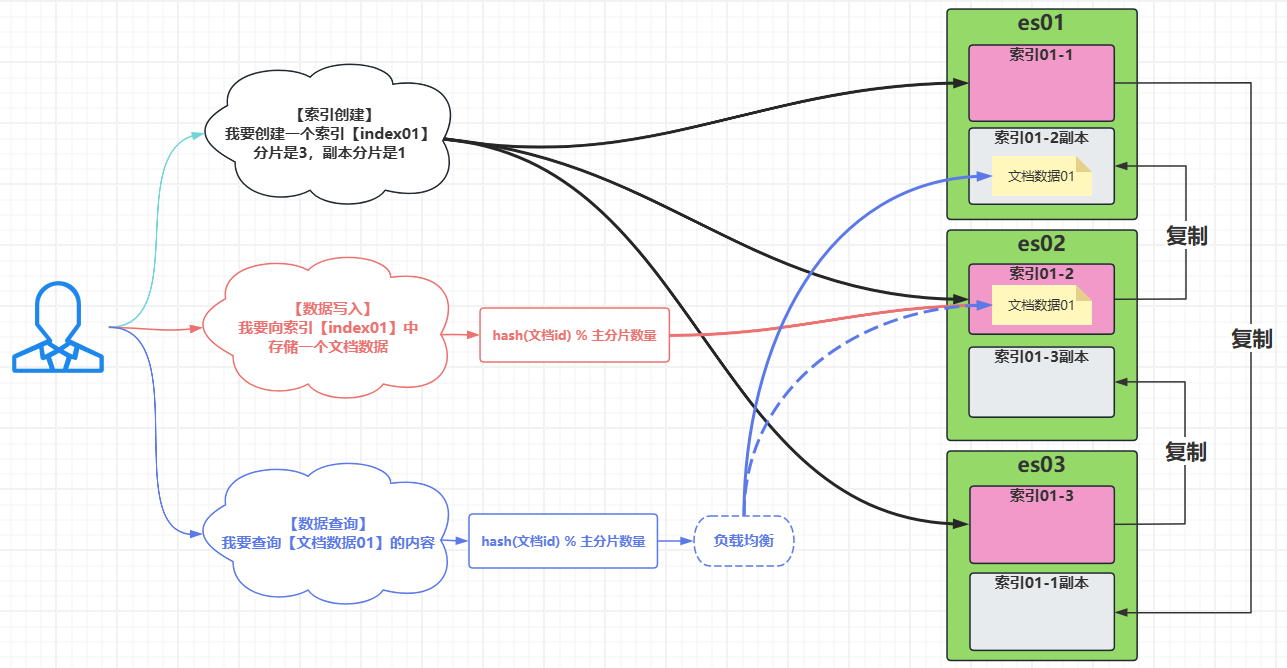
| 索引主分片primary shard | 索引分布的位置 | 索引的分布、组成结构; |
| 索引副本分片replica shard | 分片的备份数量 | 一个索引的分片的副本分片,不能与主分片在相同的节点上; 【作用价值】: :one:允许一个节点故障 :two:根据节点负载,选择低延迟节点查询数据; |
2,创建索引
· 索引初体验
1,创建一个索引
相当于创建一张空表,表名叫做:index01
- 就是一个空白表;
- 没有字段、没有数据;
# 创建索引
[root@es01:~]# curl -k -u elastic:123456 -X PUT "https://10.0.0.101:9200/index01"

# 创建索引并以json格式输出【?pretty】;
[root@es01 ~ ]# curl -k -u elastic:123456 -X PUT "https://10.0.0.101:9200/index01?pretty"
{
  "acknowledged" : true,
  "shards_acknowledged" : true,
  "index" : "index01"
}
| 字段 | 解释说明 |
|---|---|
| acknowledged | 表示该索引创建请求,是否被集群的“主节点”所接受?? [true]表示主节点接受了创建索引的请求; [false]表示创建失败,主节点不接受创建请求; |
| shards_acknowledged | 表示这个创建的索引的每个分片(包括副本)是否都已经启动? [true]表示所有所需分片都已启动; [false]表示有分片没启动; |
| index | 表示创建索引的名称,此时创建成功; |

2,查看索引详细信息
可以看到,索引中包含3个一级字段:
- aliases字段:索引的别名;
- mappings字段:索引的字段与字段类型;
- settings字段:索引的元数据(分片)信息;
- 默认主分片为【1】
- 默认副本分片为【1】
# 查看索引详情,并以json格式输出【?pretty】
[root@es01 ~ ]# curl -k -u elastic:123456 -X GET 'https://10.0.0.101:9200/index01?pretty'
{
  "index01": {
    "aliases": {},
    "mappings": {},
    "settings": {
      "index": {
        "routing": {"allocation": {"include": {"_tier_preference": "data_content"}}},
        "number_of_shards": "1",
        "provided_name": "index01",
        "creation_date": "1755331625832",
        "number_of_replicas": "1",
        "uuid": "nWDP4lovSiC7ls24ie5zhA",
        "version": {"created": "7172999"}
      }
    }
  }
}
3,索引字段解释
【aliases字段】:索引的别名
"aliases": {},
【mappings字段】:索引的字段级字段数据类型
"mappings": {},
【settings字段】:索引的主、副本分片等元数据信息设置
"settings": {
      "index": {
        "routing": {"allocation": {"include": {"_tier_preference": "data_content"}}},
        "number_of_shards": "1",
        "provided_name": "index01",
        "creation_date": "1755331625832",
        "number_of_replicas": "1",
        "uuid": "nWDP4lovSiC7ls24ie5zhA",
        "version": {"created": "7172999"}
      }
    }
| settings字段 | 说明 |
|---|---|
| routing": {"allocation": {"include": {"_tier_preference": "data_content"}}} | 表示索引存储在什么角色的节点中?; 【node.role】查看集群列表可以看到节点充当的角色; |
| number_of_shards | 表示索引的【主分片数量】; |
| number_of_replicas | 表示索引的【副本分片数量】; |
| provided_name | 表示索引的名称; |
| creation_date | 表示索引创建的时间戳;单位:毫秒; |
| uuid | 索引的唯一标识; |
| version | 表示索引创建在ElasticSearch的什么版本中; |
查看集群节点列表中:【node.role】就是节点充当的角色;
[root@es03:~]# curl -k -u elastic:123456 -X GET "https://10.0.0.102:9200/_cat/nodes?v"
ip         heap.percent ram.percent cpu load_1m load_5m load_15m node.role   master name
10.0.0.103           12          95   0    0.00    0.00     0.00 cdfhilmrstw -      es03
10.0.0.102           38          95   0    0.06    0.02     0.00 cdfhilmrstw *      es02
10.0.0.101           40          89   0    0.00    0.00     0.00 cdfhilmrstw -      es01

# 节点扮演的角色node.role中【cdfhilmrstw】表示:
	- c:code,冷数据节点
	- d:data,数据节点,存储索引分片
	- f:frozen,冻结数据节点,用于可搜索的快照
	- h:hot,热数据节点
	- i:ingest,摄取节点,了运行预处理管道
	- l:machine_learning,机器学习节点
	- m:master,在于选举master的节点
	- r:remote_cluster_client,远程集群客户端节点,可以远程连接集群
	- s:content,内容节点(表示date+ingest)
	- t:transform,转换节点,运行transform任务
	- v:voting_only,进投票节点,参与主节点的选举,但是不在选;
	- w:warm,温数据节点
· 创建索引设置索引分片
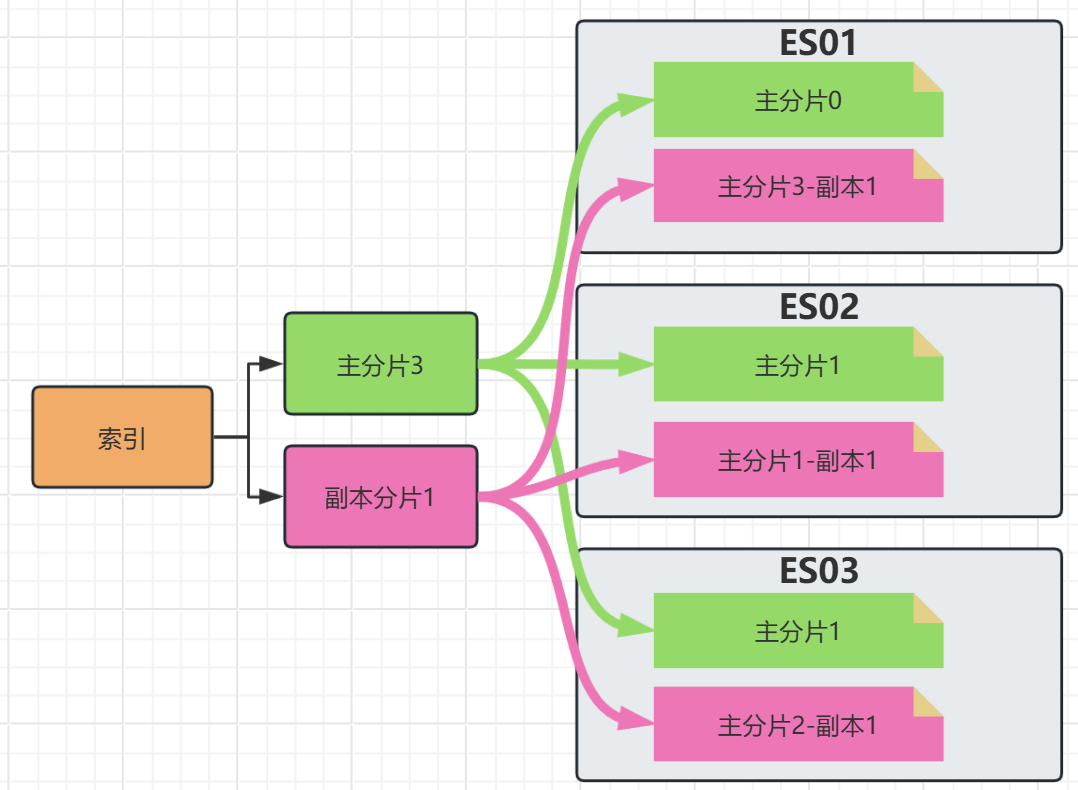
创建索引指定【主分片】和【副本分片】;
- 相同的数据的主分片与副本分片不能同时在相同的一台主机上;(也没有意义)
- 所以,3台主机的集群,最多只能设计2个副本分片,也就是:【集群主机数量 - 1】
- 主分片的数量,在创建索引是就确定,之后不可修改;
- 副本分片可以随需求进行数量调整;
| curl命令参数 | 解释说明 |
|---|---|
| -d | 请求URL时,提交的数据信息; |
| -H | 请求URL时,携带的请求头字段设置; |
[root@es01:~]# curl -k -u elastic:123456 -X PUT "https://10.0.0.101:9200/index02?pretty" -H 'Content-Type: application/json' -d '
{
   "settings":{
     "number_of_shards": 3,
     "number_of_replicas": 1
   }
}'
查看索引详情
[root@es01 ~ ]# curl -k -u elastic:123456 -X GET 'https://10.0.0.101:9200/index02?pretty'
{
  "index02" : {
    "aliases" : { },
    "mappings" : { },
    "settings" : {
      "index" : {
        "routing" : {
          "allocation" : {
            "include" : {
              "_tier_preference" : "data_content"
            }
          }
        },
        "number_of_shards" : "3",            # 主分片数量
        "provided_name" : "index02",
        "creation_date" : "1764305560662",
        "number_of_replicas" : "1",          # 副本分片数量
        "uuid" : "Vu7Cz7UtSOudlk8SrRKPtA",
        "version" : {
          "created" : "7172999"
        }
      }
    }
  }
}
· 创建索引设置字段映射
01,数据类型介绍
| ES数据类型 | 含义说明 |
|---|---|
| text | 普通文本类型,可以模糊搜索的文本信息; |
| keyword | 精准匹配文本类型,不可以模糊匹配,必须精确查找; |
| integer/long/short/float | 【整数32/大整数64/小整数16/小数】数值类型,可以计算、范围查找、比较查找; |
| scaled_float | 缩放浮点经度类型;0.21会存储为12; |
| ip | ip地址类型,可以通过ip范围、网段进行查找的类型 |
| date/date_nanos | 时间类型/纳秒级别时间类型 |
| boolean | 布尔类型:true/false |
| geo_point | 经纬度类型;存储经纬度坐标 |
| geo_shape | 地理形状类型:多组经纬度组成的图形区域; |
| version | 版本类型;可以对版本进行索引; |
| object | 对象类型;内涵多组键值对,每个键可以单独设置数据类型 |
| alias | 别名类型;指向具体的keyword类型的字段上; |
| histogram | 直方图类型;设置区间分组,数据分析时使用的类型; |
02,创建索引映射text类型
| 字段 | 解释说明 |
|---|---|
| mappings | 表示声明,设置字段映射; |
| properties | 【属性】:表示设置字段与属性信息(就是类型) |
| usernme | 自定义的字段名,随便写;根据业务场景需求自定义; |
| type:text | 设置字段的类型是text |
| analyzer | 【分词器】设置;standard是系统默认的分词器(后面会详细讲); |
[root@es01 ~ ]# curl -k -u elastic:123456 -X PUT "https://10.0.0.101:9200/index03?pretty" -H 'Content-Type: application/json' -d'
{
  "mappings": {
    "properties": {
        "usernme": {
            "type": "text",
            "analyzer": "standard"
        }
    }
  },
  "settings": {
    "number_of_shards": 3,
    "number_of_replicas": 1
  }
}'
查看索引详情
[root@es01 ~ ]# curl -k -u elastic:123456 -X GET 'https://10.0.0.101:9200/index03?pretty'
{
......
    "mappings" : {
      "properties" : {
        "usernme" : {
          "type" : "text",
          "analyzer" : "standard"
......
03,创建索引映射keyword类型
| 字段 | 含义说明 |
|---|---|
| level | 自定义字段名称,随便写; |
| type:keyword | 设置字段类型为keyword |
| doc_values | 设置存储方式为:【正排索引】(keyword类型默认的存储方式,后面会讲),为了方便排序聚合; |
[root@es01 ~ ]# curl -k -u elastic:123456 -X PUT "https://10.0.0.101:9200/index04?pretty" -H 'Content-Type: application/json' -d'
{
  "mappings": {
    "properties": {
        "tags": {
            "type": "keyword",
            "doc_values": true
        }
    }
  },
  "settings": {
    "number_of_shards": 3,
    "number_of_replicas": 1
  }
}'
查看索引详情
[root@es01 ~ ]# curl -k -u elastic:123456 -X GET 'https://10.0.0.101:9200/index04?pretty'
{
......
    "mappings" : {
      "properties" : {
        "tags" : {
          "type" : "keyword"
......
04,创建索引映射数值类型
| 字段 | 含义说明 |
|---|---|
| short | 表示2^16次方大小,-3.2万 ~ 3.2万 |
| index | 表示是否允许被搜索?默认是true; |
| integer | 表示2^32次方大小,-21亿 ~ 21亿 |
| long | 表示2^64次方大小; |
| float | 表示最高存储6位数;【123.456】【222.333】【1.22222】【12.3456】 |
| scaled_float | 精度小数类型,将小数存储为整数; 需要自行设置取整的算法:【 "scaling_factor": 100 】表示 存储的数值都乘以100再存储; |
[root@es01 ~ ]# curl -k -u elastic:123456 -X PUT "https://10.0.0.101:9200/index05?pretty" -H 'Content-Type: application/json' -d'
{
  "mappings": {
    "properties": {
        "kucun": {
            "type": "integer"
        },
        "order_number": {
            "type": "long"
        },
        "price": {
            "type": "float"
        },
        "weight": {
            "type": "short",
            "index": false
        },
        "pi": {
            "type": "scaled_float",
            "scaling_factor": 100
        }
    }
  },
  "settings": {
    "number_of_shards": 3,
    "number_of_replicas": 1
  }
}'
查看索引详情
[root@es01 ~ ]# curl -k -u elastic:123456 -X GET 'https://10.0.0.101:9200/index05?pretty'
......
        "kucun" : {
          "type" : "integer"
        },
        "order_number" : {
          "type" : "long"
        },
        "pi" : {
          "type" : "scaled_float",
          "scaling_factor" : 100.0
        },
        "price" : {
          "type" : "float"
        },
        "weight" : {
          "type" : "short",
          "index" : false
......
05,创建索引映射时间类型
| 字段 | 含义说明 |
|---|---|
| type: date | 普通时间类型 |
| format: yyyy-MM-dd HH:mm:ss || epoch_millis | 表示允许写入的时间格式: 【yyyy-MM-dd HH:mm:ss】:1991-11-12 03:32:43 【epoch_millis】:表示时间戳; 【||】:或者的意思,就是两种格式写入数据都被允许; |
| type : date_nanos | 纳秒时间类型 |
| format: strict_date_optional_time_nanos|| epoch_millis | 不设置默认也是这个 【strict_date_optional_time_nanos】表示纳秒字符串时间; 同等于:yyyy-MM-dd HH:mm:ss.SSSSSSSSS |
[root@es01 ~ ]# curl -k -u elastic:123456 -X PUT "https://10.0.0.101:9200/index06?pretty" -H 'Content-Type: application/json' -d'
{
  "mappings": {
    "properties": {
       "order_create_time": {
       		"type": "date",
       		"format": "yyyy-MM-dd HH:mm:ss||epoch_millis"
       },
       "shipment_time": {
       		"type": "date_nanos",
       		"format": "strict_date_optional_time_nanos||epoch_millis"
       }
    }
  },
  "settings": {
    "number_of_shards": 3,
    "number_of_replicas": 1
  }
}'
查看索引详情
[root@es01 ~ ]# curl -k -u elastic:123456 -X GET 'https://10.0.0.101:9200/index06?pretty'
......
        "order_create_time" : {
          "type" : "date",
          "format" : "yyyy-MM-dd HH:mm:ss||epoch_millis"
        },
        "shipment_time" : {
          "type" : "date_nanos"
......
06,创建索引映射坐标类型
| 字段 | 含义说明 |
|---|---|
| "type": "geo_point" | 经纬度数据类型; |
| "type": "geo_shape" | 范围类型,多组经纬度; |
[root@es01 ~ ]# curl -k -u elastic:123456 -X PUT "https://10.0.0.101:9200/index07?pretty" -H 'Content-Type: application/json' -d'
{
  "mappings": {
    "properties": {
       "warehouse_address": {
       		"type": "geo_point"
       },
       "delivery_area": {
       		"type": "geo_shape"
       }
    }
  },
  "settings": {
    "number_of_shards": 3,
    "number_of_replicas": 1
  }
}'
查看索引详情
[root@es01 ~ ]# curl -k -u elastic:123456 -X GET 'https://10.0.0.101:9200/index07?pretty'
......
        "delivery_area" : {
          "type" : "geo_shape"
        },
        "warehouse_address" : {
          "type" : "geo_point"
......
07,创建索引映射布尔类型
| 字段 | 含义说明 |
|---|---|
| "type": "boolean" | 布尔类型 |
[root@es01 ~ ]# curl -k -u elastic:123456 -X PUT "https://10.0.0.101:9200/index08?pretty" -H 'Content-Type: application/json' -d'
{
  "mappings": {
    "properties": {
       "is_up": {
       		"type": "boolean"
       }
    }
  },
  "settings": {
    "number_of_shards": 3,
    "number_of_replicas": 1
  }
}'
查看索引详情
[root@es01 ~ ]# curl -k -u elastic:123456 -X GET 'https://10.0.0.101:9200/index08?pretty'
......
        "is_up" : {
          "type" : "boolean"
......
08,创建索引映射ip类型
| 字段 | 含义说明 |
|---|---|
| "type": "ip" | ip类型 |
[root@es01 ~ ]# curl -k -u elastic:123456 -X PUT "https://10.0.0.101:9200/index09?pretty" -H 'Content-Type: application/json' -d'
{
  "mappings": {
    "properties": {
       "remote_ip": {
       		"type": "ip"
       }
    }
  },
  "settings": {
    "number_of_shards": 3,
    "number_of_replicas": 1
  }
}'
查看索引详情
[root@es01 ~ ]# curl -k -u elastic:123456 -X GET 'https://10.0.0.101:9200/index09?pretty'
......
        "remote_ip" : {
          "type" : "ip"
 ......
09,创建索引映射版本类型
| 字段 | 含义说明 |
|---|---|
| "type": "version" | 版本类型,一般拥挤记录用户使用的app版本信息 |
[root@es01 ~ ]# curl -k -u elastic:123456 -X PUT "https://10.0.0.101:9200/index10?pretty" -H 'Content-Type: application/json' -d'
{
  "mappings": {
    "properties": {
       "app_version": {
       		"type": "version"
       }
    }
  },
  "settings": {
    "number_of_shards": 3,
    "number_of_replicas": 1
  }
}'
查看索引详情
[root@es01 ~ ]# curl -k -u elastic:123456 -X GET 'https://10.0.0.101:9200/index10?pretty'
......
    "mappings" : {
      "properties" : {
        "app_version" : {
          "type" : "version"
......
10,创建索引映射直方图类型
| 字段 | 含义说明 |
|---|---|
| "type": "histogram" | 直方图类型 |
[root@es01 ~ ]# curl -k -u elastic:123456 -X PUT "https://10.0.0.101:9200/index11?pretty" -H 'Content-Type: application/json' -d'
{
  "mappings": {
    "properties": {
       "app_version": {
       		"type": "histogram"
       }
    }
  },
  "settings": {
    "number_of_shards": 3,
    "number_of_replicas": 1
  }
}'
查看索引详情
[root@es01 ~ ]# curl -k -u elastic:123456 -X GET 'https://10.0.0.101:9200/index11?pretty'
......
        "app_version" : {
          "type" : "histogram"
......
11,创建索引映射对象类型
| 字段 | 含义说明 |
|---|---|
| specifications | 【规格】:自定义字段名称,表示商品规格; |
| "type": "object" | 类型为对象类型;字段中包含多个字段; |
| properties | 子字段的属相设置 |
| "color": { "type": "keyword" }, "size": { "type": "keyword" }, "material": { "type": "text" } |
子字段的名称与类型 |
[root@es01 ~ ]# curl -k -u elastic:123456 -X PUT "https://10.0.0.101:9200/index12?pretty" -H 'Content-Type: application/json' -d'
{
  "mappings": {
    "properties": {
      "specifications": {
        "type": "object",
        "properties": {
          "color": { "type": "keyword" },
          "size": { "type": "keyword" },
          "material": { "type": "text" }
        }
      }
    }
  },
  "settings": {
    "number_of_shards": 3,
    "number_of_replicas": 1
  }
}'
查看索引详情
[root@es01 ~ ]# curl -k -u elastic:123456 -X GET 'https://10.0.0.101:9200/index12?pretty'
......
    "mappings" : {
      "properties" : {
        "specifications" : {
          "properties" : {
            "color" : {
              "type" : "keyword"
            },
            "material" : {
              "type" : "text"
            },
            "size" : {
              "type" : "keyword"
            }
          }
        }
      }
    },
......
12,创建索引映射别名类型
什么是别名类型:就是给字段起一个别名,可以理解为一个【字段的另一个入口】;
- 当我们有一个字段叫:【name】
- 后来由于业务需求,我们需要将这个字段修改为:【user_name】
- 但是,这个字段下已经存在很多数据,之前的开发写的代码调取的也都是【name】字段;
- 在这种情况下,我们可以给这个字段【name】起一个别名,叫【user_name】;
| 字段 | 含义说明 |
|---|---|
| type: alias | 别名类型 |
| "path": "name" | 别名指向的原来的字段; |
[root@es01 ~ ]# curl -k -u elastic:123456 -X PUT "https://10.0.0.101:9200/index13?pretty" -H 'Content-Type: application/json' -d'
{
  "mappings": {
    "properties": {
      "name": {
        "type": "text"
      },
      "user_name": {
        "type": "alias",
        "path": "name"
      }
    }
  },
  "settings": {
    "number_of_shards": 3,
    "number_of_replicas": 1
  }
}'
查看索引详情
[root@es01 ~ ]# curl -k -u elastic:123456 -X GET 'https://10.0.0.101:9200/index13?pretty'
......
      "properties" : {
        "name" : {
          "type" : "text"
        },
        "user_name" : {
          "type" : "alias",
          "path" : "name"
        }
      }
    },
......
13,创建索引同一个字段映射多个类型
当我们想要搜索一个字段时,有时候会同时有两种需求:
- 既要这个字段可以模糊匹配,又要这个字段必须精准查找;
- 也就是说这个字段要同时拥有两个类型属性:【text】和【keyword】;
- 假设一个备注字段【comment】;
- 接口一:要对它迷糊搜索;
- 接口二:要对它精准搜索;
| 字段 | 含义说明 |
|---|---|
| comment | 自定义字段名称 |
| "type": "text" | 字段类型为模糊搜索类型text |
| fields: | 定义子字段 |
| "keyword": { | 自定义子字段的名称,注意:要与另一个类型名称相同;否则kibana不识别; |
| "type": "keyword", | 子字段类型; |
| "ignore_above": 256 | 当用户精确查找这个字段数据时,数据如果超过UTF-8的256个字符(不是字节),则不允许被过滤; |
[root@es01 ~ ]# curl -k -u elastic:123456 -X PUT "https://10.0.0.101:9200/index14?pretty" -H 'Content-Type: application/json' -d'
{
  "mappings": {
    "properties": {
      "comment": {
        "type": "text",
        "fields": {
        	"keyword": {
        		"type": "keyword",
                "ignore_above": 256
        	}
        },
        "analyzer": "standard"
      }
    }
  },
  "settings": {
    "number_of_shards": 3,
    "number_of_replicas": 1
  }
}'
查看索引详情
[root@es01 ~ ]# curl -k -u elastic:123456 -X GET 'https://10.0.0.101:9200/index14?pretty'
......
      "properties" : {
        "comment" : {
          "type" : "text",
          "fields" : {
            "keyword" : {
              "type" : "keyword",
              "ignore_above" : 256
            }
          },
          "analyzer" : "standard"
        }
      }
    },
......
· 创建索引设置索引别名
1,创建索引设置索引别名
什么是索引别名:
- 就是索引的另一个入口;
- 假设索引名称叫:【index01】,你给它设置两个别名【alias01】【alias02】;
- 当你查询索引的时候:
- 查询index01的别名【alias01】
- 查询index01的别名【alias02】
- 本质上查的都是索引【index01】数据,只是从不同的入口进来;
[root@es01:~]# curl -k -u elastic:123456 -X PUT "https://10.0.0.101:9200/index15?pretty" -H 'Content-Type: application/json' -d '
{
   "aliases":{
     "wa_alias_01": {},
     "wa_alias_02": {},
     "wa_alias_03": {}
   },
   "mappings": {
     "properties": {
       "name": {
         "type": "text"
      }
     }
   },
   "settings":{
     "number_of_shards": 3,
     "number_of_replicas": 1
   }
}'
查看索引详情
[root@es01 ~ ]# curl -k -u elastic:123456 -X GET 'https://10.0.0.101:9200/index15?pretty'
{
  "index15" : {
    "aliases" : {
      "wa_alias_01" : { },
      "wa_alias_02" : { },
      "wa_alias_03" : { }
    },
......
2,创建索引并设置别名过滤数据
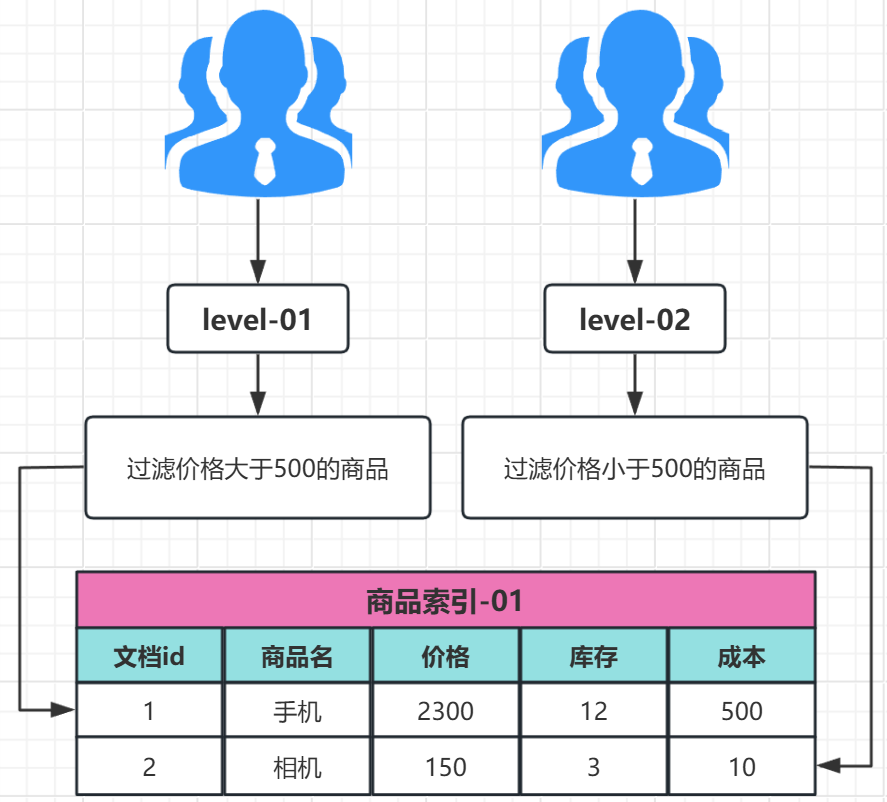
假设我们有一个需求:
- 我们将用户分为三个等级,【A】【B】【C】;
- 【A】用户来查询我们的索引,给他显示5000以上价格的产品;
- 【B】用户来查询我们的索引,给他显示1000到5000价格的产品;
- 【C】用户来查询我们的索引,给他显示1000以下价格的产品;
- 我们就可以给同一个商品列表的索引,设置自带不同查询条件的3个不同的别名
- 【A】类用户进入页面
- 让其自动查询索引别名【wa_alias_01】
- 给索引设置只显示、只自动查询出价格大于5000的商品;
- 【B】类用户进入页面
- 让其自动查询索引别名【wa_alias_02】
- 给索引设置只显示、只自动查询出价格大于1000小于5000的商品;
- 【C】类用户进入页面
- 让其自动查询索引别名【wa_alias_03】
- 给索引设置只显示、只自动查询出价格小于1000的商品;
# 查询数据还没讲,先了解它有这个功能作用;
[root@es01:~]# curl -k -u elastic:123456 -X PUT "https://10.0.0.101:9200/index16?pretty" -H 'Content-Type: application/json' -d '
{
   "aliases":{
     "wa_alias_01": {
       "filter": {
         "range": {
           "price": {
             "gte": 5000.0,
           }
         }
        }
     },
     "wa_alias_02": {
       "filter": {
         "range": {
           "price": {
             "gte": 1000.0,
             "lt": 5000.0
           }
         }
        }
     },
     "wa_alias_03": {
       "filter": {
         "range": {
           "price": {
             "lte": 1000.0,
           }
         }
        }
     }
   },
   "mappings": {
     "properties": {
       "price": {
         "type": "float"
      }
     }
   },
   "settings":{
     "number_of_shards": 3,
     "number_of_replicas": 1
   }
}'
注意:
- 由于json格式数据太长,xshell无法直接使用curl命令执行;
- 我们采用curl命令与文件的方式执行命令
[root@es01 ~ ]# vim alias.json
{
   "aliases":{
     "wa_alias_01": {
       "filter": {
         "range": {
           "price": {
             "gte": 5000.0
           }
         }
        }
     },
     "wa_alias_02": {
       "filter": {
         "range": {
           "price": {
             "gte": 1000.0,
             "lt": 5000.0
           }
         }
        }
     },
     "wa_alias_03": {
       "filter": {
         "range": {
           "price": {
             "lte": 1000.0
           }
         }
        }
     }
   },
   "mappings": {
     "properties": {
       "price": {
         "type": "float"
      }
     }
   },
   "settings":{
     "number_of_shards": 3,
     "number_of_replicas": 1
   }
}

# curl指定文件为请求主体
[root@es01 ~ ]# curl -k -u elastic:123456 -X PUT "https://10.0.0.101:9200/index16?pretty" -H 'Content-Type: application/json' --data-binary @./alias.json
{
  "acknowledged" : true,
  "shards_acknowledged" : true,
  "index" : "index16"
}
| curl命令参数 | 解释说明 |
|---|---|
| -d '文本内容' | 指定请求主体内容 |
| -d @文件路径 | 指定请求主体为文件 |
| --data-binary @文件路径 | 指定请求主体为文件,并保留文件格式; |
查看索引详情
[root@es01 ~ ]# curl -k -u elastic:123456 -X GET 'https://10.0.0.101:9200/index16?pretty'
{
  "index16" : {
    "aliases" : {
      "wa_alias_01" : {
        "filter" : {
          "range" : {
            "price" : {
              "gte" : 5000.0
            }
          }
        }
      },
      "wa_alias_02" : {
        "filter" : {
          "range" : {
            "price" : {
              "lt" : 5000.0,
              "gte" : 1000.0
            }
          }
        }
      },
      "wa_alias_03" : {
        "filter" : {
          "range" : {
            "price" : {
              "lte" : 1000.0
            }
          }
        }
      }
    },
    "mappings" : {
      "properties" : {
        "price" : {
          "type" : "float"
        }
      }
    },
......
3,索引别名的作用说明
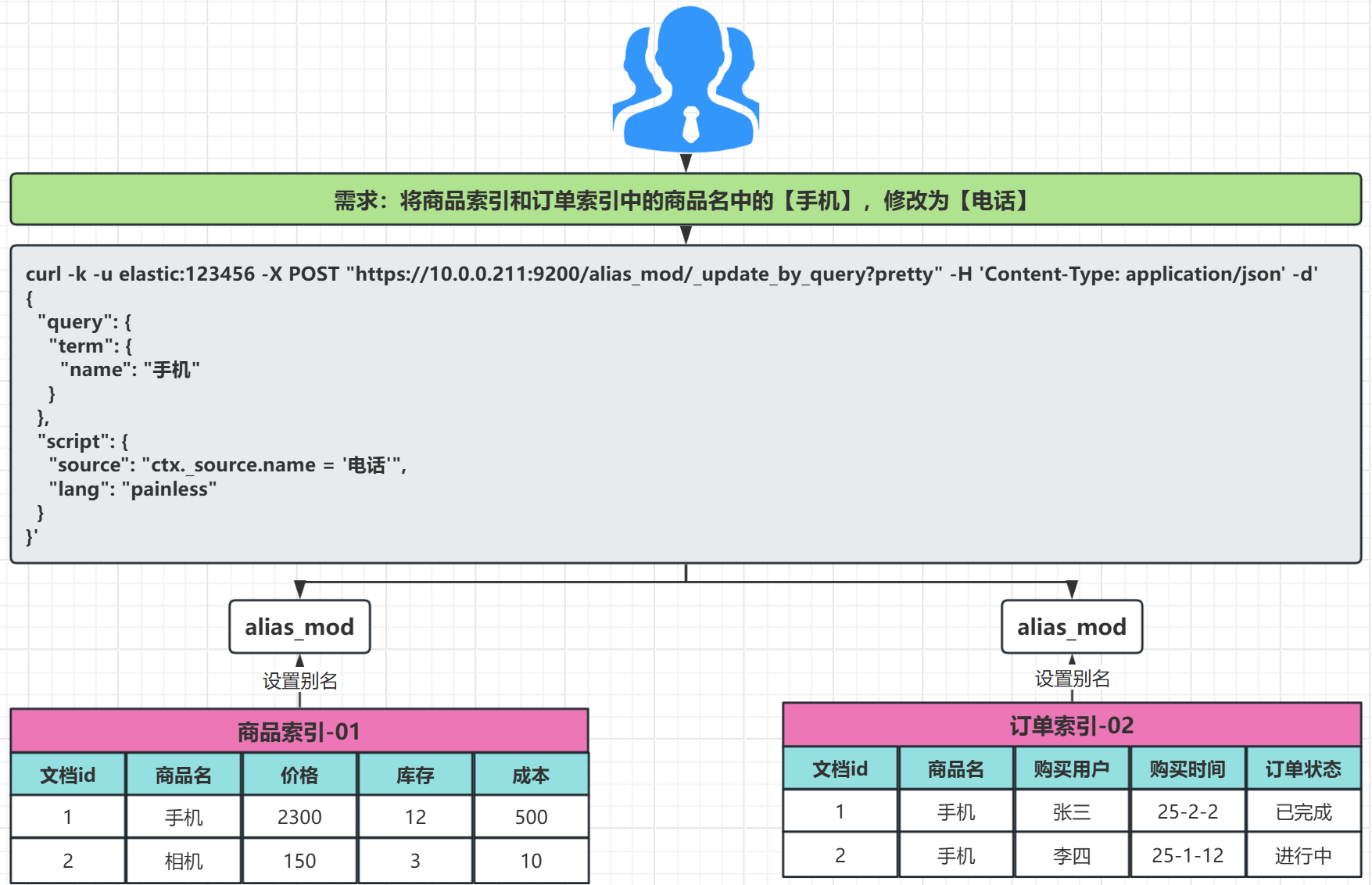
需求1:批量操作多个索引数据;
例如:我想将两个索引中的相同字段中的信息,一起修改;
需求2:不同的用户,访问形同索引的不同别名,得到不同的结果
3,查看索引
· 查看索引详细信息
[root@es01 ~ ]# curl -k -u elastic:123456 -X GET 'https://10.0.0.101:9200/index16?pretty'
{
  "index16" : {
    "aliases" : {
      "wa_alias_01" : {
        "filter" : {
          "range" : {
            "price" : {
              "gte" : 5000.0
            }
          }
        }
      },
      "wa_alias_02" : {
        "filter" : {
          "range" : {
            "price" : {
              "lt" : 5000.0,
              "gte" : 1000.0
            }
          }
        }
      },
      "wa_alias_03" : {
        "filter" : {
          "range" : {
            "price" : {
              "lte" : 1000.0
            }
          }
        }
      }
    },
    "mappings" : {
      "properties" : {
        "price" : {
          "type" : "float"
        }
      }
    },
    "settings" : {
      "index" : {
        "routing" : {
          "allocation" : {
            "include" : {
              "_tier_preference" : "data_content"
            }
          }
        },
        "number_of_shards" : "3",
        "provided_name" : "index16",
        "creation_date" : "1764324765535",
        "number_of_replicas" : "1",
        "uuid" : "hmSH5wAVTLmfE-rCUbrn7w",
        "version" : {
          "created" : "7172999"
        }
      }
    }
  }
}
· 查询索引中单个字段
1,查看索引只显示settings字段
[root@es01 ~ ]# curl -k -u elastic:123456 -X GET 'https://10.0.0.101:9200/index16/_settings?pretty'
{
  "index16" : {
    "settings" : {
      "index" : {
        "routing" : {
          "allocation" : {
            "include" : {
              "_tier_preference" : "data_content"
            }
          }
        },
        "number_of_shards" : "3",
        "provided_name" : "index16",
        "creation_date" : "1764324765535",
        "number_of_replicas" : "1",
        "uuid" : "hmSH5wAVTLmfE-rCUbrn7w",
        "version" : {
          "created" : "7172999"
        }
      }
    }
  }
}
2,查看索引只显示alias字段
[root@es01 ~ ]# curl -k -u elastic:123456 -X GET 'https://10.0.0.101:9200/index16/_alias?pretty'
{
  "index16" : {
    "aliases" : {
      "wa_alias_01" : {
        "filter" : {
          "range" : {
            "price" : {
              "gte" : 5000.0
            }
          }
        }
      },
      "wa_alias_02" : {
        "filter" : {
          "range" : {
            "price" : {
              "lt" : 5000.0,
              "gte" : 1000.0
            }
          }
        }
      },
      "wa_alias_03" : {
        "filter" : {
          "range" : {
            "price" : {
              "lte" : 1000.0
            }
          }
        }
      }
    }
  }
}
3,查看索引只显示mappings字段
[root@es01 ~ ]# curl -k -u elastic:123456 -X GET 'https://10.0.0.101:9200/index16/_mappings?pretty'
{
  "index16" : {
    "mappings" : {
      "properties" : {
        "price" : {
          "type" : "float"
        }
      }
    }
  }
}
· 查看索引的分片详情
| 字段 | 解释说明 |
|---|---|
| index | 索引名称 |
| shard | 分片的排序序号,三个分片,就是【0、1、2】 |
| prirep | 分片的类型:【r:表示replica shard副本分片】,【p:表示primary shard主分片】 |
| state | 分片的状态:【STARTED=运行中】【UNASSIGNED=未分配】【RELOCATING=迁移中】 |
| docs | 分片存储的文档数量; |
| store | 表示该分片所占用的磁盘存储空间; |
| ip | 所在节点的ip地址 |
| node | 所在节点的主机名称 |
表示:index02这个索引中:
- p主分片:有3个,分别是【0】【1】【2】;
- r副本分片:有1个,三个主分片分别有一个副本分片,切在不同的机器上;
[root@es01 ~ ]# curl -k -u elastic:123456 -X GET 'https://10.0.0.101:9200/_cat/shards/index16?v'
index   shard prirep state   docs store ip         node
index16 2     r      STARTED    0  227b 10.0.0.212 es02
index16 2     p      STARTED    0  227b 10.0.0.101 es01
index16 1     p      STARTED    0  227b 10.0.0.213 es03
index16 1     r      STARTED    0  227b 10.0.0.101 es01
index16 0     r      STARTED    0  227b 10.0.0.213 es03
index16 0     p      STARTED    0  227b 10.0.0.212 es02
· 查看集群的索引列表
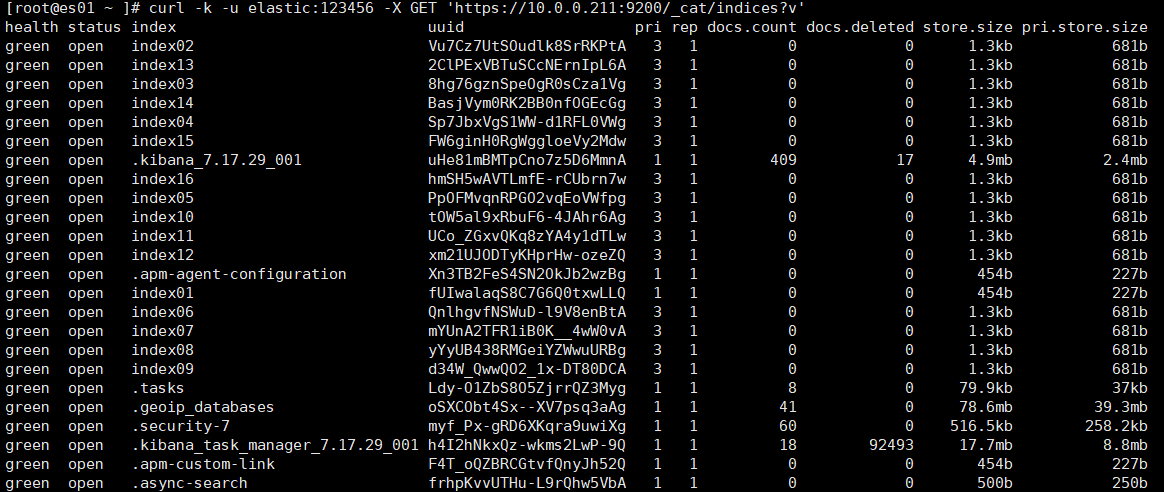
可以看到默认的【主分片】与【副本分片】均为:1;
| 字段 | 解释说明 |
|---|---|
| health | 索引的监看状态; :one:【green】:绿色,表示主分片和副本分片都可用; :two:【yellow】:黄色,表示主分片可用、副本分片不可用; :three:【red】:红色,表示主分片不可用,数据丢失; |
| status | 表示索引当前状态: 【open】表示开启状态,可以正常读写数据; 【close】表示关闭状态,不能急进行读写操作; |
| index | 索引名称 |
| uuid | 索引在集群中的唯一标识符,id; |
| pri | 索引的【主分片】数量 |
| rep | 索引的【副本分片】数量 |
| docs.count | 索引中文档的数量 |
| docs.deleted | 索引中被删除的文档数量 |
| store.size | 索引中总存储数据大小; |
| pri.store.size | 索引中主分片的总存储数据大小; |
[root@es01 ~ ]# curl -k -u elastic:123456 -X GET 'https://10.0.0.101:9200/_cat/indices?v'
· 查看集群中所有索引别名列表
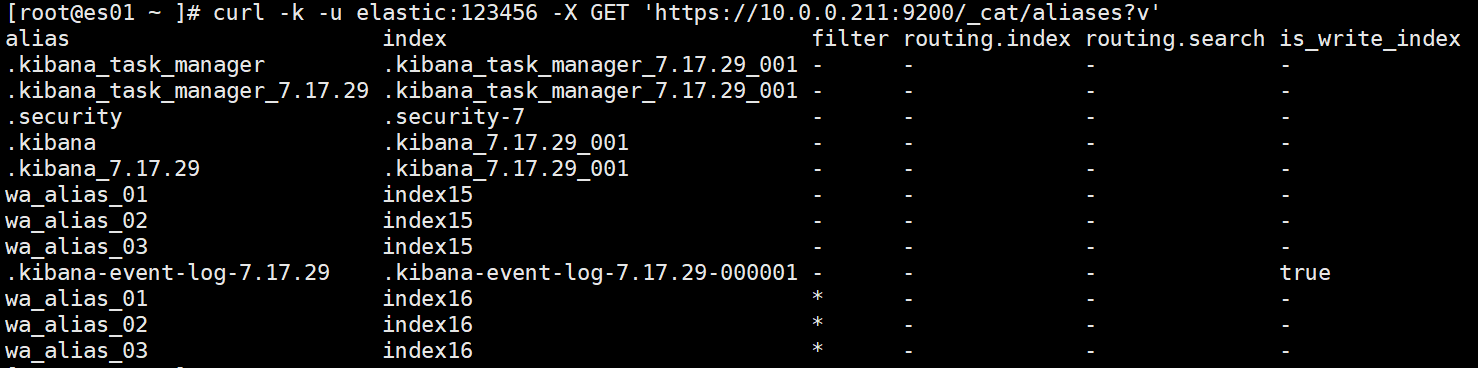
| 字段说明 | 解释说明 |
|---|---|
| alias | 别名的名称 |
| index | 别名指向哪个索引(就是那个索引的别名是这个) |
| filter | 【-】表示没有过滤条件,【*】表示有过滤条件; |
| routing.index | 索引路由;【-】表示使用默认路由; 当通过该别名执行写入操作(如索引、更新、删除文档)时使用的可选路由值(Routing Value)。 用于控制文档被存储在哪个分片上。 【-】就是使用默认的存储计算方式(路由):【hash(文档id) % 主分片数量】 |
| routing.search | 搜索路由;【-】表示搜索所有分片; 当通过该别名执行搜索操作时使用的可选路由值(Routing Value)。 用于将搜索请求限定到特定的一个或多个分片。 |
| is_write_index | 写索引标志;【true】表示为写索引,【-】或【false】表示不是写索引 |
[root@es01 ~ ]# curl -k -u elastic:123456 -X GET 'https://10.0.0.101:9200/_cat/aliases?v
4,修改索引
· 修改副本分片数量
1,修改分片
注意:
- 只能修改【副本分片】;
- 主分片创建时设定,之后不允许修改;
[root@es01:~]# curl -k -u elastic:123456 -X PUT 'https://10.0.0.101:9200/index03/_settings'  -H 'Content-Type: application/json' -d '
{
     "number_of_replicas": 2
}'
2,查看集群索引列表验证
[root@es01 ~ ]# curl -k -u elastic:123456 -X GET 'https://10.0.0.101:9200/_cat/indices?v'
health status index     uuid                   pri rep docs.count docs.deleted store.size pri.store.size
......
green  open   index03   8hg76gznSpeOgR0sCza1Vg 3   2   0          0            1.9kb      681b
......
· 修改索引别名
1,查看索引别名
可以看到,我们原来的三个别名的过滤数据的条件
- 【wa_alias_01】:过滤价格【>=5000】
- 【wa_alias_02】:过滤价格【<5000】切【>=1000】
- 【wa_alias_03】:过滤价格【<=1000】
[root@es01 ~ ]# curl -k -u elastic:123456 -X GET 'https://10.0.0.101:9200/index16/_alias?pretty'
{
  "index16" : {
    "aliases" : {
      "wa_alias_01" : {
        "filter" : {
          "range" : {
            "price" : {
              "gte" : 5000.0
            }
          }
        }
      },
      "wa_alias_02" : {
        "filter" : {
          "range" : {
            "price" : {
              "lt" : 5000.0,
              "gte" : 1000.0
            }
          }
        }
      },
      "wa_alias_03" : {
        "filter" : {
          "range" : {
            "price" : {
              "lte" : 1000.0
            }
          }
        }
      }
    }
  }
}
2,修改别名过滤条件
别名的修改,本质上就是先删除,再创建;
需求:
- 将【wa_alias_03】原来的过滤条件<=1000;
- 修改为:<1000;
[root@es01 ~ ]# curl -k -u elastic:123456 -X POST 'https://10.0.0.101:9200/_aliases' -H 'Content-Type: application/json' -d'
{
  "actions": [
    {
      "remove": {
        "index": "index16",
        "alias": "wa_alias_03"
      }
    },
    {
      "add": {
        "index": "index16",
        "alias": "wa_alias_03",
        "filter": {
          "range": {
        	  "price": {
                  "lt": 1000.0
              }
          }
        }
      }
    }
  ]
}'
修改后查看索引详情验证
[root@es01 ~ ]# curl -k -u elastic:123456 -X GET 'https://10.0.0.101:9200/index16/_alias?pretty'
......
      "wa_alias_03" : {
        "filter" : {
          "range" : {
            "price" : {
              "lt" : 1000.0     # 看这里,修改成功;
......
3,索引新增别名
[root@es01 ~ ]# curl -k -u elastic:123456 -X POST 'https://10.0.0.101:9200/_aliases' -H 'Content-Type: application/json' -d'
{
  "actions": [
    {
      "add": {
        "index": "index16",
        "alias": "wa_alias_04",
        "filter": {
          "range": {
        	  "price": {
                  "lt": 1000.0,
                  "gte": 500
              }
          }
        }
      }
    }
  ]
}'
查看索引详情
[root@es01 ~ ]# curl -k -u elastic:123456 -X GET 'https://10.0.0.101:9200/index16/_alias?pretty'
......
      "wa_alias_04" : {
        "filter" : {
          "range" : {
            "price" : {
              "lt" : 1000.0,
              "gte" : 500
......
4,索引新增多个别名
[root@es01 ~ ]# curl -k -u elastic:123456 -X POST 'https://10.0.0.101:9200/_aliases' -H 'Content-Type: application/json' -d'
{
  "actions": [
    {
      "add": {
        "index": "index16",
        "alias": "wa_alias_05",
        "filter": {
          "range": {
        	  "price": {
                  "lt": 500.0,
                  "gte": 300.0
              }
          }
        }
      }
    },
    {
      "add": {
        "index": "index16",
        "alias": "wa_alias_06",
        "filter": {
          "range": {
        	  "price": {
                  "lt": 300.0,
                  "gte": 1.0
              }
          }
        }
      }
    }
  ]
}'
查看验证
[root@es01 ~ ]# curl -k -u elastic:123456 -X GET 'https://10.0.0.101:9200/index16/_alias?pretty'
......
      "wa_alias_05" : {
        "filter" : {
          "range" : {
            "price" : {
              "lt" : 500.0,
              "gte" : 300.0
            }
          }
        }
      },
      "wa_alias_06" : {
        "filter" : {
          "range" : {
            "price" : {
              "lt" : 300.0,
              "gte" : 1.0
......
5,删除索引别名
[root@es01 ~ ]# curl -k -u elastic:123456 -X POST 'https://10.0.0.101:9200/_aliases' -H 'Content-Type: application/json' -d'
{
  "actions": [
    {
      "remove": {
        "index": "index16",
        "alias": "wa_alias_04"
      }
    },
    {
      "remove": {
        "index": "index16",
        "alias": "wa_alias_05"
      }
    },
    {
      "remove": {
        "index": "index16",
        "alias": "wa_alias_06"
      }
    }
  ]
}'
查看验证
[root@es01 ~ ]# curl -k -u elastic:123456 -X GET 'https://10.0.0.101:9200/index16/_alias?pretty'
{
  "index16" : {
    "aliases" : {
      "wa_alias_01" : {
        "filter" : {
          "range" : {
            "price" : {
              "gte" : 5000.0
            }
          }
        }
      },
      "wa_alias_02" : {
        "filter" : {
          "range" : {
            "price" : {
              "lt" : 5000.0,
              "gte" : 1000.0
            }
          }
        }
      },
      "wa_alias_03" : {
        "filter" : {
          "range" : {
            "price" : {
              "lt" : 1000.0
            }
          }
        }
      }
    }
  }
}
· 索引映射无法修改:star:
与mysql数据库不同,索引的映射字段,无法进行修改;
5,索引的开启和关闭
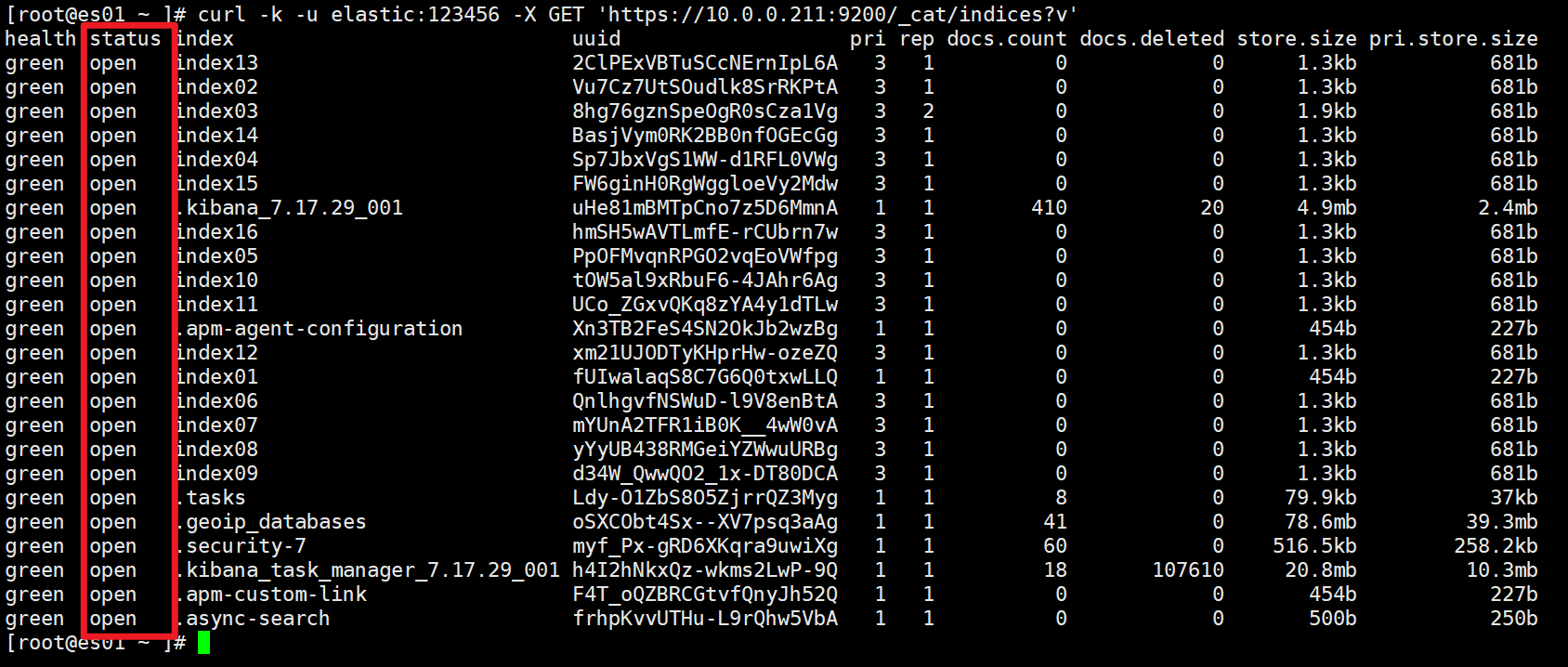
· 查看集群索引列表
查看第二列的【status】状态:你会发现都是【open】,也就是开启状态;
[root@es01 ~ ]# curl -k -u elastic:123456 -X GET 'https://10.0.0.101:9200/_cat/indices?v'
· 索引中写入文档数据(后面会讲)
[root@es01:~]# curl -k -u elastic:123456 -X POST "https://10.0.0.101:9200/index03/_doc/1?pretty" -H 'Content-Type: application/json' -d '
{
	"username": "张三"
}'
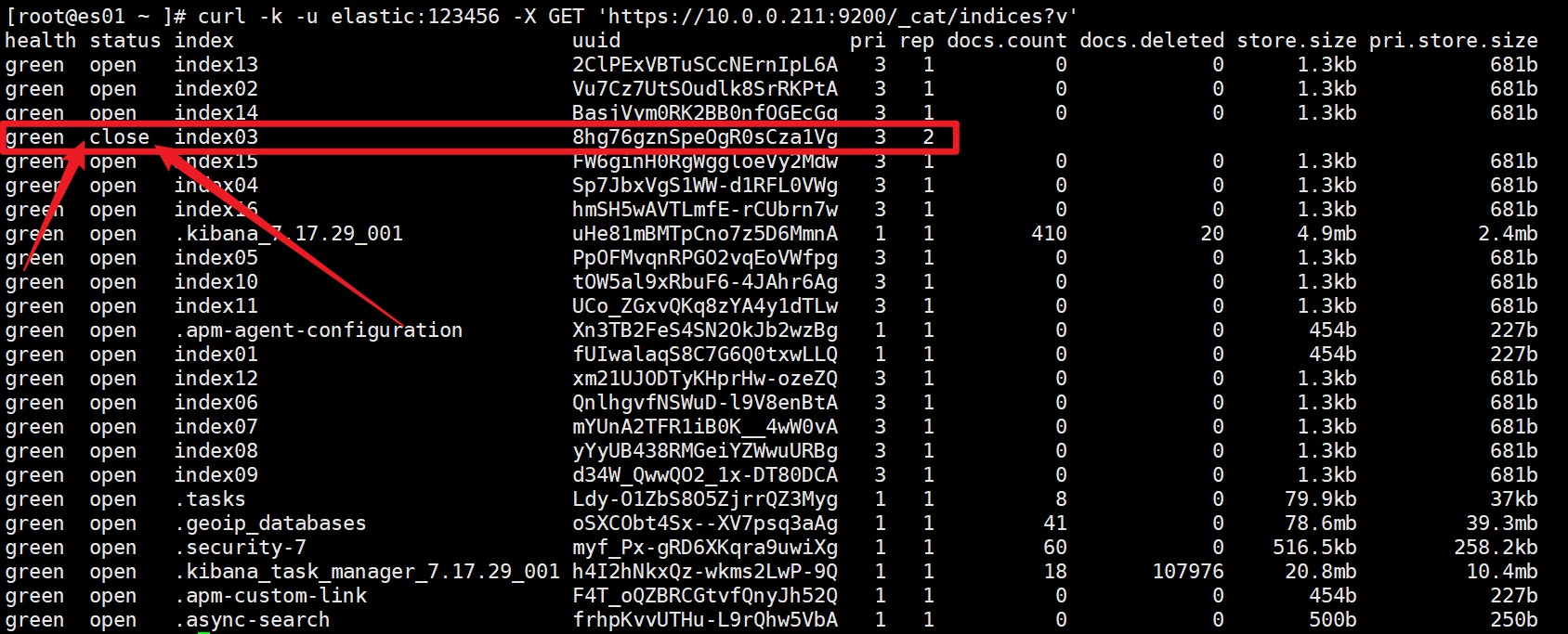
· 关闭索引
[root@es01:~]# curl -k -u elastic:123456 -X POST 'https://10.0.0.101:9200/index03/_close'
关闭后查看集群索引列表
[root@es01 ~ ]# curl -k -u elastic:123456 -X GET 'https://10.0.0.101:9200/_cat/indices?v'
· 尝试写入数据-失败
[root@es01 ~ ]# curl -k -u elastic:123456 -X POST "https://10.0.0.101:9200/index03/_doc/2?pretty" -H 'Content-Type: application/json' -d '
{
        "username": "李四"
}'

# 返回结果显示:索引是关闭状态
{
  "error" : {
    "root_cause" : [
      {
        "type" : "index_closed_exception",
        "reason" : "closed",
        "index_uuid" : "8hg76gznSpeOgR0sCza1Vg",
        "index" : "index03"
      }
    ],
    "type" : "index_closed_exception",
    "reason" : "closed",
    "index_uuid" : "8hg76gznSpeOgR0sCza1Vg",
    "index" : "index03"
  },
  "status" : 400
}
· 开启索引
[root@es01:~]# curl -k -u elastic:123456 -X POST 'https://10.0.0.101:9200/index03/_open'
· 尝试写入数据-成功
[root@es01 ~ ]# curl -k -u elastic:123456 -X POST "https://10.0.0.101:9200/index03/_doc/2?pretty" -H 'Content-Type: application/json' -d '
{
        "username": "李四"
}'
# 返回结果显示成功;
{
  "_index" : "index03",
  "_type" : "_doc",
  "_id" : "2",
  "_version" : 1,
  "result" : "created",
  "_shards" : {
    "total" : 3,
    "successful" : 3,
    "failed" : 0
  },
  "_seq_no" : 0,
  "_primary_term" : 3
}
6,删除索引
· 删除单个索引
[root@es01 ~ ]# curl -k -u elastic:123456 -X DELETE 'https://10.0.0.101:9200/index01'
{"acknowledged":true}
· 模糊匹配删除多个索引
1,查看集群索引列表
[root@es01 ~ ]# curl -k -u elastic:123456 -X GET 'https://10.0.0.101:9200/_cat/indices?v'
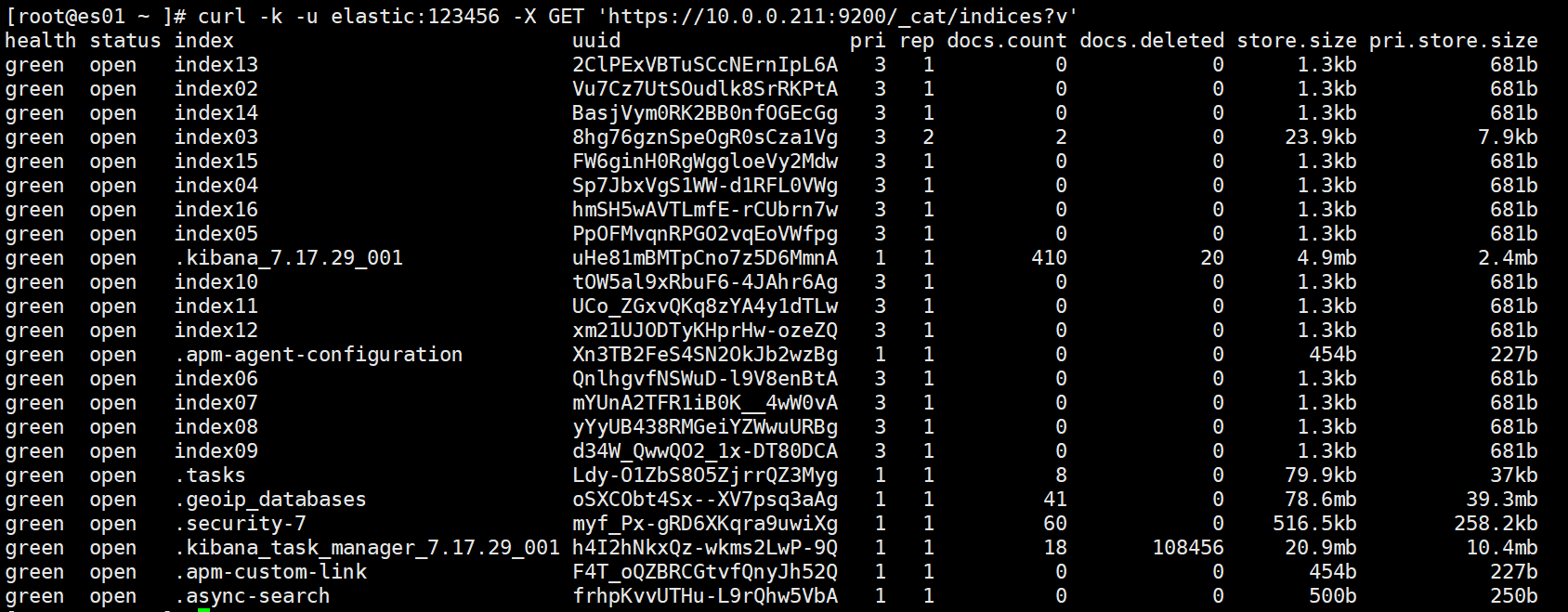
2,模糊匹配删除索引
将【index0】开头的索引全部删除
[root@es01:~]# curl -k -u elastic:123456 -X DELETE 'https://10.0.0.101:9200/index0*'
3,查看集群索引列表验证
查看发现【index0】开头的索引已经被删除
[root@es01:~]# curl -k -u elastic:123456 -X GET 'https://10.0.0.101:9200/_cat/indices?v'
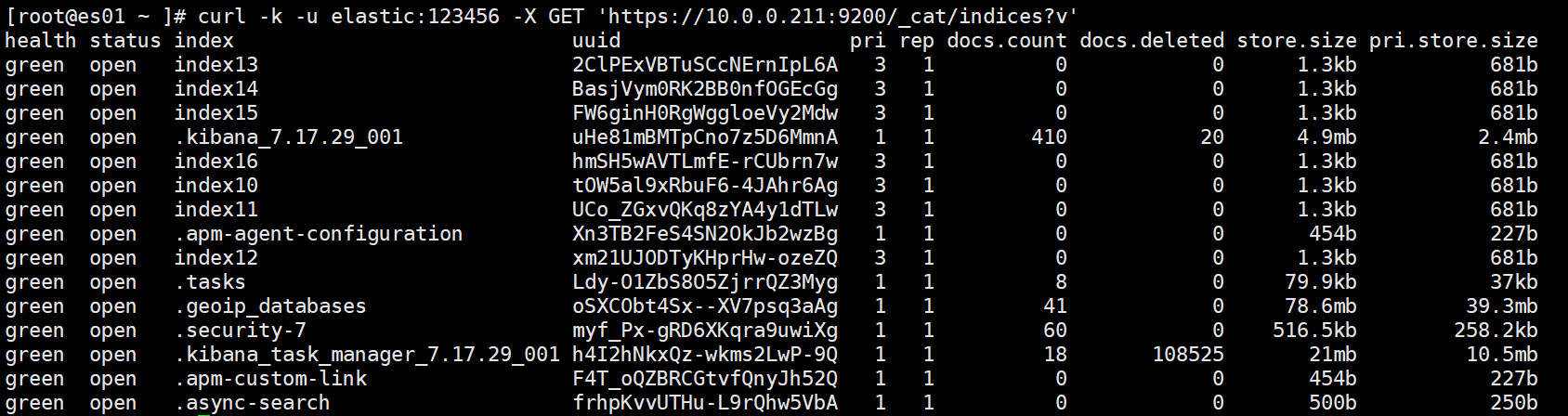
7,索引模板
· 索引模板介绍
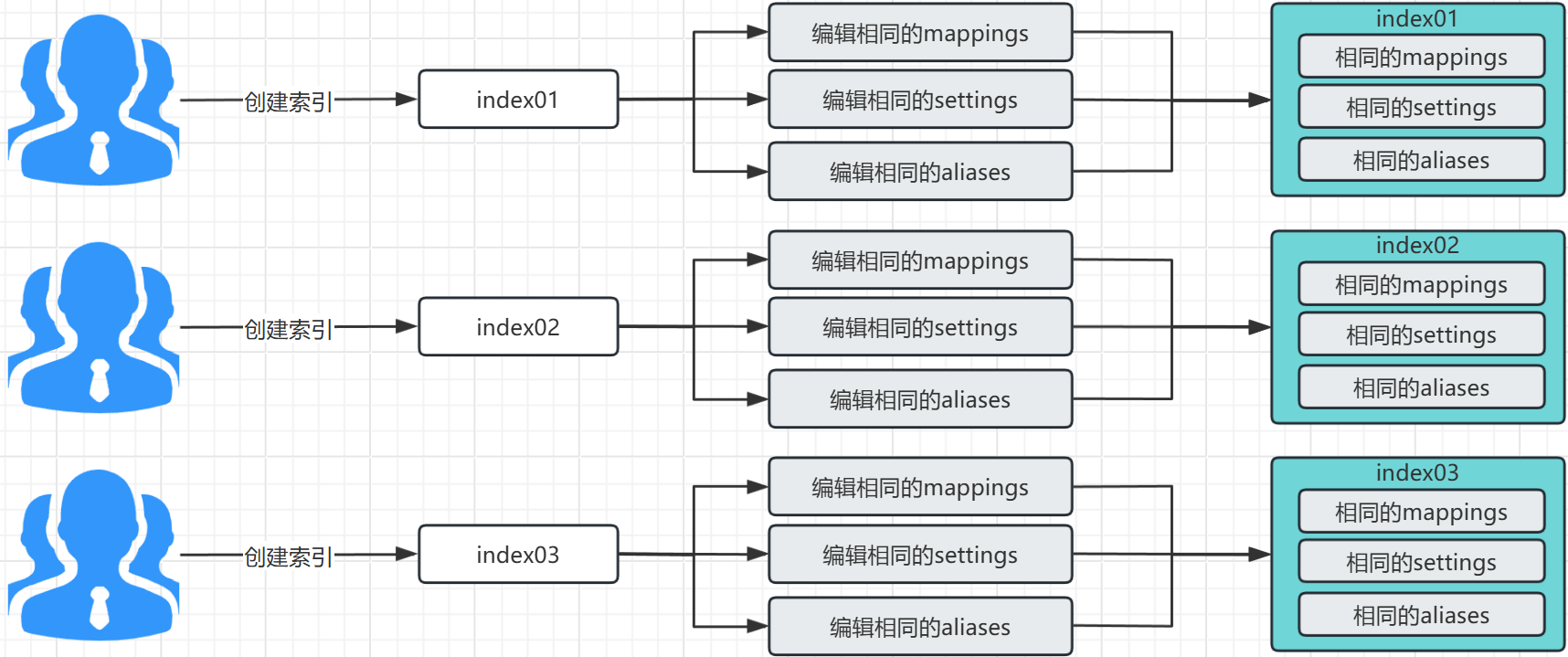
1,索引创建的问题
什么是索引模板:
- 在上述的【索引】的学习中,我们了解到:
- 创建【索引】有三个主字段需要注意:
- 【settings】:表示索引的主分片与副本分片的设置;
- 【mappings】:表示存入的数据字段的设置与数据字段的类型;
- 【aliases】:表示索引的别名与别名过滤规则的设置;
- 我们的问题是:
- 当我们未来的业务中,要不断地创建新的索引;
- 这些新的索引有一定的共性:
- 相同的主分片、相同的副本分片;
- 相同的mappings映射字段与类型;
- 相同的别名与过滤规则;
- 那么每次创建这些索引时,我们都在做重复的、没有意义的事情;
- 于是,为了解决索引创建的重复工作问题,ES提供了:【索引模板】的功能与概念;
2,索引模板的工作原理
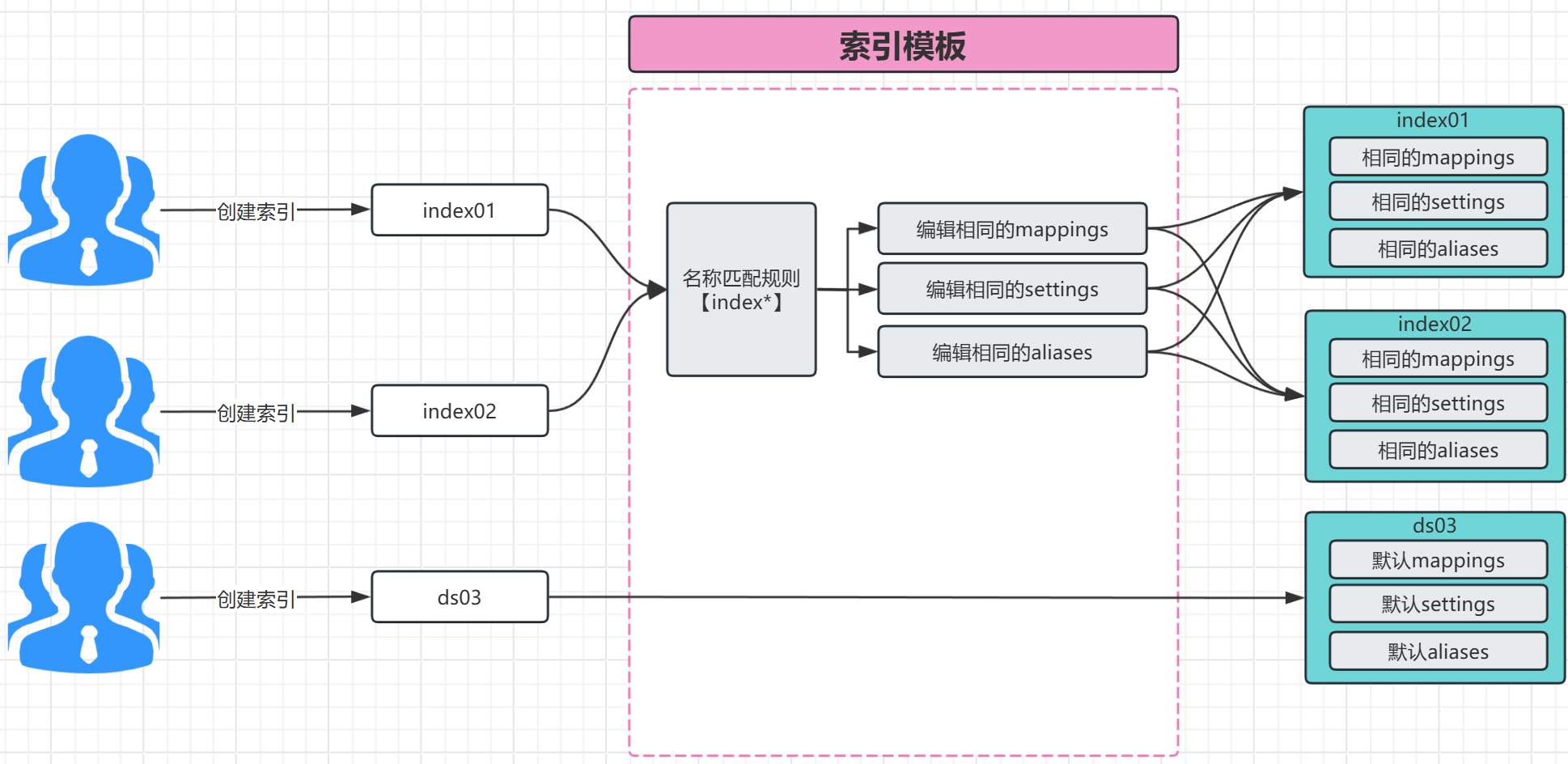
索引模板的工作原理:
- 我们创建一个【索引模板】,编辑好settings、mappings、aliases等配置;
- 同时设置好【名称匹配规则】;
- 例如:【bakwite*】
- 含义:当新创建的索引名称以bakwite开头,则默认使用索引模板中的设置;
- 如此一来,我们就省去了创建重复配置信息的工作,增加了生产效率;
· 创建索引模板
| 字段 | 含义说明 |
|---|---|
| index_patterns | 【索引模式】:就是索引的名称匹配规则, |
| [bakwite*,xjzw*] | 表示凡是再次创建以bakwite和xjzw开头的名称的索引,都使用这个模板的配置信息; 【*】表示,匹配所有新创建的索引; |
| priority | 模板优先级(从前叫order),当创建的索引同时满足多个模板时,优先使用order值大的那个; 优先级范围:【0-100】 |
[root@es01 ~ ]# curl -k -u elastic:123456 -X PUT 'https://10.0.0.101:9200/_index_template/bakwite_index_tmp01' -H 'Content-Type: application/json' -d'
{
  "index_patterns": [
    "bakwite*",
    "xjzw*"
  ],
  "priority": 1,
  "template": {
    "aliases": {
      "wa_alias_01": {},
      "wa_alias_02": {},
      "wa_alias_03": {}
    },
    "mappings": {
      "properties": {
        "id": {
          "type": "keyword",
          "doc_values": true
        },
        "name": {
          "type": "text"
        },
        "create_time": {
          "type": "date",
          "format": "yyyy-MM-dd HH:mm:ss||epoch_millis"
        }
      }
    },
    "settings": {
      "number_of_shards": 3,
      "number_of_replicas": 1
    }
  }
}'
· 查看索引模板
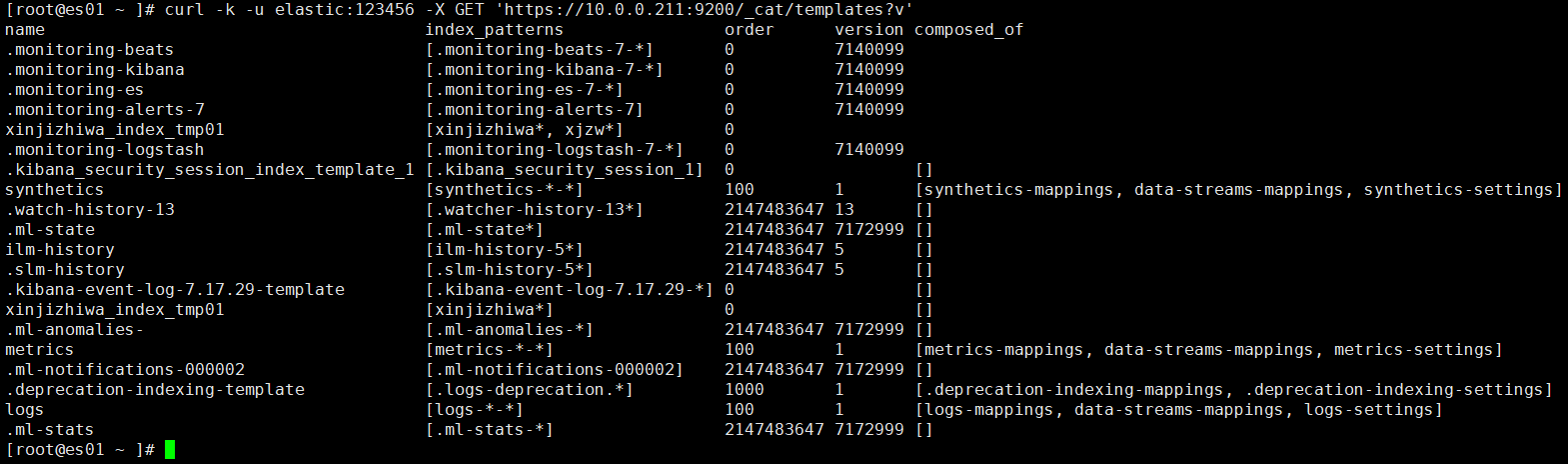
1,查看集群索引模板列表
| 显示字段 | 解释说明 |
|---|---|
| name | 索引模板的名称 |
| index_patterns | 索引名称的匹配模式 |
| order | 模板匹配索引的优先级;如果创建索引时,名称匹配了多个满足条件的索引模板,优先选择哪个? |
| version | 索引模板的版本号,空表示没设置 |
| composed_of | 组件模板,空表示没有使用组件模板(组件模板:系统自带的模板); |
[root@es01 ~ ]# curl -k -u elastic:123456 -X GET 'https://10.0.0.101:9200/_cat/templates?v'
name                       index_patterns          order     version  composed_of
......
bakwite_index_tmp01     [bakwite*, xjzw*]    0
......
2,查看单个索引模板
[root@es01 ~ ]# curl -k -u elastic:123456 -X GET 'https://10.0.0.101:9200/_index_template/bakwite_index_tmp01?pretty'
显示结果
{
  "index_templates" : [
    {
      "name" : "bakwite_index_tmp01",
      "index_template" : {
        "index_patterns" : [
          "bakwite*",
          "xjzw*"
        ],
        "template" : {
          "settings" : {
            "index" : {
              "number_of_shards" : "3",
              "number_of_replicas" : "1"
            }
          },
          "mappings" : {
            "properties" : {
              "create_time" : {
                "format" : "yyyy-MM-dd HH:mm:ss||epoch_millis",
                "type" : "date"
              },
              "name" : {
                "type" : "text"
              },
              "id" : {
                "type" : "keyword",
                "doc_values" : true
              }
            }
          },
          "aliases" : {
            "wa_alias_01" : { },
            "wa_alias_02" : { },
            "wa_alias_03" : { }
          }
        },
        "composed_of" : [ ],
        "priority" : 1
      }
    }
  ]
}
· 创建索引验证效果
1,创建满足名称匹配条件的索引
[root@es01 ~ ]# curl -k -u elastic:123456 -X PUT "https://10.0.0.101:9200/bakwite_01?pretty"
2,查看索引详情验证
可以看到:索引的配置信息与模板的相同
[root@es01 ~ ]# curl -k -u elastic:123456 -X GET "https://10.0.0.101:9200/bakwite_01?pretty"
{
  "bakwite_01" : {
    "aliases" : {
      "wa_alias_01" : { },
      "wa_alias_02" : { },
      "wa_alias_03" : { }
    },
    "mappings" : {
      "properties" : {
        "create_time" : {
          "type" : "date",
          "format" : "yyyy-MM-dd HH:mm:ss||epoch_millis"
        },
        "id" : {
          "type" : "keyword"
        },
        "name" : {
          "type" : "text"
        }
      }
    },
    "settings" : {
      "index" : {
        "routing" : {
          "allocation" : {
            "include" : {
              "_tier_preference" : "data_content"
            }
          }
        },
        "number_of_shards" : "3",
        "provided_name" : "bakwite_01",
        "creation_date" : "1764410133763",
        "number_of_replicas" : "1",
        "uuid" : "7oyq33_lTN6tfHCuIgLeZQ",
        "version" : {
          "created" : "7172999"
        }
      }
    }
  }
}
· 修改索引模板
直接创建相同的名字的索引模板就会自动覆盖
· 删除索引模板
[root@es01 ~ ]# curl -k -u elastic:123456 -X DELETE 'https://10.0.0.101:9200/_index_template/bakwite_index_tmp01'
五、ElasticSearch文档管理
1,准备工作
· 熟悉json格式
Json格式文档:
- 就是不同计算机语言之间,传递数据的一种规则;
- 通过约定好的书写方式,用于不同语言实践交换数据;
{
	"name": "bakwite",
	"age": 18,
	"like": ["长跑","游泳","唱歌"],
	"order": {
		"收件人": "蛙",
		"收货电话": "18522224444",
		"收获地址": "北京市朝阳区经纬路己72号",
		"购买商品": ["笔记本电脑","手机","SIM卡","野原新之助贴纸手机壳"],
		"备注要求": {
			"配送时间要求": "下午13:30之后",
			"配送员要求": "长得好看,大眼睛,高鼻梁",
			"快递配送品牌": ["顺丰","京东"]
		}
	}
}
· 删除所有索引
# 删除所有索引
[root@es01 ~ ]# curl -k -u elastic:123456 -X DELETE 'https://10.0.0.101:9200/index*'
[root@es01 ~ ]# curl -k -u elastic:123456 -X DELETE 'https://10.0.0.101:9200/bakwite*'

# 查看索引列表确认
[root@es01 ~ ]# curl -k -u elastic:123456 -X GET 'https://10.0.0.101:9200/_cat/indices?v'
health status index            uuid     pri rep docs.count docs.deleted store.size pri.store.size
green  open   .geoip_databases oS...    1   1   41         0            78.6mb     39.3mb
green  open   .security-7      79...    1   1   7          0            51.5kb     25.7kb
· 创建学习索引

1,编辑json文件
[root@es01 ~ ]# vim product.json
{
   "aliases":{
     "wa_alias_01": {},
     "wa_alias_02": {},
     "wa_alias_03": {}
   },
   "mappings": {
     "properties": {
     	"product_name": { "type": "keyword" },
     	"inventory": { "type": "integer" },
        "price": { "type": "float" },
        "weight": {
            "type": "short",
            "index": false
        },
        "tags": {
            "type": "keyword",
            "doc_values": true
        },
        "merchant_ip": { "type": "ip" },
        "business_address": { "type": "geo_point" },
        "delivery_area": { "type": "geo_shape" },
        "product_upload_time": {
       		"type": "date",
       		"format": "yyyy-MM-dd HH:mm:ss||epoch_millis"
        },
        "app_version": { "type": "version" },
        "is_up": { "type": "boolean" },
        "specifications": {
        	"type": "object",
        	"properties": {
          		"color": { "type": "keyword" },
          		"size": { "type": "keyword" },
          		"brand": { "type": "keyword" },
          		"material": { "type": "text" }
        	}
        },
        "comment": {
        	"type": "text",
        	"fields": {
        		"keyword": {
        			"type": "keyword",
                	"ignore_above": 256
        		}
        	},
        	"analyzer": "standard"
      	}
     }
   },
   "settings":{
     "number_of_shards": 3,
     "number_of_replicas": 1
   }
}
2,curl命令调用API创建索引
[root@es01 ~ ]# curl -k -u elastic:123456 -X PUT "https://10.0.0.101:9200/bakwite_index01?pretty" -H 'Content-Type: application/json' --data-binary @./product.json

2,创建文档
· 自定意文档ID创建文档
| 插入字段类型 | 插入时写入 |
|---|---|
| geo_point(坐标点) | [经度,纬度] |
| geo_shape(坐标范围) | 【"type": "envelope"】表示形状为:矩形形状; 写法: "区域字段": { "type": "envelope", "coordinates": [ [116.387123, 39.908992],[116.412877, 39.891008] ] }, |
| geo_shape(坐标范围) | 【"type": "circle"】表示形状为:圆形形状; 写法: "区域字段": { "type": "circle", "coordinates": [116.4, 39.9], :a:注意:这里的中心点,就是商家坐标; "radius": "1000m" :b:表示一公里范围内画圆 } :star:es7.11版本之后才支持; |
| geo_shape(坐标范围) | 【"type": "polygon"】表示多边形;要写很多个点(第1个和最后1个点相同经纬度闭合); |
# 创建一个文档,文档id为【1】;
[root@es01:~]# curl -k -u elastic:123456 -X PUT "https://10.0.0.101:9200/bakwite_index01/_doc/1?pretty" -H 'Content-Type: application/json' -d '
{
	"product_name": "高端5G智能手机",
	"inventory": 204,
	"price": 5999.0,
	"weight": 3,
	"tags": [ "2025年新款","光学摄像头","自动变焦","限时限量5折抢购","国补99%" ],
	"merchant_ip": "120.244.134.121",
	"business_address": [116.4, 39.9],
	"delivery_area": {
		"type": "envelope",
        "coordinates": [ [116.387123, 39.908992],[116.412877, 39.891008] ]
    },
	"product_upload_time": "2025-03-12 21:15:33",
	"app_version": "3.1.2",
	"is_up": true,
	"specifications": {
		"color": "尊贵金",
        "size": "430x932",
        "brand": "华为",
        "material": "28K纯金"
	},
	"comment": "遥遥领先"
}'

# 再创建一个文档,文档id为【2】;(多边形区域)
[root@es01:~]# curl -k -u elastic:123456 -X PUT "https://10.0.0.101:9200/bakwite_index01/_doc/2?pretty" -H 'Content-Type: application/json' -d '
{
	"product_name": "通用老年机",
	"inventory": 2020,
	"price": 799.0,
	"weight": 12,
	"tags": [ "2023款","光学摄像头","自动变焦","限时限量1折抢购","国补30%" ],
	"merchant_ip": "123.244.134.106",
	"business_address": [115.985000, 40.435000],
	"delivery_area": {
		"type": "polygon",
        "coordinates": [[
        	[115.975000, 40.435000],
            [115.977500, 40.441347],
            [115.982500, 40.441347],
            [115.985000, 40.435000],
            [115.982500, 40.428653],
            [115.977500, 40.428653],
            [115.975000, 40.435000]
        ]]
    },
	"product_upload_time": "2025-01-22 19:18:00",
	"app_version": "3.0.1",
	"is_up": true,
	"specifications": {
		"color": "银灰",
        "size": "430x932",
        "brand": "三星",
        "material": "塑料"
	},
	"comment": "字体大、看得清。"
}'
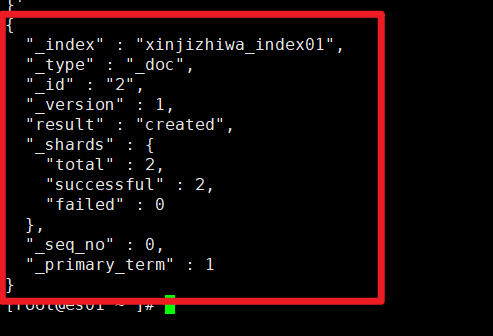
创建后返回字段说明
| 文档创建返回字段 | 解释说明 |
|---|---|
| "_index" : "index01", | 文档所属的索引名称 |
| "_type" : "_doc", | 文档类型(7.x+版本统一为_doc) |
| "_id" : "2", | 文档唯一ID(请求中指定) |
| "_version" : 1, | 文档版本号(初始为1,每次更新递增) |
| "result" : "created", | 操作结果(created表示新建成功) |
| "_shards" | 分片操作详情 "total" : 2, 应操作的分片总数(主分片+副本分片) "successful" : 2, 成功操作的分片数 "failed" : 0 操作失败的分片数 |
| "_seq_no" : 1, | 序列号(用于并发控制) |
| "_primary_term" : 1 | 主分片任期号(用于故障恢复,故障重启时会自增) |
· 创建文档不指定文档id
注意:
指定文档ID创建文档使用【PUT】【POST】请求方法都允许;
不指定文档ID创建文档必须使用:【POST】;
[root@es01:~]# curl -k -u elastic:123456 -X POST "https://10.0.0.101:9200/bakwite_index01/_doc?pretty" -H 'Content-Type: application/json' -d '
{
	"product_name":"轻薄旗舰拍照手机",
	"inventory":203,
	"price":6899.0,
	"weight":16,
	"tags":["轻薄旗舰","拍照效果惊艳","便携设计","高颜值","拍照效果出众"],
	"merchant_ip":"123.244.150.123",
	"business_address":[116.410000,39.900000],
	"delivery_area":{
		"type":"polygon",
		"coordinates":[[
			[116.400,39.910],
			[116.420,39.910],
			[116.420,39.890],
			[116.400,39.890],
			[116.400,39.910]
		]]
	},
	"product_upload_time":"2025-02-27 17:15:00",
	"app_version":"3.2.5",
	"is_up":true,
	"specifications":{
		"color":"晨曦金",
		"size":"6.4英寸",
		"brand":"OPPO",
		"material":"玻璃"
	},
	"comment":"轻薄设计,拍照效果非常惊艳"
}'
查看所有文档的ID:只看id字段;
[root@es01 ~ ]# curl -k -u elastic:123456 -X GET 'https://10.0.0.101:9200/bakwite_index01/_search?pretty&filter_path=hits.hits._id' -H 'Content-Type: application/json' -d'
{
  "query": {
    "match_all": {}
  }
}'

# 看到,文档id中,有一个随机的乱码;
# 【结论】不指定文档ID创建文档,会生成一个随机的文档ID;
{
  "hits" : {
    "hits" : [
      {
        "_id" : "2"
      },
      {
        "_id" : "2Fc00JoB1vv05c_l1-Gu"
      },
      {
        "_id" : "1"
      }
    ]
  }
}
· 批量创建文档
[root@es01:~]# curl -k -u elastic:123456 -X POST 'https://10.0.0.101:9200/_bulk?pretty' -H 'Content-Type: application/json' -d '
{ "index" : { "_index" : "bakwite_index01", "_id" : "3" } }
{"product_name":"高端旗舰智能手机","inventory":156,"price":8999.0,"weight":2,"tags":["2025年新款","徕卡摄像头","5G网络","限时优惠","国补20%","旗舰机型"],"merchant_ip":"123.244.134.107","business_address":[116.408000,39.904000],"delivery_area":{"type":"polygon","coordinates":[[[116.398,39.914],[116.418,39.914],[116.418,39.894],[116.398,39.894],[116.398,39.914]]]},"product_upload_time":"2025-03-15 10:30:00","app_version":"3.2.0","is_up":true,"specifications":{"color":"星空黑","size":"6.7英寸","brand":"华为","material":"陶瓷"},"comment":"拍照效果非常出色,夜景模式强大"}
{ "index" : { "_index" : "bakwite_index01", "_id" : "4" } }
{"product_name":"性价比拍照手机","inventory":289,"price":2999.0,"weight":18,"tags":["2024年新款","索尼摄像头","性价比高","学生优惠","拍照神器"],"merchant_ip":"123.244.135.108","business_address":[116.416000,39.902000],"delivery_area":{"type":"polygon","coordinates":[[[116.406,39.912],[116.426,39.912],[116.426,39.892],[116.406,39.892],[116.406,39.912]]]},"product_upload_time":"2025-03-14 14:20:00","app_version":"2.9.1","is_up":true,"specifications":{"color":"珍珠白","size":"6.5英寸","brand":"小米","material":"玻璃"},"comment":"拍照效果很好,性价比超高"}
'
· 批量创建文档练习
编辑json文件
[root@es01:~]# vim product.json
{ "index" : { "_index" : "bakwite_index01", "_id" : "5" } }
{"product_name":"商务旗舰智能手机","inventory":89,"price":12999.0,"weight":22,"tags":["2025年新款","商务旗舰","安全加密","高端商务","拍照效果优秀"],"merchant_ip":"123.244.136.109","business_address":[116.412000,39.898000],"delivery_area":{"type":"polygon","coordinates":[[[116.402,39.908],[116.422,39.908],[116.422,39.888],[116.402,39.888],[116.402,39.908]]]},"product_upload_time":"2025-03-13 16:45:00","app_version":"3.5.0","is_up":true,"specifications":{"color":"商务灰","size":"6.8英寸","brand":"三星","material":"金属"},"comment":"商务人士首选,安全性能极佳"}
{ "index" : { "_index" : "bakwite_index01", "_id" : "6" } }
{"product_name":"游戏性能旗舰手机","inventory":203,"price":5999.0,"weight":21,"tags":["游戏手机","高性能","散热优秀","120Hz刷新率","拍照效果不错"],"merchant_ip":"123.244.137.110","business_address":[116.404000,39.906000],"delivery_area":{"type":"polygon","coordinates":[[[116.394,39.916],[116.414,39.916],[116.414,39.896],[116.394,39.896],[116.394,39.916]]]},"product_upload_time":"2025-03-12 11:15:00","app_version":"3.1.5","is_up":true,"specifications":{"color":"电竞黑","size":"6.6英寸","brand":"一加","material":"金属"},"comment":"游戏体验极佳,拍照效果也很出色"}
{ "index" : { "_index" : "bakwite_index01", "_id" : "7" } }
{"product_name":"轻薄拍照智能手机","inventory":345,"price":4599.0,"weight":16,"tags":["轻薄设计","拍照效果好","便携","高颜值","拍照效果惊艳"],"merchant_ip":"123.244.138.111","business_address":[116.420000,39.900000],"delivery_area":{"type":"polygon","coordinates":[[[116.410,39.910],[116.430,39.910],[116.430,39.890],[116.410,39.890],[116.410,39.910]]]},"product_upload_time":"2025-03-11 09:30:00","app_version":"2.8.3","is_up":true,"specifications":{"color":"樱花粉","size":"6.4英寸","brand":"OPPO","material":"玻璃"},"comment":"轻薄便携,拍照效果非常惊艳"}
{ "index" : { "_index" : "bakwite_index01", "_id" : "8" } }
{"product_name":"长续航商务手机","inventory":178,"price":3899.0,"weight":19,"tags":["超长续航","商务办公","双卡双待","大电池","性价比高"],"merchant_ip":"123.244.139.112","business_address":[116.418000,39.896000],"delivery_area":{"type":"polygon","coordinates":[[[116.408,39.906],[116.428,39.906],[116.428,39.886],[116.408,39.886],[116.408,39.906]]]},"product_upload_time":"2025-03-10 15:20:00","app_version":"3.0.2","is_up":true,"specifications":{"color":"深海蓝","size":"6.5英寸","brand":"vivo","material":"塑料"},"comment":"续航能力超强,适合商务使用"}
{ "index" : { "_index" : "bakwite_index01", "_id" : "9" } }
{"product_name":"折叠屏旗舰手机","inventory":67,"price":15999.0,"weight":28,"tags":["折叠屏","创新科技","大屏体验","旗舰机型","拍照效果出众"],"merchant_ip":"123.244.140.113","business_address":[116.410000,39.902000],"delivery_area":{"type":"polygon","coordinates":[[[116.400,39.912],[116.420,39.912],[116.420,39.892],[116.400,39.892],[116.400,39.912]]]},"product_upload_time":"2025-03-09 13:10:00","app_version":"3.7.0","is_up":true,"specifications":{"color":"幻影紫","size":"7.6英寸","brand":"华为","material":"陶瓷"},"comment":"折叠屏体验很棒,拍照效果出众"}
{ "index" : { "_index" : "bakwite_index01", "_id" : "10" } }
{"product_name":"学生优惠智能手机","inventory":512,"price":1999.0,"weight":17,"tags":["学生专属","性价比高","学习助手","轻薄便携","拍照效果清晰"],"merchant_ip":"123.244.141.114","business_address":[116.414000,39.904000],"delivery_area":{"type":"polygon","coordinates":[[[116.404,39.914],[116.424,39.914],[116.424,39.894],[116.404,39.894],[116.404,39.914]]]},"product_upload_time":"2025-03-08 17:30:00","app_version":"2.7.1","is_up":true,"specifications":{"color":"学院蓝","size":"6.3英寸","brand":"小米","material":"塑料"},"comment":"学生党必备,性价比超高"}
{ "index" : { "_index" : "bakwite_index01", "_id" : "11" } }
{"product_name":"摄影专业旗舰手机","inventory":94,"price":10999.0,"weight":23,"tags":["专业摄影","哈苏镜头","影像旗舰","拍照效果专业","摄影神器"],"merchant_ip":"123.244.142.115","business_address":[116.406000,39.900000],"delivery_area":{"type":"polygon","coordinates":[[[116.396,39.910],[116.416,39.910],[116.416,39.890],[116.396,39.890],[116.396,39.910]]]},"product_upload_time":"2025-03-07 12:25:00","app_version":"3.6.0","is_up":true,"specifications":{"color":"摄影黑","size":"6.7英寸","brand":"一加","material":"金属"},"comment":"专业级摄影体验,拍照效果非常专业"}
{ "index" : { "_index" : "bakwite_index01", "_id" : "12" } }
{"product_name":"性价比游戏手机","inventory":321,"price":3299.0,"weight":20,"tags":["游戏性能","性价比高","高刷新率","散热优秀","学生优惠"],"merchant_ip":"123.244.143.116","business_address":[116.422000,39.898000],"delivery_area":{"type":"polygon","coordinates":[[[116.412,39.908],[116.432,39.908],[116.432,39.888],[116.412,39.888],[116.412,39.908]]]},"product_upload_time":"2025-03-06 14:50:00","app_version":"3.2.1","is_up":true,"specifications":{"color":"烈焰红","size":"6.5英寸","brand":"realme","material":"塑料"},"comment":"游戏性能优秀,性价比很高"}
{ "index" : { "_index" : "bakwite_index01", "_id" : "13" } }
{"product_name":"商务轻薄旗舰手机","inventory":156,"price":7699.0,"weight":15,"tags":["轻薄商务","高端设计","便携办公","拍照效果优秀","商务旗舰"],"merchant_ip":"123.244.144.117","business_address":[116.408000,39.896000],"delivery_area":{"type":"polygon","coordinates":[[[116.398,39.906],[116.418,39.906],[116.418,39.886],[116.398,39.886],[116.398,39.906]]]},"product_upload_time":"2025-03-05 10:15:00","app_version":"3.3.0","is_up":true,"specifications":{"color":"月光银","size":"6.4英寸","brand":"华为","material":"金属"},"comment":"轻薄设计,拍照效果优秀,商务人士首选"}
{ "index" : { "_index" : "bakwite_index01", "_id" : "14" } }
{"product_name":"长续航拍照手机","inventory":234,"price":4299.0,"weight":19,"tags":["超长续航","拍照效果好","大电池","旅行必备","拍照效果惊艳"],"merchant_ip":"123.244.145.118","business_address":[116.416000,39.906000],"delivery_area":{"type":"polygon","coordinates":[[[116.406,39.916],[116.426,39.916],[116.426,39.896],[116.406,39.896],[116.406,39.916]]]},"product_upload_time":"2025-03-04 16:40:00","app_version":"2.9.5","is_up":true,"specifications":{"color":"森林绿","size":"6.5英寸","brand":"vivo","material":"玻璃"},"comment":"续航和拍照都很出色,旅行拍照效果惊艳"}
{ "index" : { "_index" : "bakwite_index01", "_id" : "15" } }
{"product_name":"旗舰拍照智能手机","inventory":128,"price":8999.0,"weight":21,"tags":["影像旗舰","徕卡合作","拍照效果顶级","专业模式","拍照效果出众"],"merchant_ip":"123.244.146.119","business_address":[116.412000,39.904000],"delivery_area":{"type":"polygon","coordinates":[[[116.402,39.914],[116.422,39.914],[116.422,39.894],[116.402,39.894],[116.402,39.914]]]},"product_upload_time":"2025-03-03 11:55:00","app_version":"3.4.0","is_up":true,"specifications":{"color":"极光色","size":"6.7英寸","brand":"华为","material":"陶瓷"},"comment":"拍照效果顶级,影像旗舰之选"}
{ "index" : { "_index" : "bakwite_index01", "_id" : "16" } }
{"product_name":"性价比拍照神器","inventory":445,"price":2599.0,"weight":18,"tags":["拍照神器","性价比高","学生优选","拍照效果清晰","限时优惠"],"merchant_ip":"123.244.147.120","business_address":[116.420000,39.902000],"delivery_area":{"type":"polygon","coordinates":[[[116.410,39.912],[116.430,39.912],[116.430,39.892],[116.410,39.892],[116.410,39.912]]]},"product_upload_time":"2025-03-02 13:20:00","app_version":"2.8.0","is_up":true,"specifications":{"color":"珊瑚橙","size":"6.4英寸","brand":"小米","material":"塑料"},"comment":"真正的拍照神器,性价比超高"}
{ "index" : { "_index" : "bakwite_index01", "_id" : "17" } }
{"product_name":"游戏拍照全能手机","inventory":189,"price":5499.0,"weight":22,"tags":["游戏全能","拍照优秀","性能强劲","散热优秀","拍照效果出色"],"merchant_ip":"123.244.148.121","business_address":[116.404000,39.898000],"delivery_area":{"type":"polygon","coordinates":[[[116.394,39.908],[116.414,39.908],[116.414,39.888],[116.394,39.888],[116.394,39.908]]]},"product_upload_time":"2025-03-01 15:10:00","app_version":"3.1.8","is_up":true,"specifications":{"color":"电竞蓝","size":"6.6英寸","brand":"一加","material":"金属"},"comment":"游戏和拍照都很出色,全能选手"}
{ "index" : { "_index" : "bakwite_index01", "_id" : "18" } }
{"product_name":"商务精英旗舰手机","inventory":76,"price":11999.0,"weight":24,"tags":["商务精英","安全旗舰","高端材质","拍照效果专业","商务办公"],"merchant_ip":"123.244.149.122","business_address":[116.418000,39.904000],"delivery_area":{"type":"polygon","coordinates":[[[116.408,39.914],[116.428,39.914],[116.428,39.894],[116.408,39.894],[116.408,39.914]]]},"product_upload_time":"2025-02-28 09:45:00","app_version":"3.8.0","is_up":true,"specifications":{"color":"钛金灰","size":"6.8英寸","brand":"三星","material":"钛合金"},"comment":"商务精英首选,拍照效果专业"}
{ "index" : { "_index" : "bakwite_index01", "_id" : "19" } }
{"product_name":"轻薄旗舰拍照手机","inventory":203,"price":6899.0,"weight":16,"tags":["轻薄旗舰","拍照效果惊艳","便携设计","高颜值","拍照效果出众"],"merchant_ip":"123.244.150.123","business_address":[116.410000,39.900000],"delivery_area":{"type":"polygon","coordinates":[[[116.400,39.910],[116.420,39.910],[116.420,39.890],[116.400,39.890],[116.400,39.910]]]},"product_upload_time":"2025-02-27 17:15:00","app_version":"3.2.5","is_up":true,"specifications":{"color":"晨曦金","size":"6.4英寸","brand":"OPPO","material":"玻璃"},"comment":"轻薄设计,拍照效果非常惊艳"}
curl命令调用API创建
[root@es01:~]# curl -k -u elastic:123456 -X POST 'https://10.0.0.101:9200/_bulk?pretty' -H 'Content-Type: application/json' --data-binary @./product.json
3,查询文档
· 查看单个文档ID数据
| 字段说明 | 解释说明 |
|---|---|
| _index | 索引名称 |
| _type | 文档类型 |
| _id | 文档ID |
| _version | 版本号;用于"乐观锁控制",防止不同用户同时修改相同数据的版本号控制方式;每次修改都会增加; |
| _seq_no | 序列号;在索引内唯一,用于保证操作顺序,每次写/修改都自动+1,记录修改次数; |
| _premary_term | 主术语;主分片的任期标识,与_seq_no序列号一起使用,控制并发。主分片故障转移时,自动+1; |
| found | 是否查找到数据?true/false; |
| _source | 数据内容 |
[root@es01 ~ ]# curl -k -u elastic:123456 -X GET 'https://10.0.0.101:9200/bakwite_index01/_doc/1?pretty'
{
  "_index" : "bakwite_index01",
  "_type" : "_doc",
  "_id" : "1",
  "_version" : 1,
  "_seq_no" : 1,
  "_primary_term" : 1,
  "found" : true,
  "_source" : {
    "product_name" : "高端5G智能手机",
    "inventory" : 204,
    "price" : 5999.0,
    "weight" : 3,
    "tags" : ["2025年新款","光学摄像头","自动变焦","限时限量5折抢购","国补99%"],
    "merchant_ip" : "120.244.134.121",
    "business_address" : [116.4,39.9],
    "delivery_area" : {
      "type" : "envelope",
      "coordinates" : [[116.387123,39.908992],[116.412877,39.891008]]
    },
    "product_upload_time" : "2025-03-12 21:15:33",
    "app_version" : "3.1.2",
    "is_up" : true,
    "specifications" : {
      "color" : "尊贵金",
      "size" : "430x932",
      "brand" : "华为",
      "material" : "28K纯金"
    },
    "comment" : "遥遥领先"
  }
}
· 查看多个文档ID数据
# 批量查询多个文档(是能查询ID或者index索引,数据字段无法查询哦)
[root@es01 ~ ]# curl -k -u elastic:123456 -X GET "https://10.0.0.101:9200/_mget?pretty" -H 'Content-Type: application/json' -d'
{
  "docs": [
    {
      "_index": "bakwite_index01",
      "_id": "2"
    },
    {
      "_index": "bakwite_index01",
      "_id": "3"
    }
  ]
}'
查询结果
{
  "docs" : [
    {
      "_index" : "bakwite_index01",
      "_type" : "_doc",
      "_id" : "2",
      "_version" : 1,
      "_seq_no" : 0,
      "_primary_term" : 1,
      "found" : true,
      "_source" : {
        "product_name" : "通用老年机",
 .......
    },
    {
      "_index" : "bakwite_index01",
      "_type" : "_doc",
      "_id" : "3",
      "_version" : 1,
      "_seq_no" : 2,
      "_primary_term" : 1,
      "found" : true,
      "_source" : {
        "product_name" : "高端旗舰智能手机",
  ......
    }
  ]
}
· 查看所有文档
[root@es01 ~ ]# curl -k -u elastic:123456 -X GET "https://10.0.0.101:9200/dest_index/_search?pretty"
[root@es01 ~ ]# curl -k -u elastic:123456 -X GET "https://10.0.0.101:9200/bakwite_index01/_search?pretty"
· 限制显示查询结果的字段
1,过滤查询结果元数据信息
[root@es01 ~ ]# curl -k -u elastic:123456 -X GET "https://10.0.0.101:9200/_mget?pretty&filter_path=docs._source" -H 'Content-Type: application/json' -d'
{
  "docs": [
    {
      "_index": "bakwite_index01",
      "_id": "2"
    },
    {
      "_index": "bakwite_index01",
      "_id": "3"
    }
  ]
}'
查看结果
{
  "docs" : [
    {
      "_source" : {
        "product_name" : "通用老年机",
        "inventory" : 2020,
        "price" : 799.0,
        "weight" : 12,
        "tags" : [
          "2023款",
          "光学摄像头",
          "自动变焦",
          "限时限量1折抢购",
          "国补30%"
        ],
        "merchant_ip" : "123.244.134.106",
        "business_address" : [
          115.985,
          40.435
        ],
        "delivery_area" : {
          "type" : "polygon",
          "coordinates" : [
            [
              [
                115.975,
                40.435
              ],
              [
                115.9775,
                40.441347
              ],
              [
                115.9825,
                40.441347
              ],
              [
                115.985,
                40.435
              ],
              [
                115.9825,
                40.428653
              ],
              [
                115.9775,
                40.428653
              ],
              [
                115.975,
                40.435
              ]
            ]
          ]
        },
        "product_upload_time" : "2025-01-22 19:18:00",
        "app_version" : "3.0.1",
        "is_up" : true,
        "specifications" : {
          "color" : "银灰",
          "size" : "430x932",
          "brand" : "三星",
          "material" : "塑料"
        },
        "comment" : "字体大、看得清。"
      }
    },
    {
      "_source" : {
        "product_name" : "高端旗舰智能手机",
        "inventory" : 156,
        "price" : 8999.0,
        "weight" : 2,
        "tags" : [
          "2025年新款",
          "徕卡摄像头",
          "5G网络",
          "限时优惠",
          "国补20%",
          "旗舰机型"
        ],
        "merchant_ip" : "123.244.134.107",
        "business_address" : [
          116.408,
          39.904
        ],
        "delivery_area" : {
          "type" : "polygon",
          "coordinates" : [
            [
              [
                116.398,
                39.914
              ],
              [
                116.418,
                39.914
              ],
              [
                116.418,
                39.894
              ],
              [
                116.398,
                39.894
              ],
              [
                116.398,
                39.914
              ]
            ]
          ]
        },
        "product_upload_time" : "2025-03-15 10:30:00",
        "app_version" : "3.2.0",
        "is_up" : true,
        "specifications" : {
          "color" : "星空黑",
          "size" : "6.7英寸",
          "brand" : "华为",
          "material" : "陶瓷"
        },
        "comment" : "拍照效果非常出色,夜景模式强大"
      }
    }
  ]
}
2,设置文档显示的字段
| 字段 | 含义说明 |
|---|---|
| _source | 从显示结果中,指定哪些字段显示,其余的不显示; "_source": "username" :a:指定单个字段 "_source": ["username", "tags"] :b:指定多个字段 |
[root@es01 ~ ]# curl -k -u elastic:123456 -X GET "https://10.0.0.101:9200/_mget?pretty&filter_path=docs._source" -H 'Content-Type: application/json' -d'
{
  "docs": [
    {
      "_index": "bakwite_index01",
      "_id": "2",
  	  "_source": [ "merchant_ip","product_upload_time" ]
    },
    {
      "_index": "bakwite_index01",
      "_id": "3",
      "_source": [ "merchant_ip","product_upload_time" ]
    }
  ]
}'
查看返回结果
{
  "docs" : [
    {
      "_source" : {
        "merchant_ip" : "123.244.134.106",
        "product_upload_time" : "2025-01-22 19:18:00"
      }
    },
    {
      "_source" : {
        "merchant_ip" : "123.244.134.107",
        "product_upload_time" : "2025-03-15 10:30:00"
      }
    }
  ]
}
3,设置文档不显示的字段
| 字段 | 含义说明 |
|---|---|
| _source.excludes | 排除哪些文档字段不显示 |
[root@es01 ~ ]# curl -k -u elastic:123456 -X GET "https://10.0.0.101:9200/_mget?pretty&filter_path=docs._source" -H 'Content-Type: application/json' -d'
{
  "docs": [
    {
      "_index": "bakwite_index01",
      "_id": "2",
  	  "_source": {
  	  	"excludes": ["business_address","delivery_area","tags","specifications"]
  	  }
    },
    {
      "_index": "bakwite_index01",
      "_id": "3",
      "_source": {
  	  	"excludes": ["business_address","delivery_area","tags","specifications"]
  	  }
    }
  ]
}'
查看显示
{
  "docs" : [
    {
      "_source" : {
        "app_version" : "3.0.1",
        "price" : 799.0,
        "merchant_ip" : "123.244.134.106",
        "weight" : 12,
        "comment" : "字体大、看得清。",
        "inventory" : 2020,
        "product_name" : "通用老年机",
        "is_up" : true,
        "product_upload_time" : "2025-01-22 19:18:00"
      }
    },
    {
      "_source" : {
        "app_version" : "3.2.0",
        "price" : 8999.0,
        "merchant_ip" : "123.244.134.107",
        "weight" : 2,
        "comment" : "拍照效果非常出色,夜景模式强大",
        "inventory" : 156,
        "product_name" : "高端旗舰智能手机",
        "is_up" : true,
        "product_upload_time" : "2025-03-15 10:30:00"
      }
    }
  ]
}
4,修改文档数据
· 准备测试数据
提示:
- 如果创建索引不映射字段类型,也可以直接写入字段和数据;
- 但是,数据的类型就会被es自动推导、自动生成,很容易不准确;
- 生产环境不建议使用;
# 创建索引
[root@es01:~]# curl -k -u elastic:123456 -X PUT "https://10.0.0.101:9200/mod_index01?pretty" -H 'Content-Type: application/json' -d '
{
   "settings":{
     "number_of_shards": 3,
     "number_of_replicas": 1
   }
}'

# 创建文档
[root@es01 ~ ]# curl -k -u elastic:123456 -X PUT "https://10.0.0.101:9200/mod_index01/_doc/1?pretty" -H 'Content-Type: application/json' -d'
{
  "name": "裤子",
  "price": "1200",
  "color": "黑色"
}'
· 全量覆盖更新文档数据
# 全量更新数据信息
[root@es01 ~ ]# curl -k -u elastic:123456 -X PUT "https://10.0.0.101:9200/mod_index01/_doc/1?pretty" -H 'Content-Type: application/json' -d'
{
  "name": "外套"
}'

# 更新结果回显
{
  "_index" : "wa_index01",
  "_type" : "_doc",
  "_id" : "1",
  "_version" : 2,          # 数据版本;变为了2;
  "result" : "updated",    # 修改结果,已更新
  "_shards" : {
    "total" : 2,
    "successful" : 2,
    "failed" : 0
  },
  "_seq_no" : 1,           # 序列号
  "_primary_term" : 1      # 主术语:主分片的任期标识‘
}
查看数据验证:发现,之前的数据全没了,全被新数据覆盖了;
[root@es01 ~ ]# curl -k -u elastic:123456 -X GET 'https://10.0.0.101:9200/mod_index01/_doc/1?pretty'
{
  "_index" : "mod_index01",
  "_type" : "_doc",
  "_id" : "1",
  "_version" : 2,
  "_seq_no" : 1,
  "_primary_term" : 1,
  "found" : true,
  "_source" : {
    "name" : "外套"     # 只剩下了这一个字段,另外两个字段没了;
  }
}
· 局部更新文档数据
# 创建文档
[root@es01 ~ ]# curl -k -u elastic:123456 -X PUT "https://10.0.0.101:9200/mod_index01/_doc/2?pretty" -H 'Content-Type: application/json' -d'
{
  "name": "裤子",
  "price": "1200",
  "color": "黑色"
}'


# 采用局部更新,修改一个字段,新增一个字段
[root@es01 ~ ]# curl -k -u elastic:123456 -X POST "https://10.0.0.101:9200/mod_index01/_update/2?pretty" -H 'Content-Type: application/json' -d'
{
  "doc": {
    "price": "859",
    "库存": "3"
  }
}'
更新后查看:
- 原来的字段没有变动,未被覆盖;
- 新增的和修改的都被成功了;
[root@es01 ~ ]# curl -k -u elastic:123456 -X GET 'https://10.0.0.101:9200/mod_index01/_doc/2?pretty'
{
  "_index" : "mod_index01",
  "_type" : "_doc",
  "_id" : "2",
  "_version" : 2,
  "_seq_no" : 1,
  "_primary_term" : 1,
  "found" : true,
  "_source" : {
    "name" : "裤子",     # 之前的数据还在
    "price" : "859",    # 之前的数据更新修改成功
    "color" : "黑色",    # 之前的数据还在
    "库存" : "3"         # 新增的数据字段
  }
}
· 批量修改数据
1,批量修改
[root@es01 ~ ]# curl -k -u elastic:123456 -X POST 'https://10.0.0.101:9200/_bulk?pretty' -H 'Content-Type: application/json' -d'
{ "update": {"_index": "mod_index01", "_id": "1" }}
{ "doc": {"name": "袜子", "type": "生活用品" } }
{ "update": {"_index": "mod_index01", "_id": "2" }}
{ "doc": {"name": "携带", "type": "生活用品" } }
'
2,批量查看文档验证数据
[root@es01 ~ ]# curl -k -u elastic:123456 -X GET "https://10.0.0.101:9200/_mget?pretty&filter_path=docs._source" -H 'Content-Type: application/json' -d'
{
  "docs": [
    {
      "_index": "mod_index01",
      "_id": "1"
    },
    {
      "_index": "mod_index01",
      "_id": "2"
    }
  ]
}'
返回结果查看
{
  "docs" : [
    {
      "_source" : {
        "name" : "袜子",
        "type" : "生活用品"
      }
    },
    {
      "_source" : {
        "name" : "携带",
        "price" : "859",
        "color" : "黑色",
        "库存" : "3",
        "type" : "生活用品"
      }
    }
  ]
}
5,删除文档
· 根据文档ID删除
1,删除单个文档ID
# 删除 mod_index01 中 ID=1 的文档
[root@es01 ~ ]# curl -k -u elastic:123456 -X DELETE "https://10.0.0.101:9200/mod_index01/_doc/1?pretty"

# 操作结果显示
{
  "_index" : "wa_index01",
  "_type" : "_doc",
  "_id" : "1",
  "_version" : 4,
  "result" : "deleted",    # 操作结果:已删除
  "_shards" : {
    "total" : 2,
    "successful" : 2,
    "failed" : 0
  },
  "_seq_no" : 3,           # 数据序列号
  "_primary_term" : 1      # 数据主术语
}
2,批量删除文档ID
# 批量写入
[root@es01:~]# curl -k -u elastic:123456 -X POST 'https://10.0.0.101:9200/_bulk?pretty' -H 'Content-Type: application/json' -d '
{ "index" : { "_index" : "mod_index01", "_id" : "3" } }
{ "name": "张三", "sex": "男", "age": "18" }
{ "index" : { "_index" : "mod_index01", "_id" : "4" } }
{ "name": "李四", "sex": "男", "age": "18" }
{ "index" : { "_index" : "mod_index01", "_id" : "5" } }
{ "name": "王五", "sex": "男", "age": "18" }
{ "index" : { "_index" : "mod_index01", "_id" : "6" } }
{ "name": "赵六", "sex": "男", "age": "18" }
'

# 批量删除
[root@es01 ~ ]# curl -k -u elastic:123456 -X POST "https://10.0.0.101:9200/_bulk?pretty" -H 'Content-Type: application/json' -d'
{ "delete" : { "_index" : "mod_index01", "_id" : "2" } }
{ "delete" : { "_index" : "mod_index01", "_id" : "3" } }
{ "delete" : { "_index" : "mod_index01", "_id" : "4" } }
{ "delete" : { "_index" : "mod_index01", "_id" : "5" } }
{ "delete" : { "_index" : "mod_index01", "_id" : "6" } }
'
· 根据查询条件删除
1,准备数据
# 批量写入
[root@es01:~]# curl -k -u elastic:123456 -X POST 'https://10.0.0.101:9200/_bulk?pretty' -H 'Content-Type: application/json' -d '
{ "index" : { "_index" : "mod_index01", "_id" : "3" } }
{ "name": "张三", "sex": "男", "age": "18" }
{ "index" : { "_index" : "mod_index01", "_id" : "4" } }
{ "name": "李四", "sex": "男", "age": "18" }
{ "index" : { "_index" : "mod_index01", "_id" : "5" } }
{ "name": "王五", "sex": "男", "age": "18" }
{ "index" : { "_index" : "mod_index01", "_id" : "6" } }
{ "name": "赵六", "sex": "男", "age": "18" }
'
2,根据模糊查询条件删除
# 【匹配删除】删除所有mod_index开头的索引中,name字段为"张三"的文档
[root@es01 ~ ]# curl -k -u elastic:123456 -X POST "https://10.0.0.101:9200/mod_index01/_delete_by_query?pretty" -H 'Content-Type: application/json' -d'
{
  "query": {
    "match": {
      "name": "张三"
    }
  }
}'
查看返回结果
{
  "took" : 1008,
  "timed_out" : false,
  "total" : 1,
  "deleted" : 1,       # 已删除
  "batches" : 1,
  "version_conflicts" : 0,
  "noops" : 0,
  "retries" : {
    "bulk" : 0,
    "search" : 0
  },
  "throttled_millis" : 0,
  "requests_per_second" : -1.0,
  "throttled_until_millis" : 0,
  "failures" : [ ]
}
3,根据通配符匹配删除
# 【模糊匹配删除】删除所有mod_index开头的索引中type字段为"文"字开头的文档
# 如果字段值有变化,使用通配符
[root@es01 ~ ]# curl -k -u elastic:123456 -X POST "https://10.0.0.101:9200/mod_index01/_delete_by_query?pretty" -H 'Content-Type: application/json' -d'
{
  "query": {
    "wildcard": {
      "name": "*王*"
    }
  }
}'
返回结果显示:已删除
{
  "took" : 302,
  "timed_out" : false,
  "total" : 1,
  "deleted" : 1,
  "batches" : 1,
  "version_conflicts" : 0,
  "noops" : 0,
  "retries" : {
    "bulk" : 0,
    "search" : 0
  },
  "throttled_millis" : 0,
  "requests_per_second" : -1.0,
  "throttled_until_millis" : 0,
  "failures" : [ ]
}
查看索引列表会显示删除的操作记录
[root@es01 ~ ]# curl -k -u elastic:123456 -X GET 'https://10.0.0.101:9200/_cat/indices?v'
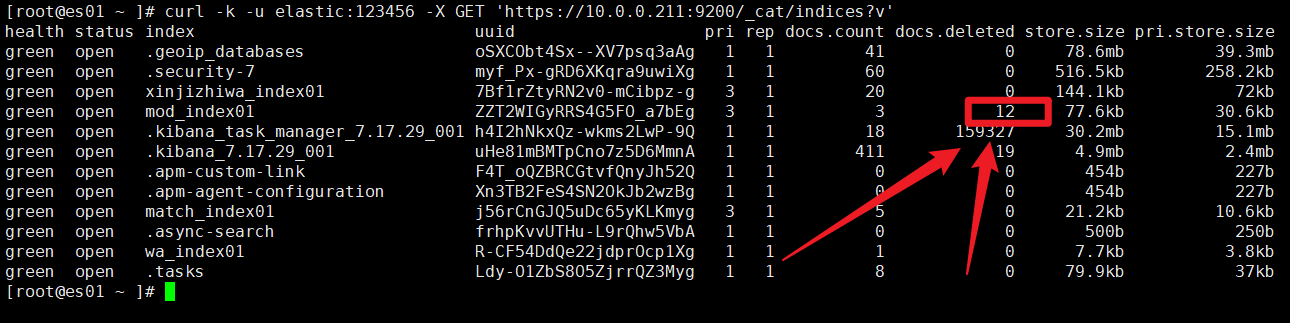
6,文档跨索引迁移
· 准备要迁移的文档数据
1,创建索引
假设,我们创建一个索引,映射两个字段:
- product_name商品名称,我们映射为text类型;
- price商品价格,我们映射为keyword;
[root@es01 ~ ]# curl -k -u elastic:123456 -X PUT "https://10.0.0.101:9200/move_index?pretty" -H 'Content-Type: application/json' -d '
{
  "mappings": {
    "properties": {
      "product_name": {
        "type": "text"
      },
      "price": {
        "type": "float"
      }
    }
  },
  "settings": {
    "number_of_shards": 3,
    "number_of_replicas": 1
  }
}
'
查看索引字段映射确认
[root@es01 ~ ]# curl -k -u elastic:123456 -X GET "https://10.0.0.101:9200/move_index/_mapping?pretty"
{
  "move_index01" : {
    "mappings" : {
      "properties" : {
        "price" : {
          "type" : "keyword"
        },
        "product_name" : {
          "type" : "float"
        }
      }
    }
  }
}
2,写入3个文档
[root@es01 ~ ]# curl -k -u elastic:123456 -X POST "https://10.0.0.101:9200/move_index/_bulk?pretty" -H 'Content-Type: application/json' -d'
{ "index" : { "_id" : "1000" } }
{ "product_name": "5G高端智能手机", "price": 2400.0 }
{ "index" : { "_id" : "1001" } }
{ "product_name": "高端老年机", "price": 500.0 }
{ "index" : { "_id" : "1002" } }
{ "product_name": "SKii", "price": "1000.0" }
'
· 迁移全部字段数据
1,准备新索引
[root@es01 ~ ]# curl -k -u elastic:123456 -X PUT "https://10.0.0.101:9200/dest_index?pretty" -H 'Content-Type: application/json' -d '
{
  "mappings": {
    "properties": {
      "product_name": {
        "type": "keyword"
      },
      "price": {
        "type": "float"
      }
    }
  },
  "settings": {
    "number_of_shards": 3,
    "number_of_replicas": 1
  }
}
'
2,迁移数据
[root@es01 ~ ]# curl -k -u elastic:123456 -X POST "https://10.0.0.101:9200/_reindex?pretty" -H 'Content-Type: application/json' -d'
{
  "source": { "index": "move_index" },
  "dest": { "index": "dest_index" }
}'
3,查看新索引文档验证
[root@es01 ~ ]# curl -k -u elastic:123456 -X GET "https://10.0.0.101:9200/dest_index/_search?pretty"
{
  "took" : 5,
  "timed_out" : false,
  "_shards" : {
    "total" : 3,
    "successful" : 3,
    "skipped" : 0,
    "failed" : 0
  },
  "hits" : {
    "total" : {
      "value" : 3,
      "relation" : "eq"
    },
    "max_score" : 1.0,
    "hits" : [
      {
        "_index" : "dest_index",
        "_type" : "_doc",
        "_id" : "1002",
        "_score" : 1.0,
        "_source" : {
          "product_name" : "SKii",
          "price" : "1000.0"
        }
      },
      {
        "_index" : "dest_index",
        "_type" : "_doc",
        "_id" : "1000",
        "_score" : 1.0,
        "_source" : {
          "product_name" : "5G高端智能手机",
          "price" : 2400.0
        }
      },
      {
        "_index" : "dest_index",
        "_type" : "_doc",
        "_id" : "1001",
        "_score" : 1.0,
        "_source" : {
          "product_name" : "高端老年机",
          "price" : 500.0
        }
      }
    ]
  }
}
· 过滤后迁移
1,准备新索引
[root@es01 ~ ]# curl -k -u elastic:123456 -X PUT "https://10.0.0.101:9200/filter_index?pretty" -H 'Content-Type: application/json' -d '
{
  "mappings": {
    "properties": {
      "product_name": {
        "type": "keyword"
      },
      "price": {
        "type": "float"
      }
    }
  },
  "settings": {
    "number_of_shards": 3,
    "number_of_replicas": 1
  }
}
'
2,过滤部分数据再迁移
只迁移价格大于2000的数据文档
[root@es01 ~ ]# curl -k -u elastic:123456 -X POST "https://10.0.0.101:9200/_reindex?pretty" -H 'Content-Type: application/json' -d'
{
  "source": {
    "index": "move_index",
    "query": {
      "range": {
        "price": { "gte": 2000 }
      }
    }
  },
  "dest": { "index": "filter_index" }
}'
3,查看新索引文档数据
[root@es01 ~ ]# curl -k -u elastic:123456 -X GET "https://10.0.0.101:9200/filter_index/_search?pretty"
{
  "took" : 711,
  "timed_out" : false,
  "_shards" : {
    "total" : 3,
    "successful" : 3,
    "skipped" : 0,
    "failed" : 0
  },
  "hits" : {
    "total" : {
      "value" : 1,
      "relation" : "eq"
    },
    "max_score" : 1.0,
    "hits" : [
      {
        "_index" : "filter_index",
        "_type" : "_doc",
        "_id" : "1000",
        "_score" : 1.0,
        "_source" : {
          "product_name" : "5G高端智能手机",
          "price" : 2400.0
        }
      }
    ]
  }
}
6,查看新索引数据
[root@es01 ~ ]# curl -k -u elastic:123456 -X GET "https://10.0.0.101:9200/bakwite_index03/_search?pretty"
{
  "took" : 962,
  "timed_out" : false,
  "_shards" : {
    "total" : 3,
    "successful" : 3,
    "skipped" : 0,
    "failed" : 0
  },
  "hits" : {
    "total" : {
      "value" : 3,
      "relation" : "eq"
    },
    "max_score" : 1.0,
    "hits" : [
      {
        "_index" : "bakwite_index03",
        "_type" : "_doc",
        "_id" : "1002",
        "_score" : 1.0,
        "_source" : {
          "commodity_id" : "ID1002"
        }
      },
      {
        "_index" : "bakwite_index03",
        "_type" : "_doc",
        "_id" : "1000",
        "_score" : 1.0,
        "_source" : {
          "commodity_id" : "ID1000"
        }
      },
      {
        "_index" : "bakwite_index03",
        "_type" : "_doc",
        "_id" : "1001",
        "_score" : 1.0,
        "_source" : {
          "commodity_id" : "ID1001"
        }
      }
    ]
  }
}
六、ElasticSearch文档过滤
1,ES存储数据原理
· ES数据存储方式
| 存储方式 | 解释说明 |
|---|---|
| 行式存储 | 文档必须存储的方式,每创建一个文档,ES都会将其以行式存储到系统中; |
| 列式存储 | 创建索引映射字段时自定义某一列的单独存储方式,为了将来对这个字段列进行排序、计算、统计等操作; |
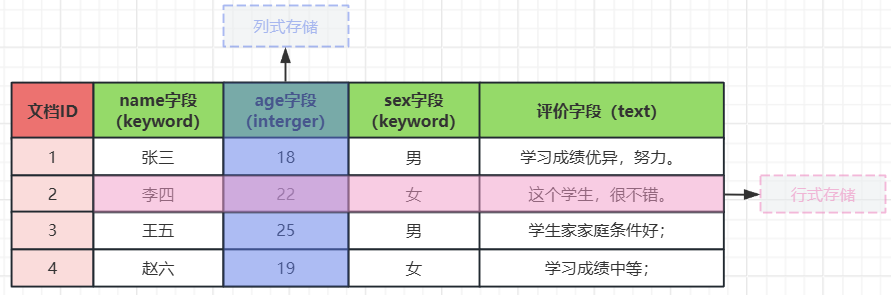
列示存储:
文档id   age字段
1       18
2       22
3       25
4       19
行式存储
文档id   name字段  age字段  sex字段 评价字段
1       张三       18      男      学习成绩优异,努力。
· ES倒排索引【查询】数据
1,查询精确类型数据
当你查询sex字段时:
- sex字段的类型为keyword,精确查找类型;所以不分词;
- 直接将源字段值整合到一起进行查询;
- 如果你查询sex字段下的【男】,那么会直接获取到文档id;并索引到整个文档数据;
# 查询sex字段
【sex字段】     【属于的文档】
男               1,3
女               2,4

# 查询name字段
【name字段】     【属于的文档】
张三             1
李四             2
王五             3
赵六             4
2,查询text类型数据
当你查询【评价】字段时:
- name字段的类型为text,模糊查找类型;所以系统会根据分词器进行分词;
- 默认的分词器【Standard】它会将:
- 英文:以单词为单位进行分词;【hello、world】
- 中文:以一个汉字为一个词进行拆分;【你、好、世、界】
【评价字段】      【属于的文档】
学               1,2,3,4
习               1,4
成               1,4
绩               1,4
优               1
异               1
努               1
力               1
这               2
个               2
生               2,3
很               2
不               2
错               2
家               3
庭               3
条               3
件               3
好               3
中               4
等               4
· ES正排索引【计算】数据
当我们需要计算姓名name字段的重复数量时,系统会采用【正排索引】
【文档id】    【name字段】
1            张三
2            李四
3            王五
4            赵六
当我们要计算平均年龄时
【文档id】    【age字段】
1            18
2            22
3            25
4            19
2,查询所有文档数据match_all
· 匹配所有match_all
| 查询语法字段 | 含义说明 |
|---|---|
| query | 表示查询文档数据 |
| match_all | 匹配所有文档; |
我们目前有20个文档,结果特别杂乱;
[root@es01 ~ ]#  curl -k -u elastic:123456 -X GET 'https://10.0.0.101:9200/bakwite_index01/_search?pretty' -H 'Content-Type: application/json' -d'
{
  "query":{
    "match_all":{}
  }
}'
查询结果格式
| 元数据【一级字段】 | 元数据【二级字段】 | 字段说明 |
|---|---|---|
| took | 查询耗时,单位:毫秒 | |
| time_out | 是否查询超时 | |
| _shard | ["total" : 3]:一共查了多少个分片; ["successful" : 3]:在多少个分片查询成功; ["skipped" : 0]:跳过了多少个分片; [failed" : 0]:在多少个分片查询出错; |
|
| hits | 命中情况 | |
| total | 命中总体情况 ["value" : 20]:命中文档总数 ["relation" : "eq"]:eq为匹配,gte为近似匹配 |
|
| max_score | 相关性评分,就是【查询条件】与【查询结果】的匹配程度;范围:0到2.5 | |
| hits | 匹配到的具体索引与文档的数据信息; |
{
  "took" : 4,
  "timed_out" : false,
  "_shards" : {
    "total" : 3,
    "successful" : 3,
    "skipped" : 0,
    "failed" : 0
  },
  "hits" : {
    "total" : {
      "value" : 20,
      "relation" : "eq"
    },
    "max_score" : 1.0,
    "hits" : [
      {
        "_index" : "bakwite_index01",
        "_type" : "_doc",
        "_id" : "5",
        "_score" : 1.0,
        "_source" : {
          "product_name" : "商务旗舰智能手机",
          "inventory" : 89,
          "price" : 12999.0,
          "weight" : 22,
          "tags" : [
            "2025年新款",
            "商务旗舰",
            "安全加密",
            "高端商务",
            "拍照效果优秀"
          ],
          "merchant_ip" : "123.244.136.109",
......
        }
      }
    ]
  }
}
· 查询结果显示设置
1,限制【本页】返回文档的数量size
| 字段 | 含义说明 |
|---|---|
| size | 限制【本页】返回文档的数量 |
[root@es01 ~ ]#  curl -k -u elastic:123456 -X GET 'https://10.0.0.101:9200/bakwite_index01/_search?pretty' -H 'Content-Type: application/json' -d'
{
  "query":{
    "match_all":{}
  },
  "size": 1
}'
2,分页显示数据
| 字段 | 含义说明 |
|---|---|
| from | 从第几个数据开始显示;(如果size设置为10,from设置为20,表示从第3页开始显示) |
[root@es01 ~ ]#  curl -k -u elastic:123456 -X GET 'https://10.0.0.101:9200/bakwite_index01/_search?pretty' -H 'Content-Type: application/json' -d'
{
  "query":{
    "match_all":{}
  },
  "from": 10,
  "size": 10
}'
3,去除元数据指定字段显示
[root@es01 ~ ]#  curl -k -u elastic:123456 -X GET 'https://10.0.0.101:9200/bakwite_index01/_search?pretty&filter_path=hits.hits._source' -H 'Content-Type: application/json' -d'
{
  "query":{
    "match_all":{}
  },
  "from": 10,
  "size": 10,
  "_source":  [ "merchant_ip","product_upload_time" ]
}'
查看显示结果
{
  "hits" : {
    "hits" : [
      {
        "_source" : {
          "merchant_ip" : "123.244.146.119",
          "product_upload_time" : "2025-03-03 11:55:00"
        }
      },
      {
        "_source" : {
          "merchant_ip" : "123.244.150.123",
          "product_upload_time" : "2025-02-27 17:15:00"
        }
      },
      {
        "_source" : {
          "merchant_ip" : "120.244.134.121",
          "product_upload_time" : "2025-03-12 21:15:33"
        }
      },
      {
        "_source" : {
          "merchant_ip" : "123.244.137.110",
          "product_upload_time" : "2025-03-12 11:15:00"
        }
      },
      {
        "_source" : {
          "merchant_ip" : "123.244.139.112",
          "product_upload_time" : "2025-03-10 15:20:00"
        }
      },
      {
        "_source" : {
          "merchant_ip" : "123.244.140.113",
          "product_upload_time" : "2025-03-09 13:10:00"
        }
      },
      {
        "_source" : {
          "merchant_ip" : "123.244.142.115",
          "product_upload_time" : "2025-03-07 12:25:00"
        }
      },
      {
        "_source" : {
          "merchant_ip" : "123.244.147.120",
          "product_upload_time" : "2025-03-02 13:20:00"
        }
      },
      {
        "_source" : {
          "merchant_ip" : "123.244.148.121",
          "product_upload_time" : "2025-03-01 15:10:00"
        }
      },
      {
        "_source" : {
          "merchant_ip" : "123.244.149.122",
          "product_upload_time" : "2025-02-28 09:45:00"
        }
      }
    ]
  }
}
· 查询结果字段排序
1,查询价格字段
[root@es01 ~ ]#  curl -k -u elastic:123456 -X GET 'https://10.0.0.101:9200/bakwite_index01/_search?pretty&filter_path=hits.hits._source' -H 'Content-Type: application/json' -d'
{
  "query":{
    "match_all":{}
  },
  "from": 5,
  "size": 5,
  "_source":  "price"
}'
2,根据价格字段排序
| 字段 | 含义 |
|---|---|
| order | 排序:asc表示从小到大,desc表示从大到小 |
| "missing": "_last" | 表示:没有数据的文档,如何处理?【_last】表示放到最后显示; |
[root@es01 ~ ]# curl -k -u elastic:123456 -X GET 'https://10.0.0.101:9200/bakwite_index01/_search?pretty&filter_path=hits.hits._source' -H 'Content-Type: application/json' -d'
{
  "query":{
    "match_all":{}
  },
  "sort": [
    {
      "price": {
        "order": "asc",
        "missing": "_last"
      }
    }
  ],
  "from": 5,
  "size": 5,
  "_source":  "price"
}'
查询结果
{
  "hits" : {
    "hits" : [
      {
        "_source" : {
          "price" : 3899.0
        }
      },
      {
        "_source" : {
          "price" : 4299.0
        }
      },
      {
        "_source" : {
          "price" : 4599.0
        }
      },
      {
        "_source" : {
          "price" : 5499.0
        }
      },
      {
        "_source" : {
          "price" : 5999.0
        }
      }
    ]
  }
}
3,模糊查询数据
| 模糊匹配方法 | 适合查询类型 | 解释说明 |
|---|---|---|
| match | text | 分词模糊匹配单个字段 |
| multi_match | text | 分词模糊匹配多个字段 |
| match_phrase | text | 分词短语模糊匹配 |
| wildcard | keyword | 通配符匹配 |
| fuzziness | text和keyword | 查询keyword类型时(查询test类型时无所谓),查询词,必须与字段值的字符数相同; |
· 准备测试数据
# 创建新索引映射text类型
[root@es01 ~ ]# curl -k -u elastic:123456 -X PUT "https://10.0.0.101:9200/match_index01?pretty" -H 'Content-Type: application/json' -d'
{
  "mappings": {
    "properties": {
        "name": {
            "type": "text",
            "analyzer": "standard"
        }
    }
  },
  "settings": {
    "number_of_shards": 3,
    "number_of_replicas": 1
  }
}'

# 批量写入测试数据文档
[root@es01:~]# curl -k -u elastic:123456 -X POST 'https://10.0.0.101:9200/_bulk?pretty' -H 'Content-Type: application/json' -d '
{ "index" : { "_index" : "match_index01", "_id" : "1" } }
{ "name": "高端智能手机" }
{ "index" : { "_index" : "match_index01", "_id" : "2" } }
{ "name": "手表维修机" }
{ "index" : { "_index" : "match_index01", "_id" : "3" } }
{ "name": "防割伤手套" }
{ "index" : { "_index" : "match_index01", "_id" : "4" } }
{ "name": "AI智能扫地机器人" }
{ "index" : { "_index" : "match_index01", "_id" : "5" } }
{ "name": "电饭煲" }
'
· match匹配text类型
1,模糊匹配【或】
| 字段位置 | 字段 | 解释说明 |
|---|---|---|
| URL参数 | pretty | json格式显示 |
| URL参数 | filter_path | 过滤查询结果的显示字段 |
| 查询字段 | query | 表示查询 |
| 查询字段 | match | 模糊匹配查询 |
[root@es01 ~ ]# curl -k -u elastic:123456 -X GET "https://10.0.0.101:9200/match_index01/_search?pretty&filter_path=hits.hits._source" -H 'Content-Type: application/json' -d'
{
  "query": {
    "match": {
      "name": "手机"
    }
  }
}'

# 或者可以写成:
[root@es01 ~ ]# curl -k -u elastic:123456 -X GET "https://10.0.0.101:9200/match_index01/_search?pretty&filter_path=hits.hits._source" -H 'Content-Type: application/json' -d'
{
  "query": {
    "match": {
      "name": {
      	"query": "手机"
      }
    }
  }
}'
查看结果:凡是有【手】或者【机】的文档都被查询了出来;
{
  "hits" : {
    "hits" : [
      {
        "_source" : {
          "name" : "手表维修机"
        }
      },
      {
        "_source" : {
          "name" : "高端智能手机"
        }
      },
      {
        "_source" : {
          "name" : "防割伤手套"
        }
      },
      {
        "_source" : {
          "name" : "AI智能扫地机器人"
        }
      }
    ]
  }
}
2,模糊匹配【与】
[root@es01 ~ ]# curl -k -u elastic:123456 -X GET "https://10.0.0.101:9200/match_index01/_search?pretty&filter_path=hits.hits._source" -H 'Content-Type: application/json' -d'
{
  "query": {
    "match": {
      "name": {
      	"query": "手机",
      	"operator": "and"
      }
    }
  }
}'
查看返回结果:这次是【与】的关系,必须同时满足分词;必须同时包含【手】和【机】
{
  "hits" : {
    "hits" : [
      {
        "_source" : {
          "name" : "手表维修机"
        }
      },
      {
        "_source" : {
          "name" : "高端智能手机"
        }
      }
    ]
  }
}
3,匹配原理
| match匹配原则 |
|---|
| 【查询词】与【被查询词】中的分词,只要有一个分词匹配成功,则算作命中; |
我们知道,根据【ES倒排索引】的原理可知:
- 默认的分词器【Standard】,会将【被查询数据】与【查询词】进行分词;
- 切如果查询的是汉语,会一个汉字一个词的分词方式;

· multi_match匹配多字段
1,匹配text类型多字段
[root@es01 ~ ]# curl -k -u elastic:123456 -X GET 'https://10.0.0.101:9200/bakwite_index01/_search?pretty&filter_path=hits.hits._source' -H 'Content-Type: application/json' -d'
{
  "query": {
    "multi_match": {
      "query": "商务",
      "fields": ["specifications.color", "comment"]
    }
  },
  "_source": ["specifications.color", "comment"]
}'
查看匹配结果
{
  "hits" : {
    "hits" : [
      {
        "_source" : {
          "comment" : "续航能力超强,适合商务使用",
          "specifications" : {
            "color" : "深海蓝"
          }
        }
      },
      {
        "_source" : {
          "comment" : "商务精英首选,拍照效果专业",
          "specifications" : {
            "color" : "钛金灰"
          }
        }
      },
      {
        "_source" : {
          "comment" : "商务人士首选,安全性能极佳",
          "specifications" : {
            "color" : "商务灰"
          }
        }
      },
      {
        "_source" : {
          "comment" : "轻薄设计,拍照效果优秀,商务人士首选",
          "specifications" : {
            "color" : "月光银"
          }
        }
      }
    ]
  }
}
2,匹配设置容错
| 字段 | 含义说明 |
|---|---|
| "fuzziness": "AUTO" | 表示允许搜索词错几个字,AUTO表示自动,也可以设置数值; |
[root@es01 ~ ]# curl -k -u elastic:123456 -X GET 'https://10.0.0.101:9200/bakwite_index01/_search?pretty&filter_path=hits.hits._source' -H 'Content-Type: application/json' -d'
{
  "query": {
    "multi_match": {
      "query": "商午",
      "fields": ["specifications.color", "comment"],
      "fuzziness": "AUTO"
    }
  },
  "_source": ["specifications.color", "comment"]
}'
返回结果查看
{
  "hits" : {
    "hits" : [
      {
        "_source" : {
          "comment" : "续航能力超强,适合商务使用",
          "specifications" : {
            "color" : "深海蓝"
          }
        }
      },
      {
        "_source" : {
          "comment" : "商务精英首选,拍照效果专业",
          "specifications" : {
            "color" : "钛金灰"
          }
        }
      },
      {
        "_source" : {
          "comment" : "商务人士首选,安全性能极佳",
          "specifications" : {
            "color" : "商务灰"
          }
        }
      },
      {
        "_source" : {
          "comment" : "轻薄设计,拍照效果优秀,商务人士首选",
          "specifications" : {
            "color" : "月光银"
          }
        }
      }
    ]
  }
}
· match_phrase短语模糊搜索text类型
| match_phrase查询原理 |
|---|
| 【查询词】与被查询词的分词,必须全部命中,切必须是连续的(比如查询"手机",被查询词中也必须是"手机",不能是"机手") |
[root@es01 ~ ]# curl -k -u elastic:123456 -X GET "https://10.0.0.101:9200/match_index01/_search?pretty&filter_path=hits.hits._source" -H 'Content-Type: application/json' -d'
{
  "query": {
    "match_phrase": {
      "name": "手机"
    }
  }
}'
查看结果:只显示了有【手机】这个词的文档;
{
  "hits" : {
    "hits" : [
      {
        "_source" : {
          "name" : "高端智能手机"
        }
      }
    ]
  }
}
· wildcard通配符匹配keyword类型
| 字段 | 查询类型 | 含义说明 |
|---|---|---|
| wildcard | keyword | 表示使用通配符进行数据匹配; |
# 使用 * 和 ? 通配符匹配,【字段结尾】是【手机】的文档
[root@es01 ~ ]# curl -k -u elastic:123456 -X GET 'https://10.0.0.101:9200/bakwite_index01/_search?pretty&filter_path=hits.hits._source' -H 'Content-Type: application/json' -d'
{
  "query": {
    "wildcard": {
      "product_name": {
        "value": "*手机"
      }
    }
  },
  "_source": "product_name"
}'
查看返回信息:可以看到,只要是以手机结尾的字段数据,都被查了出来;
{
  "hits" : {
    "hits" : [
      {
        "_source" : {
          "product_name" : "商务旗舰智能手机"
        }
      },
      {
        "_source" : {
          "product_name" : "轻薄拍照智能手机"
        }
      },
      {
        "_source" : {
          "product_name" : "商务轻薄旗舰手机"
        }
      },
      {
        "_source" : {
          "product_name" : "轻薄旗舰拍照手机"
        }
      },
      {
        "_source" : {
          "product_name" : "高端旗舰智能手机"
        }
      },
      {
        "_source" : {
          "product_name" : "性价比拍照手机"
        }
      },
      {
        "_source" : {
          "product_name" : "学生优惠智能手机"
        }
      },
      {
        "_source" : {
          "product_name" : "性价比游戏手机"
        }
      },
      {
        "_source" : {
          "product_name" : "长续航拍照手机"
        }
      },
      {
        "_source" : {
          "product_name" : "旗舰拍照智能手机"
        }
      }
    ]
  }
}
· fuzzy容错查询text与keyword类型
| fuzzy容错查询 | 含义说明 |
|---|---|
| 查询要求 | 查询keyword类型时(查询test类型时无所谓),查询词,必须与字段值的字符数相同; |
| fuzziness | 表示允许查询词汇总的错误字符数;“AUTO”表示自动识别; |
# 最常用场景 - 文本字段的拼写纠错
[root@es01 ~ ]# curl -k -u elastic:123456 -X GET 'https://10.0.0.101:9200/bakwite_index01/_search?pretty&filter_path=hits.hits._source' -H 'Content-Type: application/json' -d'
{
  "query": {
    "fuzzy": {
      "product_name": {
        "value": "高端旗舰智能鸡",
        "fuzziness": "AUTO"
      }
    }
  },
  "_source": "product_name"
}'
查看返回结构
{
  "hits" : {
    "hits" : [
      {
        "_source" : {
          "product_name" : "高端旗舰智能手机"
        }
      }
    ]
  }
}
· IK分词器
1,查看当前字段分词器的分词情况
分词英文
[root@es01 ~ ]# curl -k -u elastic:123456 -X GET "https://10.0.0.101:9200/match_index01/_analyze?pretty" -H 'Content-Type: application/json' -d'
{
  "field": "name",
  "text": "hello,world"
}'

# 返回结果
......
      "token" : "hello",
......
      "token" : "world",
......
分词中文
[root@es01 ~ ]# curl -k -u elastic:123456 -X GET "https://10.0.0.101:9200/match_index01/_analyze?pretty" -H 'Content-Type: application/json' -d'
{
  "field": "name",
  "text": "你好,世界"
}'

# 返回结果
......
      "token" : "你",
......
      "token" : "好",
......
      "token" : "世",
......
      "token" : "界",
......
2,指定分词器测试分词
测试分词英文
[root@es01 ~ ]# curl -k -u elastic:123456 -X GET "https://10.0.0.101:9200/_analyze?pretty" -H 'Content-Type: application/json' -d'
{
  "analyzer": "standard",
  "text": "hello,world"
}'

# 返回结果
......
      "token" : "hello",
......
      "token" : "world",
......
测试分词中文
[root@es01 ~ ]# curl -k -u elastic:123456 -X GET "https://10.0.0.101:9200/_analyze?pretty" -H 'Content-Type: application/json' -d'
{
  "analyzer": "standard",
  "text": "你好,世界"
}'

# 返回结果
......
      "token" : "你",
......
      "token" : "好",
......
      "token" : "世",
......
      "token" : "界",
......
3,下载IK分词器安装包
| 名词 | 解释说明 |
|---|---|
| IK分词器 | IK Analyzer是一个开源的,基于java语言开发的轻量级的中文分词工具包 |
IK分词器下载网址:
# 需要科学上网
https://github.com/infinilabs/analysis-ik

# 向下滑动,找到下载地址
https://release.infinilabs.com/
# 选择【analysis-ik】进入
# 选择【stable】进入
# 选择与ES版本相同的版本号进行下载
[root@es01 ~ ]# curl -k -u elastic:123456 -X GET https://10.0.0.101:9200
{
  "name" : "es01",
  "cluster_name" : "bakwite-es-cluster",
  "cluster_uuid" : "QB3VinL3SWm_d76B9qhCRA",
  "version" : {
    "number" : "7.17.29",               # 我们的版本是7.17.29
    "build_flavor" : "default",
    "build_type" : "tar",
    "build_hash" : "580aff1a0064ce4c93293aaab6fcc55e22c10d1c",
    "build_date" : "2025-06-19T01:37:57.847711500Z",
    "build_snapshot" : false,
    "lucene_version" : "8.11.3",
    "minimum_wire_compatibility_version" : "6.8.0",
    "minimum_index_compatibility_version" : "6.0.0-beta1"
  },
  "tagline" : "You Know, for Search"
}
# 下载到本地
[root@es01 ~ ]# wget https://release.infinilabs.com/analysis-ik/stable/elasticsearch-analysis-ik-7.17.29.zip

# 查看
[root@es01 ~ ]# ls -l
......
-rw-r--r-- 1 root root   4504852 Nov 25 08:54 elasticsearch-analysis-ik-7.17.29.zip
4,安装IK分词器
# 创建插件目录
[root@es01 ~ ]# mkdir /tools/es/elasticsearch-7.17.29/plugins/ik

# 将ik分词器解压到插件目录下
[root@es01 ~ ]# unzip elasticsearch-analysis-ik-7.17.29.zip -d /tools/es/elasticsearch-7.17.29/plugins/ik/

# 修改ik分词器插件目录权限
[root@es01 ~ ]# chown -R elasticsearch.elasticsearch  /tools/es/elasticsearch-7.17.29/plugins/ik/

# 将分词器分发给其他集群节点
[root@es01 ~ ]# scp -r /tools/es/elasticsearch-7.17.29/plugins/ik 10.0.0.102:/tools/es/elasticsearch-7.17.29/plugins/
[root@es01 ~ ]# scp -r /tools/es/elasticsearch-7.17.29/plugins/ik 10.0.0.103:/tools/es/elasticsearch-7.17.29/plugins/

# 重启es
[root@es01 ~ ]# systemctl restart elasticsearch.service
[root@es02 ~ ]# systemctl restart elasticsearch.service
[root@es03 ~ ]# systemctl restart elasticsearch.service
5,测试ik分词器
| ik分词器 | 解释说明 |
|---|---|
| ik_max_word | 细颗粒度拆分 |
[root@es01 ~ ]# curl -k -u elastic:123456 -X GET "https://10.0.0.101:9200/_analyze?pretty" -H 'Content-Type: application/json' -d'
{
  "analyzer": "ik_max_word",
  "text": "去天安门溜达"
}'
查看分词结果:
- 已经成功按照汉语的词语进行分词了;
# 查看分词结果
......
      "token" : "去",
......
      "token" : "天安门",
......
      "token" : "天安",
......
      "token" : "门",
......
      "token" : "溜达",
......
| ik分词器 | 解释说明 |
|---|---|
| ik_smart | 粗颗粒度查询 |
[root@es01 ~ ]# curl -k -u elastic:123456 -X GET "https://10.0.0.101:9200/_analyze?pretty" -H 'Content-Type: application/json' -d'
{
  "analyzer": "ik_smart",
  "text": "去天安门溜达"
}'
查看分词结果
......
      "token" : "去",
......
      "token" : "天安门",
......
      "token" : "溜达",
......
6,ik分词器自定义词典
ik分词器分词原理:
- 就是在../ik/config/目录下创建【*.dic】文件;
- 在文件中写入固定的汉语分词;
# 查看分词文件
[root@es01 ~ ]# ls -l /tools/es/elasticsearch-7.17.29/plugins/ik/config/
total 8260
-rw-r--r-- 1 elasticsearch elasticsearch 5225922 Jul 27 16:45 extra_main.dic
-rw-r--r-- 1 elasticsearch elasticsearch   63188 Jul 27 16:45 extra_single_word.dic
-rw-r--r-- 1 elasticsearch elasticsearch   63188 Jul 27 16:45 extra_single_word_full.dic
-rw-r--r-- 1 elasticsearch elasticsearch   10855 Jul 27 16:45 extra_single_word_low_freq.dic
-rw-r--r-- 1 elasticsearch elasticsearch     156 Jul 27 16:45 extra_stopword.dic
-rw-r--r-- 1 elasticsearch elasticsearch     625 Jul 27 16:45 IKAnalyzer.cfg.xml
-rw-r--r-- 1 elasticsearch elasticsearch 3058510 Jul 27 16:45 main.dic
-rw-r--r-- 1 elasticsearch elasticsearch     123 Jul 27 16:45 preposition.dic
-rw-r--r-- 1 elasticsearch elasticsearch    1824 Jul 27 16:45 quantifier.dic
-rw-r--r-- 1 elasticsearch elasticsearch     164 Jul 27 16:45 stopword.dic
-rw-r--r-- 1 elasticsearch elasticsearch     192 Jul 27 16:45 suffix.dic
-rw-r--r-- 1 elasticsearch elasticsearch     752 Jul 27 16:45 surname.dic

# 查看文件内容
[root@es01 ~ ]# tail -10 /tools/es/elasticsearch-7.17.29/plugins/ik/config/extra_main.dic
做着
做主
做庄
做莊
做足
做作
做作业
做做
做咗手腳
自定义词典
[root@es01 ~ ]# vim /tools/es/elasticsearch-7.17.29/plugins/ik/config/bakwite.dic
吭哧瘪肚
比比划划
麻麻赖赖
五迷三道

# 创还能玩文件,记得授权
[root@es01 ~ ]# chown -R elasticsearch.elasticsearch /tools/es/elasticsearch-7.17.29/plugins/ik/config/bakwite.dic

# 其他集群节点传送
[root@es01 ~ ]# scp  /tools/es/elasticsearch-7.17.29/plugins/ik/config/bakwite.dic 10.0.0.212:/tools/es/elasticsearch-7.17.29/plugins/ik/config/
[root@es01 ~ ]# scp  /tools/es/elasticsearch-7.17.29/plugins/ik/config/bakwite.dic 10.0.0.213:/tools/es/elasticsearch-7.17.29/plugins/ik/config/
编辑分词器配置文件,加载自定义分词
[root@es01 ~ ]# vim /tools/es/elasticsearch-7.17.29/plugins/ik/config/IKAnalyzer.cfg.xml
<?xml version="1.0" encoding="UTF-8"?>
<!DOCTYPE properties SYSTEM "http://java.sun.com/dtd/properties.dtd">
<properties>
        <comment>IK Analyzer 扩展配置</comment>
        <!--用户可以在这里配置自己的扩展字典 -->
        <entry key="ext_dict">bakwite.dic</entry>
         <!--用户可以在这里配置自己的扩展停止词字典-->
        <entry key="ext_stopwords"></entry>
        <!--用户可以在这里配置远程扩展字典 -->
        <!-- <entry key="remote_ext_dict">words_location</entry> -->
        <!--用户可以在这里配置远程扩展停止词字典-->
        <!-- <entry key="remote_ext_stopwords">words_location</entry> -->
</properties>


# 分发给其他节点
[root@es01 ~ ]# scp /tools/es/elasticsearch-7.17.29/plugins/ik/config/IKAnalyzer.cfg.xml 10.0.0.212:/tools/es/elasticsearch-7.17.29/plugins/ik/config/
[root@es01 ~ ]# scp /tools/es/elasticsearch-7.17.29/plugins/ik/config/IKAnalyzer.cfg.xml 10.0.0.213:/tools/es/elasticsearch-7.17.29/plugins/ik/config/
重启es集群
[root@es01 ~ ]# systemctl restart elasticsearch.service
[root@es02 ~ ]# systemctl restart elasticsearch.service
[root@es03 ~ ]# systemctl restart elasticsearch.service
测试自定义词典是否生效
[root@es01 ~ ]# curl -k -u elastic:123456 -X GET "https://10.0.0.101:9200/_analyze?pretty" -H 'Content-Type: application/json' -d'
{
  "analyzer": "ik_smart",
  "text": "这人吭哧瘪肚的,遇到点事嗨比比划划、妆画的麻麻赖赖的,说话吭哧瘪肚的,可咋整"
}'

# 查看返回结果
......
      "token" : "这人",
......
      "token" : "吭哧瘪肚",
......
      "token" : "的",
......
      "token" : "遇",
......
      "token" : "到点",
......
      "token" : "事",
......
      "token" : "嗨",
......
      "token" : "比比划划",
......
      "token" : "妆",
......
      "token" : "画",
......
      "token" : "的",
......
      "token" : "麻麻赖赖",
......
      "token" : "的",
......
      "token" : "说话",
......
      "token" : "吭哧瘪肚",
......
      "token" : "的",
......
      "token" : "可",
......
      "token" : "咋",
......
      "token" : "整",
......
7,设置分词器
集群索引默认分词器设置
[root@es01 ~ ]# vim /tools/es/elasticsearch-7.17.29/config/elasticsearch.yml
......
# 存储时分词器(索引分词)
index.analysis.analyzer.default.type: ik_smart
# 查询时分词器(查询分词)
index.analysis.analyzer.default_search.type: ik_smart
创建索引时的分词器设置
# mappings设置单个字段的分词器
{
   "mappings": {
     "properties": {
        "comment": {
        	"type": "text",
        	"fields": {
        		"keyword": {
        			"type": "keyword",
                	"ignore_above": 256
        		}
        	},
        	"analyzer": "ik_smart",
            "search_analyzer": "ik_smart"
          }
        }
      }
4,查询字段是否存在
· 测试查看不存在的字段
[root@es01 ~ ]# curl -k -u elastic:123456 -X GET 'https://10.0.0.101:9200/bakwite_index01/_search?pretty' -H 'Content-Type: application/json' -d'
{
	"query": {
		"exists": {
			"field": "abcdefg"
		}
	}
}'
返回结果
{
  "took" : 2,
  "timed_out" : false,
  "_shards" : {
    "total" : 3,
    "successful" : 3,
    "skipped" : 0,
    "failed" : 0
  },
  "hits" : {
    "total" : {
      "value" : 0,
      "relation" : "eq"
    },
    "max_score" : null,
    "hits" : [ ]
  }
}
· 测试查看存在的字段
[root@es01 ~ ]# curl -k -u elastic:123456 -X GET 'https://10.0.0.101:9200/bakwite_index01/_search?pretty' -H 'Content-Type: application/json' -d'
{
	"query": {
		"exists": {
			"field": "tags"
		}
	},
	"size": 1
}'
返回结果
{
  "took" : 3,
  "timed_out" : false,
  "_shards" : {
    "total" : 3,
    "successful" : 3,
    "skipped" : 0,
    "failed" : 0
  },
  "hits" : {
    "total" : {
      "value" : 20,
      "relation" : "eq"
    },
    "max_score" : 1.0,
    "hits" : [
      {
        "_index" : "bakwite_index01",
        "_type" : "_doc",
        "_id" : "5",
        "_score" : 1.0,
        "_source" : {
          "product_name" : "商务旗舰智能手机",
          "inventory" : 89,
          "price" : 12999.0,
          "weight" : 22,
          "tags" : [
            "2025年新款",
            "商务旗舰",
            "安全加密",
            "高端商务",
            "拍照效果优秀"
          ],
          "merchant_ip" : "123.244.136.109",
          "business_address" : [
            116.412,
            39.898
          ],
          "delivery_area" : {
            "type" : "polygon",
            "coordinates" : [
              [
                [
                  116.402,
                  39.908
                ],
                [
                  116.422,
                  39.908
                ],
                [
                  116.422,
                  39.888
                ],
                [
                  116.402,
                  39.888
                ],
                [
                  116.402,
                  39.908
                ]
              ]
            ]
          },
          "product_upload_time" : "2025-03-13 16:45:00",
          "app_version" : "3.5.0",
          "is_up" : true,
          "specifications" : {
            "color" : "商务灰",
            "size" : "6.8英寸",
            "brand" : "三星",
            "material" : "金属"
          },
          "comment" : "商务人士首选,安全性能极佳"
        }
      }
    ]
  }
}
5,精准查询
· term精准匹配keyword类型
1,精准匹配案例
[root@es01 ~ ]# curl -k -u elastic:123456 -X GET 'https://10.0.0.101:9200/bakwite_index01/_search?pretty&filter_path=hits.hits._source' -H 'Content-Type: application/json' -d'
{
  "query": {
    "term": {
      "product_name": "高端旗舰智能手机"
    }
  },
  "_source": "product_name"
}'

# 也可以写成:
[root@es01 ~ ]# curl -k -u elastic:123456 -X GET 'https://10.0.0.101:9200/bakwite_index01/_search?pretty&filter_path=hits.hits._source' -H 'Content-Type: application/json' -d'
{
  "query": {
    "term": {
      "product_name": {
      	"value": "高端旗舰智能手机"
      }
    }
  },
  "_source": "product_name"
}'
查看显示结果
{
  "hits" : {
    "hits" : [
      {
        "_source" : {
          "product_name" : "高端旗舰智能手机"
        }
      }
    ]
  }
}
2,精准匹配失败案例
[root@es01 ~ ]# curl -k -u elastic:123456 -X GET 'https://10.0.0.101:9200/bakwite_index01/_search?pretty&filter_path=hits.hits._source' -H 'Content-Type: application/json' -d'
{
  "query": {
    "term": {
      "product_name": "高端旗舰智能手"
    }
  },
  "_source": "product_name"
}'
返回结果,精准匹配keyword,错一个字都不行哦~
{ }
· term匹配IP类型
1,匹配精准IP地址
[root@es01 ~ ]# curl -k -u elastic:123456 -X GET 'https://10.0.0.101:9200/bakwite_index01/_search?pretty&filter_path=hits.hits._source' -H 'Content-Type: application/json' -d'
{
  "query": {
    "term": {
      "merchant_ip": "123.244.135.108"
    }
  },
  "_source": "merchant_ip"
}'
查看返回值
{
  "hits" : {
    "hits" : [
      {
        "_source" : {
          "merchant_ip" : "123.244.135.108"
        }
      }
    ]
  }
}
2,精准匹配网段
[root@es01 ~ ]# curl -k -u elastic:123456 -X GET 'https://10.0.0.101:9200/bakwite_index01/_search?pretty&filter_path=hits.hits._source' -H 'Content-Type: application/json' -d'
{
  "query": {
    "term": {
      "merchant_ip": "123.244.135.0/24"
    }
  },
  "_source": "merchant_ip"
}'
查看返回结果
{
  "hits" : {
    "hits" : [
      {
        "_source" : {
          "merchant_ip" : "123.244.135.108"
        }
      }
    ]
  }
}
· term匹配布尔类型
[root@es01 ~ ]# curl -k -u elastic:123456 -X GET 'https://10.0.0.101:9200/bakwite_index01/_search?pretty&filter_path=hits.hits._source' -H 'Content-Type: application/json' -d'
{
  "query": {
    "term": {
      "is_up": true
    }
  },
  "_source": "is_up"
}'
查看返回结果
{
  "hits" : {
    "hits" : [
      {
        "_source" : {
          "is_up" : true
        }
      },
      {
        "_source" : {
          "is_up" : true
        }
      },
      {
        "_source" : {
          "is_up" : true
        }
      },
      {
        "_source" : {
          "is_up" : true
        }
      },
      {
        "_source" : {
          "is_up" : true
        }
      },
      {
        "_source" : {
          "is_up" : true
        }
      },
      {
        "_source" : {
          "is_up" : true
        }
      },
      {
        "_source" : {
          "is_up" : true
        }
      },
      {
        "_source" : {
          "is_up" : true
        }
      },
      {
        "_source" : {
          "is_up" : true
        }
      }
    ]
  }
}
· terms精准匹配多个值
精准匹配【手机】或者【智能】
[root@es01 ~ ]# curl -k -u elastic:123456 -X GET 'https://10.0.0.101:9200/bakwite_index01/_search?pretty&filter_path=hits.hits._source' -H 'Content-Type: application/json' -d'
{
"query": {
"terms": {
"product_name": ["高端旗舰智能手机", "轻薄拍照智能手机"]
}
},
"_source": "product_name"
}'
查看返回结果
{
"hits" : {
"hits" : [
{
"_source" : {
"product_name" : "轻薄拍照智能手机"
}
},
{
"_source" : {
"product_name" : "高端旗舰智能手机"
}
}
]
}
}
6,range范围查询
| 字段 | 含义说明 |
|---|---|
| gte | 大于等于 |
| lte | 小于等于 |
| gt | 大于 |
| lt | 小于 |
· 数值范围查询
# 查询价格在1000到5000之间的数据文档
[root@es01 ~ ]# curl -k -u elastic:123456 -X GET "https://10.0.0.101:9200/bakwite_index01/_search?pretty&filter_path=hits.hits._source" -H 'Content-Type: application/json' -d'
{
"query": {
"range": {
"price": {
"gte": 1000.0,
"lte": 5000.0
}
}
},
"_source": "price"
}'
查看返回结果
{
"hits" : {
"hits" : [
{
"_source" : {
"price" : 4599.0
}
},
{
"_source" : {
"price" : 2999.0
}
},
{
"_source" : {
"price" : 1999.0
}
},
{
"_source" : {
"price" : 3299.0
}
},
{
"_source" : {
"price" : 4299.0
}
},
{
"_source" : {
"price" : 3899.0
}
},
{
"_source" : {
"price" : 2599.0
}
}
]
}
}
· 时间范围查询
1,日期区间范围查询
[root@es01 ~ ]# curl -k -u elastic:123456 -X GET "https://10.0.0.101:9200/bakwite_index01/_search?pretty&filter_path=hits.hits._source" -H 'Content-Type: application/json' -d'
{
"query": {
"range": {
"product_upload_time": {
"gte": "2025-01-01",
"lte": "2025-05-31",
"format": "yyyy-MM-dd"
}
}
},
"_source": "product_upload_time"
}'
查看返回结果
{
"hits" : {
"hits" : [
{
"_source" : {
"product_upload_time" : "2025-03-13 16:45:00"
}
},
{
"_source" : {
"product_upload_time" : "2025-03-11 09:30:00"
}
},
{
"_source" : {
"product_upload_time" : "2025-03-05 10:15:00"
}
},
{
"_source" : {
"product_upload_time" : "2025-01-22 19:18:00"
}
},
{
"_source" : {
"product_upload_time" : "2025-02-27 17:15:00"
}
},
{
"_source" : {
"product_upload_time" : "2025-03-15 10:30:00"
}
},
{
"_source" : {
"product_upload_time" : "2025-03-14 14:20:00"
}
},
{
"_source" : {
"product_upload_time" : "2025-03-08 17:30:00"
}
},
{
"_source" : {
"product_upload_time" : "2025-03-06 14:50:00"
}
},
{
"_source" : {
"product_upload_time" : "2025-03-04 16:40:00"
}
}
]
}
}
2,相对时间范围查询
| 字段说明 | 含义说明 |
|---|---|
| now-3000d | 表示从今天向前推进3000天 |
| /d | 表示单位是天 |
[root@es01 ~ ]# curl -k -u elastic:123456 -X GET "https://10.0.0.101:9200/bakwite_index01/_search?pretty&filter_path=hits.hits._source" -H 'Content-Type: application/json' -d'
{
"query": {
"range": {
"product_upload_time": {
"gte": "now-300d/d"
}
}
},
"_source": "product_upload_time"
}'
查看返回结果
{
"hits" : {
"hits" : [
{
"_source" : {
"product_upload_time" : "2025-03-13 16:45:00"
}
},
{
"_source" : {
"product_upload_time" : "2025-03-11 09:30:00"
}
},
{
"_source" : {
"product_upload_time" : "2025-03-05 10:15:00"
}
},
{
"_source" : {
"product_upload_time" : "2025-02-27 17:15:00"
}
},
{
"_source" : {
"product_upload_time" : "2025-03-15 10:30:00"
}
},
{
"_source" : {
"product_upload_time" : "2025-03-14 14:20:00"
}
},
{
"_source" : {
"product_upload_time" : "2025-03-08 17:30:00"
}
},
{
"_source" : {
"product_upload_time" : "2025-03-06 14:50:00"
}
},
{
"_source" : {
"product_upload_time" : "2025-03-04 16:40:00"
}
},
{
"_source" : {
"product_upload_time" : "2025-03-03 11:55:00"
}
}
]
}
}
· ip范围查询
[root@es01 ~ ]# curl -k -u elastic:123456 -X GET "https://10.0.0.101:9200/bakwite_index01/_search?pretty&filter_path=hits.hits._source" -H 'Content-Type: application/json' -d'
{
"query": {
"range": {
"merchant_ip": {
"gte": "123.244.0.1",
"lte": "123.244.255.255"
}
}
},
"_source": "merchant_ip"
}'
查看返回结果
{
"hits" : {
"hits" : [
{
"_source" : {
"merchant_ip" : "123.244.136.109"
}
},
{
"_source" : {
"merchant_ip" : "123.244.138.111"
}
},
{
"_source" : {
"merchant_ip" : "123.244.144.117"
}
},
{
"_source" : {
"merchant_ip" : "123.244.134.106"
}
},
{
"_source" : {
"merchant_ip" : "123.244.150.123"
}
},
{
"_source" : {
"merchant_ip" : "123.244.134.107"
}
},
{
"_source" : {
"merchant_ip" : "123.244.135.108"
}
},
{
"_source" : {
"merchant_ip" : "123.244.141.114"
}
},
{
"_source" : {
"merchant_ip" : "123.244.143.116"
}
},
{
"_source" : {
"merchant_ip" : "123.244.145.118"
}
}
]
}
}
· 版本范围查询
[root@es01 ~ ]# curl -k -u elastic:123456 -X GET "https://10.0.0.101:9200/bakwite_index01/_search?pretty&filter_path=hits.hits._source" -H 'Content-Type: application/json' -d'
{
"query": {
"range": {
"app_version": {
"gte": "2.1.0",
"lte": "3.0.0"
}
}
},
"_source": "app_version"
}'
查看返回结构
{
"hits" : {
"hits" : [
{
"_source" : {
"app_version" : "2.8.3"
}
},
{
"_source" : {
"app_version" : "2.9.1"
}
},
{
"_source" : {
"app_version" : "2.7.1"
}
},
{
"_source" : {
"app_version" : "2.9.5"
}
},
{
"_source" : {
"app_version" : "2.8.0"
}
}
]
}
}
7,坐标位置查询
· 查询geo_point坐标范围内的坐标
1,查询坐标范围
查询一个坐标为中心,10公里范围内的坐标数据
| 字段 | 含义说明 |
|---|---|
| geo_distance | 表示地理坐标查询 |
| distance | 表示查询的范围半径; |
| lat | 表示纬度 |
| lon | 表示经度 |
[root@es01 ~ ]# curl -k -u elastic:123456 -X GET "https://10.0.0.101:9200/bakwite_index01/_search?pretty&filter_path=hits.hits._source" -H 'Content-Type: application/json' -d'
{
"query": {
"geo_distance": {
"distance": "10km",
"business_address": {
"lat": 39.904000,
"lon": 116.408000
}
}
},
"_source": "business_address"
}'
查看返回信息
{
"hits" : {
"hits" : [
{
"_source" : {
"business_address" : [
116.412,
39.898
]
}
},
{
"_source" : {
"business_address" : [
116.42,
39.9
]
}
},
{
"_source" : {
"business_address" : [
116.408,
39.896
]
}
},
{
"_source" : {
"business_address" : [
116.41,
39.9
]
}
},
{
"_source" : {
"business_address" : [
116.408,
39.904
]
}
},
{
"_source" : {
"business_address" : [
116.416,
39.902
]
}
},
{
"_source" : {
"business_address" : [
116.414,
39.904
]
}
},
{
"_source" : {
"business_address" : [
116.422,
39.898
]
}
},
{
"_source" : {
"business_address" : [
116.416,
39.906
]
}
},
{
"_source" : {
"business_address" : [
116.412,
39.904
]
}
}
]
}
}
2,查询坐标边界范围内
查询两个坐标点之内的坐标数据
[root@es01 ~ ]# curl -k -u elastic:123456 -X GET "https://10.0.0.101:9200/bakwite_index01/_search?pretty&filter_path=hits.hits._source" -H 'Content-Type: application/json' -d'
{
"query": {
"geo_bounding_box": {
"business_address": {
"top_left": {
"lat": 39.945,
"lon": 116.354
},
"bottom_right": {
"lat": 39.855,
"lon": 116.466
}
}
}
},
"_source": "business_address"
}'
查看返回结果
{
"hits" : {
"hits" : [
{
"_source" : {
"business_address" : [
116.412,
39.898
]
}
},
{
"_source" : {
"business_address" : [
116.42,
39.9
]
}
},
{
"_source" : {
"business_address" : [
116.408,
39.896
]
}
},
{
"_source" : {
"business_address" : [
116.41,
39.9
]
}
},
{
"_source" : {
"business_address" : [
116.408,
39.904
]
}
},
{
"_source" : {
"business_address" : [
116.416,
39.902
]
}
},
{
"_source" : {
"business_address" : [
116.414,
39.904
]
}
},
{
"_source" : {
"business_address" : [
116.422,
39.898
]
}
},
{
"_source" : {
"business_address" : [
116.416,
39.906
]
}
},
{
"_source" : {
"business_address" : [
116.412,
39.904
]
}
}
]
}
}
· 查询geo_shape坐标区域的关系
关系:相交、包含、不包含
| 字段 | 含义说明 |
|---|---|
| "relation": "intersects" | 查询的类型;intersects表示交集,within表示包含在内,disjoint表示不包含在内没有任何交集; |
查询包含查询坐标点的区域坐标数据
[root@es01 ~ ]# curl -k -u elastic:123456 -X GET "https://10.0.0.101:9200/bakwite_index01/_search?pretty&filter_path=hits.hits._source" -H 'Content-Type: application/json' -d'
{
"query": {
"geo_shape": {
"delivery_area": {
"shape": {
"type": "point",
"coordinates": [116.41, 39.9]
},
"relation": "intersects"
}
}
},
"_source": "delivery_area"
}'
查看显示结果
{
"hits" : {
"hits" : [
{
"_source" : {
"delivery_area" : {
"coordinates" : [[
[116.402,39.908],
[116.422,39.908],
[116.422,39.888],
[116.402,39.888],]
]]
"type" : "polygon"
}
}
},
{
"_source" : {
"delivery_area" : {
"coordinates" : [
[[116.41,39.91],
[116.43,39.91],
[116.43,39.89],
[116.41,39.89],
[116.41,39.91]]],
"type" : "polygon"
}
}
},
......
8,布尔(多条件组合)查询
· must必须满足的多条件
案例:查询品牌是"小米",且价格必须大于1000的产品;
[root@es01 ~ ]# curl -k -u elastic:123456 -X GET "https://10.0.0.101:9200/bakwite_index01/_search?pretty&filter_path=hits.hits._source" -H 'Content-Type: application/json' -d'
{
"query": {
"bool": {
"must": [
{
"match_phrase": {
"specifications.brand": "小米"
}
},
{
"range": {
"price": {
"gte": 1000.0
}
}
}
]
}
},
"_source": ["specifications.brand","price"]
}'
查看返回结果
{
"hits" : {
"hits" : [
{
"_source" : {
"price" : 2599.0,
"specifications" : {
"brand" : "小米"
}
}
},
{
"_source" : {
"price" : 2999.0,
"specifications" : {
"brand" : "小米"
}
}
},
{
"_source" : {
"price" : 1999.0,
"specifications" : {
"brand" : "小米"
}
}
}
]
}
}
· must_not必须不包含的条件
查询案例:
- 条件一:价格必须大于"3000元";
- 条件二:品牌不许不能是"华为";
[root@es01 ~ ]# curl -k -u elastic:123456 -X GET "https://10.0.0.101:9200/bakwite_index01/_search?pretty&filter_path=hits.hits._source" -H 'Content-Type: application/json' -d'
{
"query": {
"bool": {
"must": [
{
"range": {
"price": {
"gte": 3000.0
}
}
}
],
"must_not": [
{
"term": {
"specifications.brand": "华为"
}
}
]
}
},
"_source": ["specifications.brand","price"]
}'
查看返回结果
......
"price" : 12999.0,
"specifications" : {
......
"price" : 4599.0,
"specifications" : {
"brand" : "OPPO"
......
"price" : 6899.0,
"specifications" : {
"brand" : "OPPO"
......
"price" : 3299.0,
"specifications" : {
"brand" : "realme"
......
"price" : 4299.0,
"specifications" : {
"brand" : "vivo"
......
"price" : 6899.0,
"specifications" : {
"brand" : "OPPO"
......
"price" : 5999.0,
"specifications" : {
"brand" : "一加"
......
"price" : 3899.0,
"specifications" : {
"brand" : "vivo"
......
"price" : 10999.0,
"specifications" : {
"brand" : "一加"
......
"price" : 5499.0,
"specifications" : {
"brand" : "一加"
......
· should可能满足的多条件
1,组合使用【控制结果排序】
查询案例:
- 条件一:【价格】必须大于"3000元";
- 条件二:【品牌】不许不能是"华为";
- 条件三:用户上传使用的【app版本】尽可能的大于"3.1.0";
[root@es01 ~ ]# curl -k -u elastic:123456 -X GET "https://10.0.0.101:9200/bakwite_index01/_search?pretty&filter_path=hits.hits._source" -H 'Content-Type: application/json' -d'
{
"query": {
"bool": {
"must": [
{
"range": {
"price": {
"gte": 3000.0
}
}
}
],
"must_not": [
{
"term": {
"specifications.brand": "华为"
}
}
],
"should": [
{
"range": {
"app_version": {
"gte": "3.1.0"
}
}
}
]
}
},
"_source": ["specifications.brand","price","app_version"]
}'
查看返回结果:你会发现,版本高于3.1.0的数据,会排在上面;
......
"app_version" : "3.5.0",
"price" : 12999.0,
"specifications" : {
"brand" : "三星"
......
"app_version" : "3.2.5",
"price" : 6899.0,
"specifications" : {
"brand" : "OPPO"
......
"app_version" : "3.2.1",
"price" : 3299.0,
"specifications" : {
"brand" : "realme"
......
"app_version" : "3.2.5",
"price" : 6899.0,
"specifications" : {
"brand" : "OPPO"
......
"app_version" : "3.1.5",
"price" : 5999.0,
"specifications" : {
"brand" : "一加"
......
"app_version" : "3.6.0",
"price" : 10999.0,
"specifications" : {
"brand" : "一加"
......
"app_version" : "3.1.8",
"price" : 5499.0,
"specifications" : {
"brand" : "一加"
......
"app_version" : "3.8.0",
"price" : 11999.0,
"specifications" : {
"brand" : "三星"
......
"app_version" : "2.8.3",
"price" : 4599.0,
"specifications" : {
"brand" : "OPPO"
......
"app_version" : "2.9.5",
"price" : 4299.0,
"specifications" : {
"brand" : "vivo"
......
2,组合使用设置权重影响排序
| 字段 | 含义说明 |
|---|---|
| boost | 设置权重:【0-2.5】,值越大,排名越靠前 |
查询案例:
- 条件一:【价格】必须大于"3000元";
- 条件二:【品牌】不许不能是"华为";
- 要求:【OPPO】品牌,排名在最上面;
[root@es01 ~ ]# curl -k -u elastic:123456 -X GET "https://10.0.0.101:9200/bakwite_index01/_search?pretty&filter_path=hits.hits._source" -H 'Content-Type: application/json' -d'
{
"query": {
"bool": {
"must": [
{
"range": {
"price": {
"gte": 3000.0
}
}
}
],
"must_not": [
{
"term": {
"specifications.brand": "华为"
}
}
],
"should": [
{
"term": {
"specifications.brand": {
"value": "OPPO",
"boost": 2.5
}
}
}
]
}
},
"_source": ["specifications.brand","price"]
}'
查看返回结果:你会发现,OPPO品牌的查询结果排在最上面;
......
"price" : 6899.0,
"specifications" : {
"brand" : "OPPO"
......
"price" : 6899.0,
"specifications" : {
"brand" : "OPPO"
......
"price" : 4599.0,
"specifications" : {
"brand" : "OPPO"
......
"price" : 12999.0,
"specifications" : {
"brand" : "三星"
......
"price" : 3299.0,
"specifications" : {
"brand" : "realme"
......
"price" : 4299.0,
"specifications" : {
"brand" : "vivo"
......
"price" : 5999.0,
"specifications" : {
"brand" : "一加"
......
"price" : 3899.0,
"specifications" : {
"brand" : "vivo"
......
"price" : 10999.0,
"specifications" : {
"brand" : "一加"
......
"price" : 5499.0,
"specifications" : {
"brand" : "一加"
......
3,单独使用【多选题】
| 字段 | 含义说明 |
|---|---|
| "minimum_should_match": 2 | 必须同时满足选项中的2个;【也可以写百分比,"30%": 表示必须满足30%的条件;】 |
查询案例:
- 三个条件必须满足两个的情况下;
- 例如:
- 要求【tags】标签中,必须包含:【超长续航、专业摄影、商务办公】;这三项中的两项;
[root@es01 ~ ]# curl -k -u elastic:123456 -X GET "https://10.0.0.101:9200/bakwite_index01/_search?pretty&filter_path=hits.hits._source" -H 'Content-Type: application/json' -d'
{
"query": {
"bool": {
"should": [
{ "term": {"tags": "超长续航"} },
{ "term": {"tags": "专业摄影"} },
{ "term": {"tags": "商务办公"} }
],
"minimum_should_match": 2
}
},
"_source": "tags"
}'
查看返回结果
{
"hits" : {
"hits" : [
{
"_source" : {
"tags" : [
"超长续航",
"商务办公",
"双卡双待",
"大电池",
"性价比高"
]
}
}
]
}
}
· filter从查询结果中再次过滤
查询案例:
- 条件一:【价格】必须大于"3000元";
- 条件二:【品牌】不许不能是"华为";
- 从查询结果中,过滤出,【备注】中有“游戏”二字短语的数据;
[root@es01 ~ ]# curl -k -u elastic:123456 -X GET "https://10.0.0.101:9200/bakwite_index01/_search?pretty&filter_path=hits.hits._source" -H 'Content-Type: application/json' -d'
{
"query": {
"bool": {
"must": [
{
"range": {
"price": {
"gte": 3000.0
}
}
}
],
"must_not": [
{
"term": {
"specifications.brand": "华为"
}
}
],
"filter": {
"match_phrase": {
"comment": "游戏"
}
}
}
},
"_source": ["specifications.brand","price","comment"]
}'
查看返回结果
......
"price" : 3299.0,
"comment" : "游戏性能优秀,性价比很高",
"specifications" : {
"brand" : "realme"
......
"price" : 5999.0,
"comment" : "游戏体验极佳,拍照效果也很出色",
"specifications" : {
"brand" : "一加"
......
"price" : 5499.0,
"comment" : "游戏和拍照都很出色,全能选手",
"specifications" : {
"brand" : "一加"
......
9,聚合查询(数据二次处理)
· 数值类型聚合
1,计算字段平均数avg
| 字段 | 含义说明 |
|---|---|
| aggs | 表示声明聚合查询参数 |
| price_avg | 自定义的聚合查询的key名称 |
| avg | 表示要计算【平均值】 |
| field | 表示要聚合处理的字段是哪个 |
| "size": 0 | 表示源数据不要显示(显示零个); |
聚合案例:计算商品价格的平均值
[root@es01 ~ ]# curl -k -u elastic:123456 -X GET "https://10.0.0.101:9200/bakwite_index01/_search?pretty" -H 'Content-Type: application/json' -d'
{
"aggs": {
"price_avg": {
"avg": {
"field": "price"
}
}
},
"size": 0
}'
查看返回结果
{
"took" : 3,
"timed_out" : false,
"_shards" : {
"total" : 3,
"successful" : 3,
"skipped" : 0,
"failed" : 0
},
"hits" : {
"total" : {
"value" : 20,
"relation" : "eq"
},
"max_score" : null,
"hits" : [ ]
},
"aggregations" : {
"price_avg" : {
"value" : 6674.0
}
}
}
2,计算字段最大和最小值max/min
聚合案例:计算商品价格的最大值和最小值
[root@es01 ~ ]# curl -k -u elastic:123456 -X GET "https://10.0.0.101:9200/bakwite_index01/_search?pretty&filter_path=aggregations" -H 'Content-Type: application/json' -d'
{
"aggs": {
"price_max": {
"max": {
"field": "price"
}
},
"price_min": {
"min": {
"field": "price"
}
}
},
"size": 0
}'
查看显示结果
{
"aggregations" : {
"price_min" : {
"value" : 799.0
},
"price_max" : {
"value" : 15999.0
}
}
}
3,字段求和sum
[root@es01 ~ ]# curl -k -u elastic:123456 -X GET "https://10.0.0.101:9200/bakwite_index01/_search?pretty&filter_path=aggregations" -H 'Content-Type: application/json' -d'
{
"aggs": {
"price_sum": {
"sum": {
"field": "price"
}
}
},
"size": 0
}'
查看显示结果
{
"aggregations" : {
"price_sum" : {
"value" : 133480.0
}
}
}
4,统计字段数据行数value_count
[root@es01 ~ ]# curl -k -u elastic:123456 -X GET "https://10.0.0.101:9200/bakwite_index01/_search?pretty&filter_path=aggregations" -H 'Content-Type: application/json' -d'
{
"aggs": {
"price_count": {
"value_count": {
"field": "price"
}
}
},
"size": 0
}'
查看显示结果
{
"aggregations" : {
"price_count" : {
"value" : 20
}
}
}
5,统计所有stats
最大值、最小值、平均值、求和、行数
[root@es01 ~ ]# curl -k -u elastic:123456 -X GET "https://10.0.0.101:9200/bakwite_index01/_search?pretty&filter_path=aggregations" -H 'Content-Type: application/json' -d'
{
"aggs": {
"price_stats": {
"stats": {
"field": "price"
}
}
},
"size": 0
}'
查看显示结果
{
"aggregations" : {
"price_stats" : {
"count" : 20,
"min" : 799.0,
"max" : 15999.0,
"avg" : 6674.0,
"sum" : 133480.0
}
}
}
· 桶(数值区间分组)聚合文档数量range
| 字段 | 含义说明 |
|---|---|
| price_ranges | 自定义的聚合名称,随便洗 |
| range | 表示要区间分组的桶聚合处理技术局 |
| field | 表示要聚合聚酸的字段 |
| key | 表示自定义的分组名;随便写 |
| from..to | 区间值设置,从...到... 大于等于...小于 |
查询需求,分别统计:
- 价格小于1000元的文档数量;
- 价格在大于等于1000元切小于3000元的文档数量;
- 价格在大于等于3000元切小于6000元的文档数量;
- 价格大于6000元的文档数量;
[root@es01 ~ ]# curl -k -u elastic:123456 -X GET "https://10.0.0.101:9200/bakwite_index01/_search?pretty&filter_path=aggregations" -H 'Content-Type: application/json' -d'
{
"aggs": {
"price_ranges": {
"range": {
"field": "price",
"ranges": [
{"key": "小于1k", "to": 1000},
{"key": "1k到3千","from": 1000, "to": 3000},
{"key": "3k到6k","from": 3000, "to": 6000},
{"key": "6k以上","from": 6000}
]
}
}
}
}'
查看返回结果
{
"aggregations" : {
"price_ranges" : {
"buckets" : [
{
"key" : "小于1k",
"to" : 1000.0,
"doc_count" : 1
},
{
"key" : "1k到3千",
"from" : 1000.0,
"to" : 3000.0,
"doc_count" : 3
},
{
"key" : "3k到6k",
"from" : 3000.0,
"to" : 6000.0,
"doc_count" : 7
},
{
"key" : "6k以上",
"from" : 6000.0,
"doc_count" : 9
}
]
}
}
}
· 精准查询聚合文档数量terms
需求:统计不同商品颜色的文档数量(以颜色为单位去计算)
[root@es01 ~ ]# curl -k -u elastic:123456 -X GET "https://10.0.0.101:9200/bakwite_index01/_search?pretty&filter_path=aggregations" -H 'Content-Type: application/json' -d'
{
"aggs": {
"agg_color_docs": {
"terms": {
"field": "specifications.color"
}
}
},
"size": 0
}'
查询结果
{
"aggregations" : {
"agg_color_docs" : {
"doc_count_error_upper_bound" : 0,
"sum_other_doc_count" : 9,
"buckets" : [
{
"key" : "晨曦金",
"doc_count" : 2
},
{
"key" : "商务灰",
"doc_count" : 1
},
{
"key" : "学院蓝",
"doc_count" : 1
},
{
"key" : "尊贵金",
"doc_count" : 1
},
{
"key" : "幻影紫",
"doc_count" : 1
},
{
"key" : "摄影黑",
"doc_count" : 1
},
{
"key" : "星空黑",
"doc_count" : 1
},
{
"key" : "月光银",
"doc_count" : 1
},
{
"key" : "极光色",
"doc_count" : 1
},
{
"key" : "森林绿",
"doc_count" : 1
}
]
}
}
}
· 日期直方图聚合文档数量date_histogram
| 一级字段 | 二级字段 | 三级/四级字段 | 含义说明 |
|---|---|---|---|
| aggs | 聚合查询 | ||
| aggs_product_upload_time_docs | 自定义的聚合名称 | ||
| date_histogram | 日期直方图 | ||
| calendar_interval | 以什么时间聚合: minute、hour、day、week、mouth、quarter(季度)、year、 |
||
| "format": "yyyy-MM-dd" | 现实的时间格式: yyyy、yyyy-MM、yyyy年MM月dd日、epoch_millis(时间戳) |
||
| "order": { "_key": "asc" } | 升序排序;dest降序排序 |
聚合需求:根据上传商品的日期,统计每个月上传多少个商品文档;
[root@es01 ~ ]# curl -k -u elastic:123456 -X GET "https://10.0.0.101:9200/bakwite_index01/_search?pretty&filter_path=aggregations" -H 'Content-Type: application/json' -d'
{
"aggs": {
"aggs_product_upload_time_docs": {
"date_histogram": {
"field": "product_upload_time",
"calendar_interval": "month",
"format": "yyyy-MM",
"order": { "_key": "asc" }
}
}
},
"size": 0
}'
查看结果
{
"aggregations" : {
"aggs_product_upload_time_docs" : {
"buckets" : [
{
"key_as_string" : "2025-01",
"key" : 1735689600000,
"doc_count" : 1
},
{
"key_as_string" : "2025-02",
"key" : 1738368000000,
"doc_count" : 3
},
{
"key_as_string" : "2025-03",
"key" : 1740787200000,
"doc_count" : 16
}
]
}
}
}
· 地理位置分组聚合
案例说明:将经纬度地址,以范围进行分组;
| 字段 | 含义说明 |
|---|---|
| geohash_grid | 经纬度分组 |
| precision | 【1】:5000公里 * 5000公里 【2】:1250公里 * 625公里 【3】:156公里 * 156公里 【4】:39公里 * 19.5公里 【5】:5公里 * 5公里 【6】:1.2公里 * 0.6公里 【7】:149米 * 149米 【8】:37米 * 19米 |
[root@es01 ~ ]# curl -k -u elastic:123456 -X GET "https://10.0.0.101:9200/bakwite_index01/_search?pretty&filter_path=aggregations" -H 'Content-Type: application/json' -d'
{
"aggs": {
"aggs_address": {
"geohash_grid": {
"field": "business_address",
"precision": 5
}
}
},
"size": 0
}'
查看返回结果
{
"aggregations" : {
"aggs_address" : {
"buckets" : [
{
"key" : "wx4fb",
"doc_count" : 7
},
{
"key" : "wx4fc",
"doc_count" : 6
},
{
"key" : "wx4g1",
"doc_count" : 4
},
{
"key" : "wx4g0",
"doc_count" : 2
},
{
"key" : "wx4qp",
"doc_count" : 1
}
]
}
}
}
· 直方图聚合
| 字段 | 含义说明 |
|---|---|
| histogram | 直方图聚合 |
| "interval": 3000 | 表示以3000为分组进行直方图聚合 |
聚合需求:按照价格的档位进行直方图聚合,以3000为间隔统计文档数量;
[root@es01 ~ ]# curl -k -u elastic:123456 -X GET "https://10.0.0.101:9200/bakwite_index01/_search?pretty&filter_path=aggregations" -H 'Content-Type: application/json' -d'
{
"aggs": {
"price_histogram": {
"histogram": {
"field": "price",
"interval": 3000
}
}
},
"size": 0
}'
查看显示结果
{
"aggregations" : {
"price_histogram" : {
"buckets" : [
{
"key" : 0.0,
"doc_count" : 4
},
{
"key" : 3000.0,
"doc_count" : 7
},
{
"key" : 6000.0,
"doc_count" : 5
},
{
"key" : 9000.0,
"doc_count" : 2
},
{
"key" : 12000.0,
"doc_count" : 1
},
{
"key" : 15000.0,
"doc_count" : 1
}
]
}
}
}
· 去重聚合统计文档数量
| 字段 | 含义说明 |
|---|---|
| cardinality | 表示要去重统计数量; |
聚合需求:统计商品中一共有多少种产品颜色;
[root@es01 ~ ]# curl -k -u elastic:123456 -X GET "https://10.0.0.101:9200/bakwite_index01/_search?pretty&filter_path=aggregations" -H 'Content-Type: application/json' -d'
{
"aggs": {
"unique_colors": {
"cardinality": {
"field": "specifications.color"
}
}
},
"size": 0
}'
查看结果:根据颜色字段去重后,有19个文档
{
"aggregations" : {
"unique_colors" : {
"value" : 19
}
}
}
· 百分比聚合
| 字段 | 含义说明 |
|---|---|
| percentiles | 表示要百分比聚合 |
| "percents": [25, 50, 75, 100] | 百分比的分组:【0-25%】【25%-50%】【50%-75%】【75%-100%】 |
聚合需求:
[root@es01 ~ ]# curl -k -u elastic:123456 -X GET "https://10.0.0.101:9200/bakwite_index01/_search?pretty&filter_path=aggregations" -H 'Content-Type: application/json' -d'
{
"aggs": {
"price_percentiles": {
"percentiles": {
"field": "price",
"percents": [25, 50, 75, 100]
}
}
},
"size": 0
}'
查看返回结果
{
"aggregations" : {
"price_percentiles" : {
"values" : {
"25.0" : 3599.0,
"50.0" : 5999.0,
"75.0" : 8999.0,
"100.0" : 15999.0
}
}
}
}
· 嵌套聚合
含义:聚合中进行子聚合
聚合案例:
- 先将价格进行数值区间分组(桶聚合)聚合;
- 再将每个分组聚合进行【最大值】【最小值】【求和】聚合;
# 编辑json文件:fz.json
[root@es01 ~ ]# vim fz.json
{
"aggs": {
"price_team": {
"range": {
"field": "price",
"ranges": [
{"key": "低价商品", "to": 500},
{"key": "普通商品", "from": 500, "to": 1500},
{"key": "高端商品", "from": 1500, "to": 4000},
{"key": "奢侈商品", "from": 4000}
]
},
"aggs": {
"max_price": {
"max": {"field": "price"}
},
"min_price": {
"min": {"field": "price"}
},
"sum_price": {
"sum": {"field": "price"}
}
}
}
},
"size": 0
}
# curl命令执行查询
[root@es01 ~ ]# curl -k -u elastic:123456 -X GET "https://10.0.0.101:9200/bakwite_index01/_search?pretty&filter_path=aggregations" -H 'Content-Type: application/json' --data-binary @./fz.json
查询结果
{
"aggregations" : {
"price_team" : {
"buckets" : [
{
"key" : "低价商品",
"to" : 500.0,
"doc_count" : 0,
"max_price" : {
"value" : null
},
"min_price" : {
"value" : null
},
"sum_price" : {
"value" : 0.0
}
},
{
"key" : "普通商品",
"from" : 500.0,
"to" : 1500.0,
"doc_count" : 1,
"max_price" : {
"value" : 799.0
},
"min_price" : {
"value" : 799.0
},
"sum_price" : {
"value" : 799.0
}
},
{
"key" : "高端商品",
"from" : 1500.0,
"to" : 4000.0,
"doc_count" : 5,
"max_price" : {
"value" : 3899.0
},
"min_price" : {
"value" : 1999.0
},
"sum_price" : {
"value" : 14795.0
}
},
{
"key" : "奢侈商品",
"from" : 4000.0,
"doc_count" : 14,
"max_price" : {
"value" : 15999.0
},
"min_price" : {
"value" : 4299.0
},
"sum_price" : {
"value" : 117886.0
}
}
]
}
}
}
七、JVM堆内存调优
| 系统内存大小 | JVM调整建议(不要超过32GB,否则jvm垃圾回收机制会性能降低) |
|---|---|
| 4GB | 2g |
| 8GB | 4g |
| 16GB | 8g |
| 16GB+ | 永远不要超过32g |
# 为了学习多实例部署,我们调整为:1024m,就是1g;不然另一个集群起不来;
[root@es01 ~ ]# vim /tools/es/elasticsearch-7.17.29/config/jvm.options
[root@es02 ~ ]# vim /tools/es/elasticsearch-7.17.29/config/jvm.options
[root@es03 ~ ]# vim /tools/es/elasticsearch-7.17.29/config/jvm.options
......
-Xms1024m # 启动java虚拟机【JVM】时必须占用的内存大小;
-Xmx1024m # 运行java虚拟机【JVM】时最大使用内存限制;
......
-Xms256m #后面不能有空格,不然服务起不来
-Xmx256m
八、ElasticSearch版本升级
版本升级提示:
- 版本升级,只能单版本升级,不能跨版本升级,否则会有问题;
- 我们目前是【7.x版本】,所以只能升级到【8.x版本】
1,下载新版本
# 我们选择8.18版本
[root@es01 ~ ]# wget https://artifacts.elastic.co/downloads/elasticsearch/elasticsearch-8.18.8-linux-x86_64.tar.gz
2,解压到安装目录
# 创建安装目录
[root@es01 ~ ]# mkdir /tools/es8
[root@es01 ~ ]# mkdir -p /tools/es8/{data,log}
# 解压到安装目录
[root@es01 ~ ]# tar xf elasticsearch-8.18.8-linux-x86_64.tar.gz -C /tools/es8
[root@es01 ~ ]# ls -l /tools/
drwxr-xr-x 7 elasticsearch elasticsearch 4096 Dec 3 03:59 es
drwxr-xr-x 3 root root 4096 Dec 3 04:00 es8
3,修改配置文件
[root@es01 ~ ]# vim /tools/es8/elasticsearch-8.18.8/config/elasticsearch.yml
###########[集群配置]#################
# 自定义集群名称(集群中必须一致)
cluster.name: wa-es8-cluster
# 本机节点名称
node.name: es01
# 集群主机ip列表【单点模式需要注释掉】
discovery.seed_hosts: ["10.0.0.101:10300", "10.0.0.102:10300", "10.0.0.103:10300"]
# 参与选举的主机【单点模式需要注释掉】
cluster.initial_master_nodes: ["es01", "es02", "es03"]
# 该主机的角色配置:可以成为什么角色?
# 【master主节点】表示可以成为主节点,管理整个集群
# 【data写数据节点】表示可以成为数据节点;文档数据的增删改查;
# 【ingest】可以可以成为接收、预处理节点;
# 【node.roles: []】:设置为空表示只作为协调节点使用;
node.roles: ["master","data","ingest"]
# 选举前提:必须有2个节点启动才能进行选举(防止脑裂)
# 值的设置:【(集群节点数/2)+1】
# 注意:【es8.x】版本不需要设置,会自动处理;
# discovery.zen.minimum_master_nodes: 2
# 集群模式[默认是集群模式(注释掉),单点模式需要启用]
#discovery.type: single-node
###########[网络配置]#################
# 服务监听ip地址(用户从那张网卡进来)
network.host: 0.0.0.0
# 服务监听端口
http.port: 10200
# 集群通讯端口
# es7版本:transport.tcp.port:
# es8版本有了变化;
transport.port: 10300
###########[存储配置]#################
# 数据存储路径\日志存储路径配置
path.data: /tools/es8/data/
path.logs: /tools/es8/log/
###########[性能配置]#################
# 锁定物理内存,不允许使用交换分区swap
bootstrap.memory_lock: true
###########[安全配置]#################
# 开启安全组件功能(es8.x版本默认就是开启的)
xpack.security.enabled: true
# 节点间通信 (Transport层) ,
xpack.security.transport.ssl.enabled: true
# 验证证书是否过期,但是不验证CN;
xpack.security.transport.ssl.verification_mode: certificate
xpack.security.transport.ssl.certificate: /tools/es8/elasticsearch-8.18.8/config/certs/es.crt
xpack.security.transport.ssl.key: /tools/es8/elasticsearch-8.18.8/config/certs/es.key
xpack.security.transport.ssl.certificate_authorities: /tools/es8/elasticsearch-8.18.8/config/certs/ca.crt
# HTTP API (REST层) ==========
xpack.security.http.ssl.enabled: true
# 是否要求客户端提供证书进行双向加密,[双向加密;required][单向加密:none]
xpack.security.http.ssl.client_authentication: none
xpack.security.http.ssl.certificate: /tools/es8/elasticsearch-8.18.8/config/certs/es.crt
xpack.security.http.ssl.key: /tools/es8/elasticsearch-8.18.8/config/certs/es.key
xpack.security.http.ssl.certificate_authorities: /tools/es8/elasticsearch-8.18.8/config/certs/ca.crt
内存调优:设置为1024m,否则两个集群起不来
# 为了学习多实例部署,我们调整为:1024m,就是1g;不然另一个集群起不来;
[root@es01 ~ ]# vim /tools/es8/elasticsearch-8.18.8/config/jvm.options
......
-Xms1024m # 启动java虚拟机【JVM】时必须占用的内存大小;
-Xmx1024m # 运行java虚拟机【JVM】时最大使用内存限制;
......
-Xms512m
-Xmx512m
4,生成证书
· 创建证书目录
注意:必须在安装目录的config目录下创建;否则会无法启动
[root@es01 ~ ]# mkdir /tools/es8/elasticsearch-8.18.8/config/certs/
[root@es01 ~ ]# cd /tools/es8/elasticsearch-8.18.8/config/certs/
· 生成证书
1,生成CA证书
# 创建 CA 私钥 (2048位),生成ca证书有效期10年;
[root@es01 certs ]# openssl req -x509 -newkey rsa:4096 -sha256 -days 3650 -nodes \
-subj "/C=CN/ST=Beijing/L=Beijing/O=bakwite/CN=Elasticsearch Root CA" \
-keyout ca.key -out ca.crt
2,生成ElasticSearch集群通讯证书
# 生成集群节点通讯证书的私钥与请求文件
[root@es01 certs ]# openssl req -newkey rsa:4096 -nodes -sha256 \
-subj "/C=CN/ST=Beijing/L=Beijing/O=bakwite/CN=es-cluster" \
-addext "subjectAltName=DNS:es01,DNS:es02,DNS:es03,IP:10.0.0.101,IP:10.0.0.102,IP:10.0.0.103,IP:127.0.0.1" \
-keyout es.key -out es.csr
# 生成集群节点通讯证书
[root@es01 certs ]# openssl x509 -req -in es.csr -CA ca.crt -CAkey ca.key -CAcreateserial \
-days 365 -out es.crt \
-extfile <(printf "subjectAltName=DNS:es01,DNS:es02,DNS:es03,IP:10.0.0.101,IP:10.0.0.102,IP:10.0.0.103,IP:127.0.0.1")
3,生成ElasticSearch客户端通讯证书
# 生成通用客户端证书(适用于所有客户端)
[root@es01 certs ]# openssl req -newkey rsa:4096 -nodes -sha256 \
-subj "/C=CN/ST=Beijing/L=Beijing/O=bakwite/CN=Es Client" \
-addext "extendedKeyUsage=clientAuth" \
-keyout client.key -out client.csr
[root@es01 certs ]# openssl x509 -req -in client.csr -CA ca.crt -CAkey ca.key \
-days 365 -out client.crt \
-extfile <(printf "extendedKeyUsage=clientAuth")
4,查看证书
[root@es01 certs ]# ls -l
total 32
-rw-r--r-- 1 root root 2029 Dec 3 04:24 ca.crt
-rw------- 1 root root 3268 Dec 3 04:24 ca.key
-rw-r--r-- 1 root root 2017 Dec 3 04:25 client.crt
-rw-r--r-- 1 root root 1732 Dec 3 04:25 client.csr
-rw------- 1 root root 3268 Dec 3 04:25 client.key
-rw-r--r-- 1 root root 2061 Dec 3 04:24 es.crt
-rw-r--r-- 1 root root 1777 Dec 3 04:24 es.csr
-rw------- 1 root root 3272 Dec 3 04:24 es.key
5,拷贝到其他节点
· 将es8拷贝到其他节点
[root@es01 ~ ]# scp -r /tools/es8 10.0.0.102:/tools/
[root@es01 ~ ]# scp -r /tools/es8 10.0.0.103:/tools/
· 节点目录授权
[root@es01 ~ ]# chown -R elasticsearch.elasticsearch /tools/es8
[root@es02 ~ ]# chown -R elasticsearch.elasticsearch /tools/es8
[root@es03 ~ ]# chown -R elasticsearch.elasticsearch /tools/es8
· 修改配置文件
# es02节点
[root@es02 ~ ]# vim /tools/es8/elasticsearch-8.18.8/config/elasticsearch.yml
......
node.name: es02
# es03节点
[root@es03 ~ ]# vim /tools/es8/elasticsearch-8.18.8/config/elasticsearch.yml
......
node.name: es03
6,配置system启动
· 编辑system文件
[root@es01:~]# vim /lib/systemd/system/es8.service
[Unit]
Description=Elasticsearch Service
After=network.target
[Service]
Type=simple
User=elasticsearch
Group=elasticsearch
# 环境变量 - 正确
Environment="ES_HOME=/tools/es8/elasticsearch-8.18.8/"
Environment="ES_PATH_CONF=/tools/es8/elasticsearch-8.18.8/config"
Environment="ES_JAVA_HOME=/tools/es8/elasticsearch-8.18.8/jdk"
# 修复:创建PID目录并设置权限
PermissionsStartOnly=true
# 修复:使用标准PID路径
ExecStart=/tools/es8/elasticsearch-8.18.8/bin/elasticsearch -p /tools/es8/log/elasticsearch.pid
# 修复:停止时清理PID文件
ExecStop=/bin/rm -f /tools/es8/log/elasticsearch.pid
# 资源限制
LimitNOFILE=65536
# 锁定物理内存
LimitMEMLOCK=infinity
# 重启策略
Restart=on-failure
RestartSec=60s
[Install]
WantedBy=multi-user.target
· 传输给其他节点
[root@es01 ~ ]# scp /lib/systemd/system/es8.service 10.0.0.102:/lib/systemd/system/
[root@es01 ~ ]# scp /lib/systemd/system/es8.service 10.0.0.103:/lib/systemd/system/
· 启动es8集群
1,启动集群
systemctl daemon-reload
systemctl enable --now es8.service
2,查看启动状态
[root@es01 ~ ]# ss -tnulp

7,设置用户密码
我们统一设置为:123456
[root@es01 ~ ]# /tools/es8/elasticsearch-8.18.8/bin/elasticsearch-setup-passwords interactive
******************************************************************************
Note: The 'elasticsearch-setup-passwords' tool has been deprecated. This command will be removed in a future release.
******************************************************************************
Initiating the setup of passwords for reserved users elastic,apm_system,kibana,kibana_system,logstash_system,beats_system,remote_monitoring_user.
You will be prompted to enter passwords as the process progresses.
Please confirm that you would like to continue [y/N]y
Enter password for [elastic]:
Reenter password for [elastic]:
Enter password for [apm_system]:
Reenter password for [apm_system]:
Enter password for [kibana_system]:
Reenter password for [kibana_system]:
Enter password for [logstash_system]:
Reenter password for [logstash_system]:
Enter password for [beats_system]:
Reenter password for [beats_system]:
Enter password for [remote_monitoring_user]:
Reenter password for [remote_monitoring_user]:
Changed password for user [apm_system]
Changed password for user [kibana_system]
Changed password for user [kibana]
Changed password for user [logstash_system]
Changed password for user [beats_system]
Changed password for user [remote_monitoring_user]
Changed password for user [elastic]
8,测试集群
· 查看集群节点状态
[root@es01 ~ ]# curl -k -u elastic:123456 -X GET https://10.0.0.101:10200/_cluster/health?pretty
{
"cluster_name" : "wa-es8-cluster",
"status" : "green",
"timed_out" : false,
"number_of_nodes" : 3,
"number_of_data_nodes" : 3,
"active_primary_shards" : 3,
"active_shards" : 6,
"relocating_shards" : 0,
"initializing_shards" : 0,
"unassigned_shards" : 0,
"unassigned_primary_shards" : 0,
"delayed_unassigned_shards" : 0,
"number_of_pending_tasks" : 0,
"number_of_in_flight_fetch" : 0,
"task_max_waiting_in_queue_millis" : 0,
"active_shards_percent_as_number" : 100.0
}
· 查看集群列表
[root@es01 ~ ]# curl -k -u elastic:123456 -X GET https://10.0.0.101:10200/_cat/nodes?v
ip heap.percent ram.percent cpu load_1m load_5m load_15m node.role master name
10.0.0.212 50 97 1 0.00 0.00 0.16 dim * es02
10.0.0.213 53 97 2 0.10 0.08 0.19 dim - es03
10.0.0.101 60 97 1 0.02 0.04 0.15 dim - es01
九、跨集群索引迁移
1,编辑新集群配置文件
# 新集群修改配置文件
[root@es01 ~ ]# vim /tools/es8/elasticsearch-8.18.8/config/elasticsearch.yml
[root@es02 ~ ]# vim /tools/es8/elasticsearch-8.18.8/config/elasticsearch.yml
[root@es03 ~ ]# vim /tools/es8/elasticsearch-8.18.8/config/elasticsearch.yml
......
# 设置允许向【旧版本es】节点中迁移索引
reindex.remote.whitelist: ["10.0.0.101:9200", "10.0.0.102:9200", "10.0.0.103:9200"]
# 设置不验证远程主机【旧集群/ES7】的CA证书
reindex.ssl.verification_mode: none
# 重启新集群
[root@es01 ~ ]# systemctl restart es8.service
[root@es02 ~ ]# systemctl restart es8.service
[root@es03 ~ ]# systemctl restart es8.service
2,新集群创建索引
· 编辑json文件
[root@es01 ~ ]# vim product.json
{
"aliases":{
"wa_alias_01": {},
"wa_alias_02": {},
"wa_alias_03": {}
},
"mappings": {
"properties": {
"product_name": { "type": "keyword" },
"inventory": { "type": "integer" },
"price": { "type": "float" },
"weight": {
"type": "short",
"index": false
},
"tags": {
"type": "keyword",
"doc_values": true
},
"merchant_ip": { "type": "ip" },
"business_address": { "type": "geo_point" },
"delivery_area": { "type": "geo_shape" },
"product_upload_time": {
"type": "date",
"format": "yyyy-MM-dd HH:mm:ss||epoch_millis"
},
"app_version": { "type": "version" },
"is_up": { "type": "boolean" },
"specifications": {
"type": "object",
"properties": {
"color": { "type": "keyword" },
"size": { "type": "keyword" },
"brand": { "type": "keyword" },
"material": { "type": "text" }
}
},
"comment": {
"type": "text",
"fields": {
"keyword": {
"type": "keyword",
"ignore_above": 256
}
},
"analyzer": "standard"
}
}
},
"settings":{
"number_of_shards": 3,
"number_of_replicas": 1
}
}
· curl命令创建索引
[root@es01 ~ ]# curl -k -u elastic:123456 -X PUT "https://10.0.0.101:10200/bakwite_index01?pretty" -H 'Content-Type: application/json' --data-binary @./product.json
3,跨集群索引迁移
[root@es01 ~ ]# curl -k -u elastic:123456 -X POST "https://10.0.0.101:10200/_reindex?pretty" -H 'Content-Type: application/json' -d'
{
"source": {
"remote": {
"host": "https://10.0.0.101:9200",
"username": "elastic",
"password": "123456"
},
"index": "bakwite_index01"
},
"dest": {
"index": "bakwite_index01"
}
}
'
查看结果
{
"took" : 487,
"timed_out" : false,
"total" : 21,
"updated" : 0,
"created" : 21, # 迁移成功
"deleted" : 0,
"batches" : 1,
"version_conflicts" : 0,
"noops" : 0,
"retries" : {
"bulk" : 0,
"search" : 0
},
"throttled_millis" : 0,
"requests_per_second" : -1.0,
"throttled_until_millis" : 0,
"failures" : [ ]
}
4,关闭旧集群
systemctl stop elasticsearch.service
systemctl disable elasticsearch.service
5,新集群配置文件还原
# 新集群修改配置文件,将运行迁移的参数注释掉
[root@es01 ~ ]# vim /tools/es8/elasticsearch-8.18.8/config/elasticsearch.yml
[root@es02 ~ ]# vim /tools/es8/elasticsearch-8.18.8/config/elasticsearch.yml
[root@es03 ~ ]# vim /tools/es8/elasticsearch-8.18.8/config/elasticsearch.yml
......
###########################################
# 允许跨版本索引迁移配置
#reindex.remote.whitelist: ["10.0.0.101:9200", "10.0.0.212:9200", "10.0.0.213:9200"]
#reindex.ssl.verification_mode: none
# 重启系统
[root@es01 ~ ]# systemctl restart es8.service
[root@es02 ~ ]# systemctl restart es8.service
[root@es03 ~ ]# systemctl restart es8.service
6,查看集群状态
[root@es01 ~ ]# curl -k -u elastic:123456 -X GET https://10.0.0.101:10200/_cat/nodes?v
ip heap.percent ram.percent cpu load_1m load_5m load_15m node.role master name
10.0.0.212 50 97 1 0.00 0.00 0.16 dim * es02
10.0.0.213 53 97 2 0.10 0.08 0.19 dim - es03
10.0.0.101 60 97 1 0.02 0.04 0.15 dim - es01
十、ES的用户与权限管理(RBAC)
1,ES的权限管理流程
| 流程 |
|---|
| :one:创建角色,绑定权限; |
| :two:创建用户,绑定角色; |
2,创建用户
· 集群监控员
1,创建角色
| 一级字段 | 二级字段 | 三级字段 | 解释说明 |
|---|---|---|---|
| cluster | 针对集群有什么权限 | ||
| monitor | 【集群级别的监控】;集群节点列表的监控权限URI是【xxxx/nodes】 | ||
| cluster:monitor/main | 集群健康检查的监控权限:URI是【xxxx/_health】 | ||
| indices | 表示针对索引有什么操作设置 | ||
| names | 针对的具体索引,【*】表示所有索引 | ||
| privileges | 表示针对索引有什么权限 | ||
| monitor | 【索引级别的监控】; | ||
| view_index_metadata | 【查看】索引的元数据信息的权限; 【mappings】【settings】等字段的查看 |
[root@es01 ~ ]# curl -k -u elastic:123456 -X PUT 'https://10.0.0.101:10200/_security/role/cluster_wa' -H 'Content-Type: application/json' -d '
{
"cluster": ["monitor", "cluster:monitor/main"],
"indices": [
{
"names": ["*"],
"privileges": ["monitor", "view_index_metadata"]
}
]
}'
2,创建用户【wa_jiankong】
[root@es01 ~ ]# curl -k -u elastic:123456 -X PUT 'https://10.0.0.101:10200/_security/user/wa_jiankong' -H 'Content-Type: application/json' -d '
{
"password": "123456",
"roles": ["cluster_wa"],
"full_name": "Cluster Monitor",
"email": "bakwite@bakwite.com"
}'
3,验证用户权限
# 测试监控用户查看集群状态
[root@es01 ~ ]# curl -k -u wa_jiankong:123456 -X GET 'https://10.0.0.101:10200/_cluster/health?pretty'
{
"cluster_name" : "wa-es8-cluster",
"status" : "green",
"timed_out" : false,
"number_of_nodes" : 3,
"number_of_data_nodes" : 3,
"active_primary_shards" : 80,
"active_shards" : 160,
"relocating_shards" : 0,
"initializing_shards" : 0,
"unassigned_shards" : 0,
"unassigned_primary_shards" : 0,
"delayed_unassigned_shards" : 0,
"number_of_pending_tasks" : 0,
"number_of_in_flight_fetch" : 0,
"task_max_waiting_in_queue_millis" : 0,
"active_shards_percent_as_number" : 100.0
}
# 测试监控用户查看索引列表
[root@es01 ~ ]# curl -k -u wa_jiankong:123456 -X GET 'https://10.0.0.101:10200/_cat/indices'
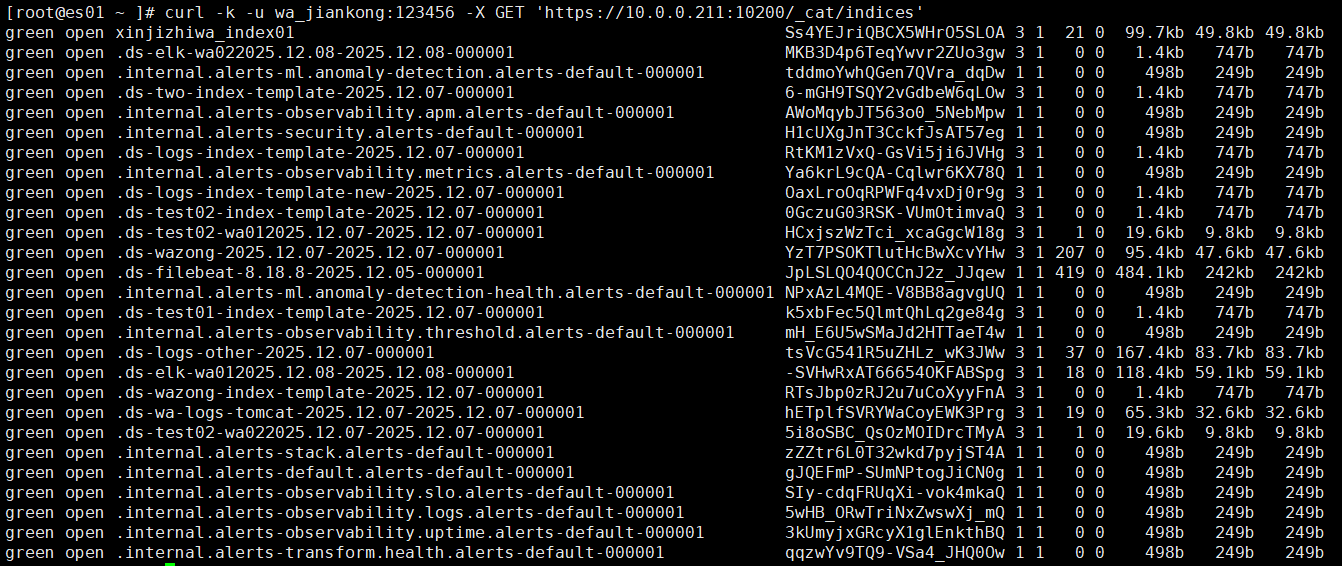
# 测试监控用户查看节点状态
[root@es01 ~ ]# curl -k -u wa_jiankong:123456 -X GET 'https://10.0.0.101:10200/_cat/nodes?v'
ip heap.percent ram.percent cpu load_1m load_5m load_15m node.role master name
10.0.0.101 31 95 1 0.00 0.00 0.00 dim - es02
10.0.0.102 67 94 1 0.00 0.00 0.00 dim - es01
10.0.0.103 50 96 0 0.00 0.02 0.00 dim * es03
· 日志开发者用户
1,创建角色
| 一级字段 | 二级 字段 | 三级字段 | 说明 |
|---|---|---|---|
| cluster | monitor | 集群监控权限;可以查看集群节点列表 | |
| indeices | names | 针对哪些索引有权限 | |
| privileges | read | 读取数据的权限 | |
| write | 写入数据的权限 | ||
| create_index | 创建索引的权限(必须是bakwite开头的索引名) | ||
| view_index_metadata | 索引的元数据查看权限(mappings、settings等) | ||
| manage | 管理索引的增删改查 | ||
| allow_restricted_indices | 是否允许访问以【.】开头的隐藏索引? |
[root@es01 ~ ]# curl -k -u elastic:123456 -X PUT 'https://10.0.0.101:10200/_security/role/log_dev_wa' -H 'Content-Type: application/json' -d '
{
"cluster": ["monitor"],
"indices": [
{
"names": ["bakwite*"],
"privileges": ["read", "write", "create_index", "view_index_metadata", "manage"],
"allow_restricted_indices": false
},
{
"names": [".kibana*"],
"privileges": ["read", "view_index_metadata"]
}
]
}'
2,创建用户【wa_dev】
[root@es01 ~ ]# curl -k -u elastic:123456 -X PUT 'https://10.0.0.101:10200/_security/user/wa_dev' -H 'Content-Type: application/json' -d '
{
"password": "123456",
"roles": ["log_dev_wa"],
"full_name": "Application Developer",
"email": "bakwite@bakwite.com"
}'
3,验证用户权限
创建索引验证:只能创建bakwite开头的索引
# 创建索引验证(只能创建bakwite开头的名称)
[root@es01 ~ ]# curl -k -u wa_dev:123456 -X PUT "https://10.0.0.101:10200/test01?pretty"
{
"error" : {
"root_cause" : [
{
"type" : "security_exception",
"reason" : "action [indices:admin/create] is unauthorized for user [wa_dev] with effective roles [log_dev_wa] on indices [test01], this action is granted by the index privileges [create_index,manage,all]"
}
],
"type" : "security_exception",
"reason" : "action [indices:admin/create] is unauthorized for user [wa_dev] with effective roles [log_dev_wa] on indices [test01], this action is granted by the index privileges [create_index,manage,all]"
},
"status" : 403
}
# 创建bakwite开头的索引测试
[root@es01 ~ ]# curl -k -u wa_dev:123456 -X PUT "https://10.0.0.101:10200/bakwite-01?pretty"
{
"acknowledged" : true,
"shards_acknowledged" : true,
"index" : "bakwite-01"
}
· 创建只读(搜索)用户
1,创建角色
| 一级字段 | 二级字段 | 三级字段 | 说明 |
|---|---|---|---|
| applications | application | kibana-.kibana | 应用程序权限配置;【kibana-.kibana】:应用程序名称 |
| privileges | 在kibana中的权限 | ||
| feature_discover.read | 【Discover】页面功能的只读功能 | ||
| feature_dashboard.read | 【dashboard】页面的只读功能 | ||
| resources | space:default | 表示权限应用到哪些资源中;【space:default】默认空间 |
[root@es01 ~ ]# curl -k -u elastic:123456 -X PUT 'https://10.0.0.101:10200/_security/role/only_read_wa' -H 'Content-Type: application/json' -d '
{
"indices": [
{
"names": ["bakwite*"],
"privileges": ["read", "view_index_metadata"]
}
],
"applications": [
{
"application": "kibana-.kibana",
"privileges": ["feature_discover.read", "feature_dashboard.read"],
"resources": ["space:default"]
}
]
}'
2,创建用户【wa_read】
[root@es01 ~ ]# curl -k -u elastic:123456 -X PUT 'https://10.0.0.101:10200/_security/user/wa_read' -H 'Content-Type: application/json' -d '
{
"password": "123456",
"roles": ["only_read_wa"],
"full_name": "Read-Only Analyst",
"email": "bakwite@bakwite.com"
}'
3,验证用户权限
# 登录kibana查看验证
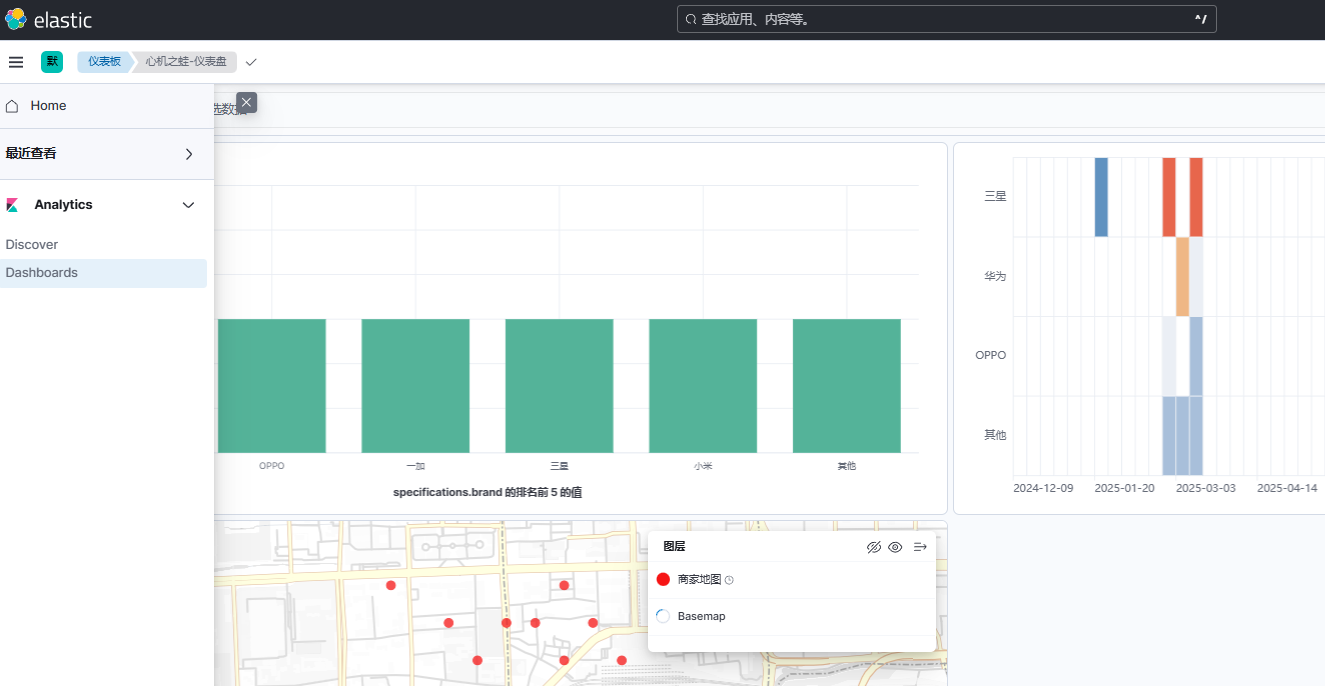
· 索引数据管理员
1,创建角色
| 一级字段 | 二级字段 | 三级字段 | 说明 |
|---|---|---|---|
| cluster | manage_index_templates | 增删改查索引模板 | |
| manage_ilm | 增删改查索引的生命周期 | ||
| monitor | 监控集群主机列表 | ||
| indices | names | 索引名称 | |
| privileges | monitor | 监控索引 | |
| view_index_metadata | 查看索引元数据(mapping、setting) | ||
| all | 所有权限 |
[root@es01 ~ ]# curl -k -u elastic:123456 -X PUT 'https://10.0.0.101:10200/_security/role/index_wa' -H 'Content-Type: application/json' -d '
{
"cluster": ["manage_index_templates", "manage_ilm", "monitor"],
"indices": [
{
"names": ["bakwite*","test*"],
"privileges": ["all"]
},
{
"names": ["*"],
"privileges": ["monitor", "view_index_metadata"]
}
]
}'
2,创建用户
[root@es01 ~ ]# curl -k -u elastic:123456 -X PUT 'https://10.0.0.101:10200/_security/user/wa_index' -H 'Content-Type: application/json' -d '
{
"password": "123456",
"roles": ["index_wa"],
"full_name": "index Analyst",
"email": "bakwite@bakwite.com"
}'
3,验证用户权限
# 创建一个test开头的索引
[root@es01 ~ ]# curl -k -u wa_index:123456 -X PUT "https://10.0.0.101:10200/test01?pretty"
{
"acknowledged" : true,
"shards_acknowledged" : true,
"index" : "test01"
}
· kibana仪表盘查看用户
1,创建角色
[root@es01 ~ ]# curl -k -u elastic:123456 -X PUT 'https://10.0.0.101:10200/_security/role/kibana_read_wa' -H 'Content-Type: application/json' -d '
{
"cluster": [],
"indices": [
{
"names": ["kibana-metrics-*", "web-analytics-*",".kibana*"],
"privileges": ["read", "view_index_metadata"]
}
],
"applications": [
{
"application": "kibana-.kibana",
"privileges": [
"feature_discover.read",
"feature_dashboard.read",
"feature_visualize.read",
"feature_canvas.read",
"feature_timelion.read",
"feature_maps.read",
"feature_ml.read"
],
"resources": ["space:default"]
}
]
}'
2,创建用户
[root@es01 ~ ]# curl -k -u elastic:123456 -X PUT 'https://10.0.0.101:10200/_security/user/wa_read_kibana' -H 'Content-Type: application/json' -d '
{
"password": "123456",
"roles": ["kibana_read_wa"],
"full_name": "Read-Only Analyst",
"email": "bakwite@bakwite.com"
}'
3,验证用户权限
# 登录kibana
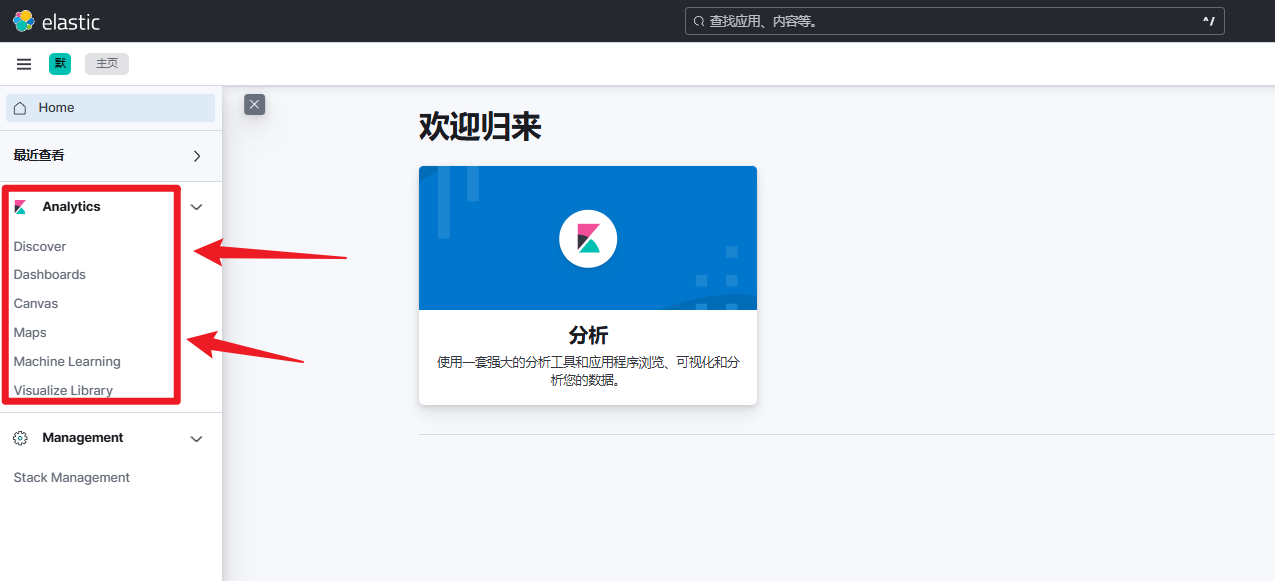
· kibana仪表盘编辑用户
1,创建角色
| 一级字段 | 二级字段 | 三级字段 | 说明 |
|---|---|---|---|
| applications | application | kibana-.kibana | 对接的软件名【kubana-*】这样写 |
| privileges | feature_discover.all | 探索数据 | |
| feature_dashboard.all | 仪表盘 | ||
| feature_visualize.all | 操作可视化 | ||
| feature_canvas.all | 动态看板功能 | ||
| feature_timelion.all | 时序分析工具功能 | ||
| feature_maps.all | 地图功能 | ||
| "feature_dev_tools.all" | 开发工具 | ||
| ui:*.all | 界面通用权限 | ||
| api:*.read | API读取权限 |
[root@es01 ~ ]# curl -k -u elastic:123456 -X PUT 'https://10.0.0.101:10200/_security/role/dash_test03' -H 'Content-Type: application/json' -d '
{
"cluster": ["monitor"],
"indices": [
{
"names": ["bakwite*",".kibana*"],
"privileges": ["read", "view_index_metadata"]
}
],
"applications": [
{
"application": "kibana-*",
"privileges": [
"feature_discover.all",
"feature_dashboard.all",
"feature_visualize.all",
"feature_canvas.all",
"feature_timelion.all",
"feature_maps.all",
"feature_ml.all",
"ui:*.all",
"api:*.read"
],
"resources": ["*"]
}
]
}'
2,创建用户
[root@es01 ~ ]# curl -k -u elastic:123456 -X PUT 'https://10.0.0.101:10200/_security/user/test03_dash' -H 'Content-Type: application/json' -d '
{
"password": "123456",
"roles": ["dash_test03"],
"full_name": "Read-Only Analyst",
"email": "bakwite@bakwite.com"
}'
3,测试用户权限
# 登录kibana
3,删除用户与角色
# 删除角色
[root@es01 ~ ]# curl -k -u elastic:123456 -X DELETE 'https://10.0.0.101:10200/_security/role/index_wa'
# 删除用户
[root@es01 ~ ]# curl -k -u elastic:123456 -X DELETE 'https://10.0.0.101:10200/_security/user/wa_index'
4,查看用户与角色
· 查看用户
1,查看所有用户
[root@es01 ~ ]# curl -k -u elastic:123456 -X GET 'https://10.0.0.101:10200/_security/user?pretty'
{
"elastic" : {
"username" : "elastic",
"roles" : [
"superuser"
],
"full_name" : null,
"email" : null,
"metadata" : {
"_reserved" : true
},
"enabled" : true
......
"test03_dash" : {
"username" : "test03_dash",
"roles" : [
"dash_test03"
],
"full_name" : "Read-Only Analyst",
"email" : "bakwite@bakwite.com",
"metadata" : { },
"enabled" : true
}
}
2,查看单个用户
[root@es01 ~ ]# curl -k -u elastic:123456 -X GET 'https://10.0.0.101:10200/_security/user/test03_dash?pretty'
{
"test03_dash" : {
"username" : "test03_dash",
"roles" : [
"dash_test03"
],
"full_name" : "Read-Only Analyst",
"email" : "bakwite@bakwite.com",
"metadata" : { },
"enabled" : true
}
}
· 查看角色
[root@es01 ~ ]# curl -k -u elastic:123456 -X GET 'https://10.0.0.101:10200/_security/role/dash_test03?pretty'
{
"dash_test03" : {
"cluster" : ["monitor"],
"indices" : [{
"names" : ["bakwite*",".kibana*"],
"privileges" : ["read", "view_index_metadata"],
"allow_restricted_indices" : false
} ],
"applications" : [
{
"application" : "kibana-.kibana",
"privileges" : [
"feature_discover.all",
"feature_dashboard.all",
"feature_visualize.all",
"feature_canvas.all",
"feature_timelion.all",
"feature_maps.all",
"feature_ml.all",
"ui:*.all",
"api:*.read"
],
"resources" : [
"*"
]
}
],
"run_as" : [ ],
"metadata" : { },
"transient_metadata" : {"enabled" : true}
}
}
十一、ES汇总
1,ES集群角色
# 集群角色
[root@es01 ~ ]# vim /tools/es8/elasticsearch-8.18.8/config/elasticsearch.yml
...
node.roles: ["master","data","ingest"]
# node.roles: []
| 角色 | 作用说明 |
|---|---|
| master | 【管理节点】:各个节点的状态管理与监控,数据存储到哪里、与数据状态、权限管理、数据类型、索引元数据管理 |
| data | 【数据存储节点】:存储数据(如果小吞吐量,也充当协调节点) |
| ingest | 【数据加工预处理节点】:数据加工预处理,数据合并、排序等工作、格式转换、数据过滤等; |
| 设置为空 | 表示协调节点 |
2,企业ES集群架构
注意:只有跨地域高可用的集群状态下,才使用5个master,否则3个足够用;
| 集群规模 | 节点角色 | 管理数据量 | 配置 | 适用场景 |
|---|---|---|---|---|
| 3台 | 混合角色(master, data, ingest) | 小于1TB | 4-8核/16-32GB | 小型网站 |
| 5-10台 | 3台master 2-7台(data,ingest) |
1TB到10TB | master:2-4核/4-8GB data/ingest:8-16核/32-64GB |
每日GB数据产生 |
| 15-30台 | 3台master 2-4台(ingest) 2-4台(协调) 5-15台(data) |
10TB到100TB | master:2-4核/4-8GB data:16-32核/64-128GB ingest:8-16核/16-32GB |
大型电商 日志平台 实时分析 高并发 复杂查询 |
| 30台+ | 3或5台master 2-4台(ingest) 4-8台(协调) 21+台(data) |
100TB 到 *PB | master:2-4核/4-8GB data:16-32核/64-128GB ingest:8-16核/16-32GB |
海量日志 物联网数据 长期归档 要求极致成本效益 |
3,ES数据流转过程
· 存储流程
客户端请求存储数据流程:假设我们6台ES集群,有一个索引【index01】,主分片为2,副本分片为1;
- 客户端向任意一个节点发起存储请求;(每个节点默认都有【协调器】,可以单独配置);
- 任意节点的【协调器】,会找到集群的master节点询问该索引【index01】的所有分片位置;
- 获取到分片位置后,协调节点通过文档ID计算该文档要存储到那个分片中;【hash(文档ID) % 分片数量】
- 计算好后,将数据交给ingest数据处理器,将数据处理成可存储格式;(加入元数据信息等操作);
- 最后,将数据存储到计算好的副本中,同时副本复制数据;存储完成。
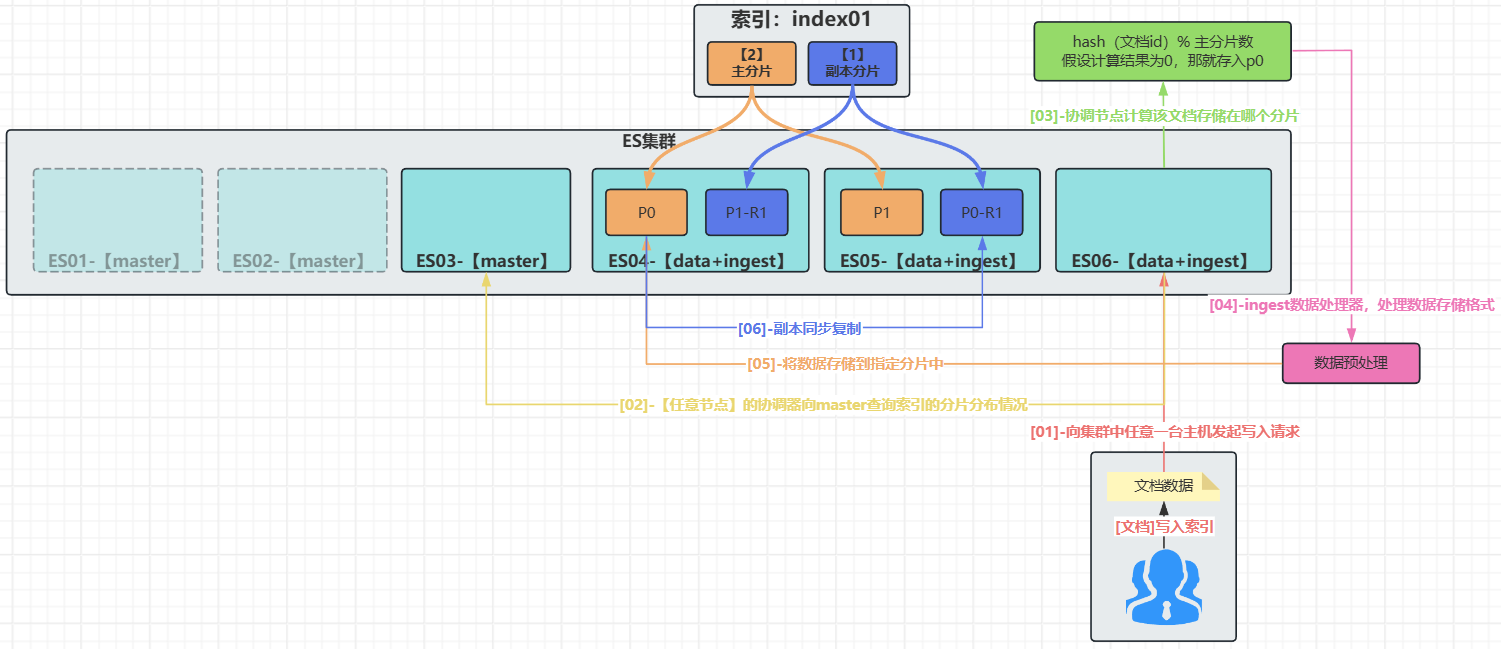
· 查询流程
数据查询流程:
- 客户端请求查询到任意一台主机;(每个节点默认都有【协调器】,可以单独配置);
- 协调器向master节点获取索引分片信息;
- 协调节点判断:数据的主分片和副本分片哪个更清闲,谁清闲就查谁;
- 确定查哪个分片后,优化查询语句,进入数据主机查询数据;
- 协调节点查询后,将数据打包返回给客户端用户;就此查询完毕;
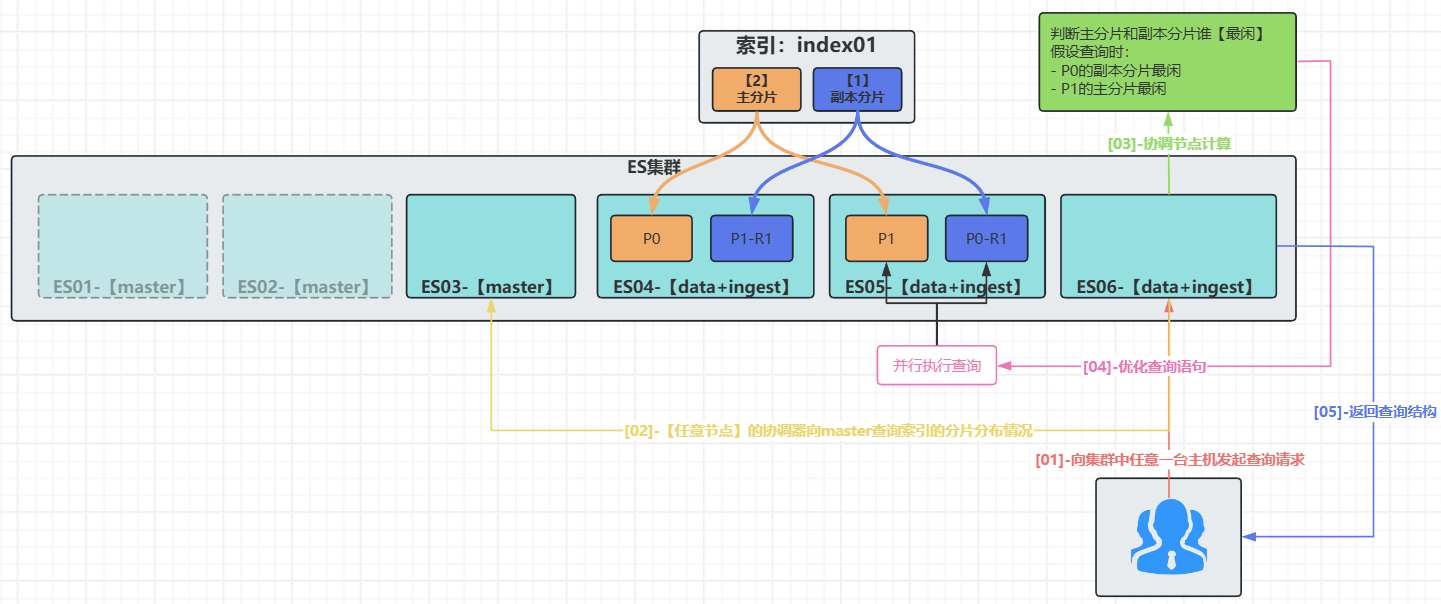
Discussion
评论