一、LogStash介绍
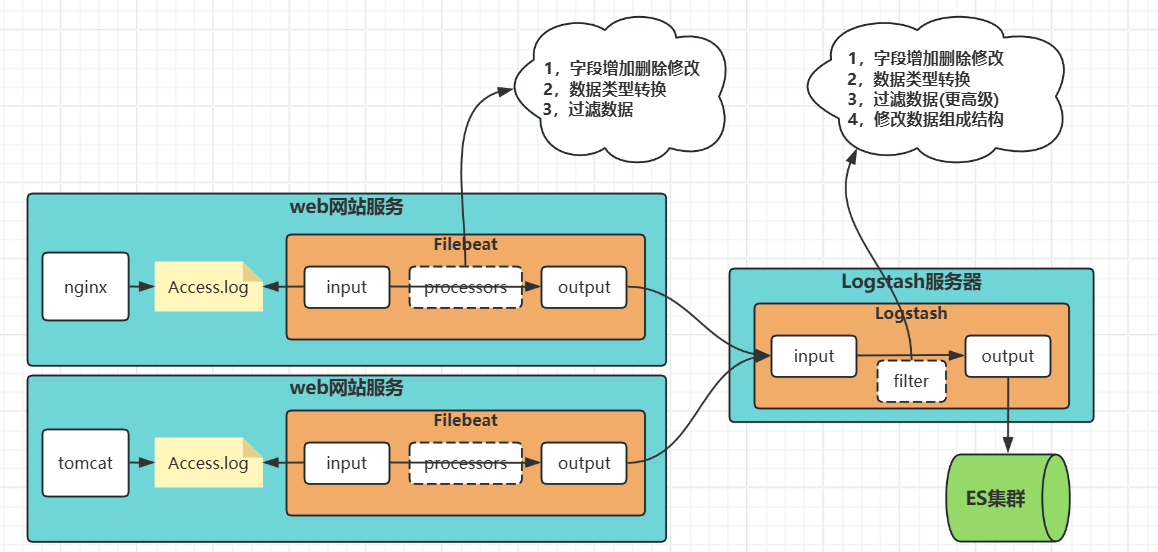
二、安装部署Logstash
1,下载安装包
# 前往elastic官网:
	- https://www.elastic.co/
	- 【Resources】-【Downloads】

# 滑动页面找到【Logstash】
	- 点击【Download】

# 进入版本选择页面

# 选择与elastic相同的版本
	- 点击【Download】下载

# 选择服务器系统架构
	- 等待下载完成

2,部署Logstash
· 上传解压安装包
# 上传安装包
[root@kibana ~ ]# rz -E
[root@kibana ~ ]# ls -l
......
-rw-r--r-- 1 root       root       438078975 Dec  9 07:34 logstash-8.18.8-linux-x86_64.tar.gz

# 解压到安装目录
[root@kibana ~ ]# tar xf logstash-8.18.8-linux-x86_64.tar.gz -C /tools/
[root@kibana ~ ]# ls -l /tools/
......
drwxr-xr-x 13 root   root   4096 Dec  9 07:44 logstash-8.18.8
查看配置文件目录
[root@kibana ~ ]# ls -l /tools/logstash-8.18.8/config/
total 48
-rw-r--r-- 1 root root  2924 Sep 30 18:40 jvm.options             # JVM虚拟机配置
-rw-r--r-- 1 root root  8681 Sep 30 18:40 log4j2.properties
-rw-r--r-- 1 root root   342 Sep 30 18:40 logstash-sample.conf
-rw-r--r-- 1 root root 15745 Sep 30 18:40 logstash.yml            # 主配置文件
-rw-r--r-- 1 root root  5098 Sep 30 18:40 pipelines.yml
-rw-r--r-- 1 root root  1696 Sep 30 18:40 startup.options
· 编辑主配置文件
[root@kibana ~ ]# vim /tools/logstash-8.18.8/config/logstash.yml
# 日志路径
path.logs: /tools/logstash-8.18.8/logs

# 数据路径
path.data: /tools/logstash-8.18.8/data

# 子配置文件目录
path.config: /tools/logstash-8.18.8/conf.d

# 日志级别
log.level: info

# HTTP API设置
http.host: "0.0.0.0"
http.port: 9600

# 队列设置(数据缓存)
queue.type: memory
queue.max_bytes: 1gb

# 管道设置
pipeline.batch.size: 125
pipeline.batch.delay: 50
pipeline.workers: 2
· 创建日志和自配置文件目录
[root@kibana ~ ]# mkdir /tools/logstash-8.18.8/{logs,conf.d}
[root@kibana ~ ]# ls -l /tools/logstash-8.18.8/
......
drwxr-xr-x 2 root root   4096 Dec  9 07:58 conf.d
......
drwxr-xr-x 2 root root   4096 Dec  9 07:58 logs
......
· 编辑子配置文件
| 字段 | 含义 |
|---|---|
| start_position | 表示从输入文件的什么位置开始读取 【end】:表示上一次读取的文件末尾开始读; 【beginning】:表示每次都从文件的首行开始读; |
[root@kibana ~ ]# vim /tools/logstash-8.18.8/conf.d/test.conf
input {
  file {
    path => "/test/1.txt"
    start_position => "end"
  }
}


output {
  file {
    path => "/test/result.json"
    codec => json_lines
  }
}
· 配置system启动
1,编辑system文件
[root@kibana ~ ]# vim /lib/systemd/system/logstash.service
[Unit]
Description=Logstash
Documentation=https://www.elastic.co/guide/en/logstash/current/index.html
Wants=network-online.target
After=network-online.target

[Service]
Type=simple
User=root
Group=root

Environment="LOGSTASH_HOME=/tools/logstash-8.18.8"
Environment="JAVA_HOME=/tools/logstash-8.18.8/jdk"

ExecStart=/tools/logstash-8.18.8/bin/logstash \
  --path.settings /tools/logstash-8.18.8/config \
  --path.config /tools/logstash-8.18.8/conf.d

Restart=always
RestartSec=10
LimitNOFILE=65536


[Install]
WantedBy=multi-user.target
2,启动
[root@kibana ~ ]# systemctl daemon-reload
[root@kibana ~ ]# systemctl restart logstash.service
[root@kibana ~ ]# systemctl status logstash.service
3,查看端口
[root@kibana ~ ]# ss -tnulp | grep -v grep | grep 9600
tcp   LISTEN 0      50      *:9600        *:*    users:(("java",pid=180965,fd=72))
3,测试文件输入输出
· 输入文件写入内容
[root@kibana ~ ]# echo "123" >> /test/1.txt
· 查看输出文件内容
[root@kibana ~ ]# cat /test/result.json
{
	"@version":"1",
	"@timestamp":"2025-12-09T08:55:39.354920276Z",
	"host":{"name":"kibana"},
	"message":"123",
	"event":{"original":"123"},
	"log":{"file":{"path":"/test/1.txt"}}
}
三、Logstash的输入输出
1,Filebeat输入到Logstash
· Logstash配置
1,准备ssl证书
创建CA根证书
# 创建证书目录
[root@kibana ~ ]# mkdir /tools/logstash-8.18.8/certs
[root@kibana ~ ]# cd /tools/logstash-8.18.8/certs

# 生成CA证书
[root@kibana /tools/logstash-8.18.8/certs ]# openssl req -x509 -newkey rsa:4096 -sha256 -days 3650 -nodes \
  -subj "/C=CN/ST=Beijing/L=Beijing/O=bakwite/CN=Logstash Root CA" \
  -keyout logstash-ca.key -out logstash-ca.crt
创建Logstash服务端证书
# 生成logstash的私钥与请求文件
[root@kibana /tools/logstash-8.18.8/certs ]# openssl req -newkey rsa:4096 -nodes -sha256 \
  -subj "/C=CN/ST=Beijing/L=Beijing/O=bakwite/CN=logstash-server" \
  -addext "subjectAltName=DNS:kibana,IP:10.0.0.110,IP:127.0.0.1" \
  -keyout logstash.key -out logstash.csr

# 生成Logstash服务端公钥证书
[root@kibana /tools/logstash-8.18.8/certs ]# openssl x509 -req -in logstash.csr -CA logstash-ca.crt -CAkey logstash-ca.key -CAcreateserial \
  -days 365 -out logstash.crt \
  -extfile <(printf "subjectAltName=DNS:kibana,IP:10.0.0.110,IP:127.0.0.1")
生成filebeat客户端证书
# 生成Filebeat客户端私钥与请求文件
[root@kibana /tools/logstash-8.18.8/certs ]# openssl req -newkey rsa:2048 -nodes -sha256 \
  -subj "/C=CN/ST=Beijing/L=Beijing/O=bakwite/CN=filebeat-client" \
  -keyout filebeat.key -out filebeat.csr

# 生成客户端公钥
[root@kibana /tools/logstash-8.18.8/certs ]# openssl x509 -req -in filebeat.csr -CA logstash-ca.crt -CAkey logstash-ca.key -CAcreateserial \
  -days 365 -out filebeat.crt
2,编辑Logstash子配置文件
[root@kibana ~ ]# cat /tools/logstash-8.18.8/conf.d/test.conf
input {
  beats {
    port => 5044
    ssl_enabled => true
    ssl_certificate => "/tools/logstash-8.18.8/certs/logstash.crt"
    ssl_key => "/tools/logstash-8.18.8/certs/logstash.key"
    ssl_certificate_authorities => ["/tools/logstash-8.18.8/certs/logstash-ca.crt"]
    ssl_client_authentication => "required"
  }
}


output {
  file {
    path => "/test/result.json"
    codec => json_lines
  }
}
3,重启Logstash
[root@kibana ~ ]# systemctl restart logstash.service
[root@kibana ~ ]# ss -tnulp | grep -v grep | grep 5044
tcp   LISTEN 0     4096    *:5044    *:*    users:(("java",pid=181363,fd=104))
· filebeat配置
1,准备客户端证书
创建证书目录
[root@kibana ~ ]# mkdir /tools/filebeat-8.18.8-linux-x86_64/certs
[root@kibana ~ ]# cd /tools/filebeat-8.18.8-linux-x86_64/certs
移动客户端证书到目录
[root@kibana /tools/filebeat-8.18.8-linux-x86_64/certs ]# cp /tools/logstash-8.18.8/certs/filebeat* ./
[root@kibana /tools/filebeat-8.18.8-linux-x86_64/certs ]# cp /tools/logstash-8.18.8/certs/logstash-ca.crt ./
[root@kibana /tools/filebeat-8.18.8-linux-x86_64/certs ]# ls -l
total 16
-rw-r--r-- 1 root root 2017 Dec  9 11:05 ca.crt
-rw-r--r-- 1 root root 1545 Dec  9 11:05 filebeat.crt
-rw-r--r-- 1 root root  993 Dec  9 11:05 filebeat.csr
-rw------- 1 root root 1704 Dec  9 11:05 filebeat.key
2,编辑配置文件
[root@kibana ~ ]# vim /tools/filebeat-8.18.8-linux-x86_64/filebeat.yml
# 数据的来源设置
filebeat.inputs:
  # 指定filestream类型
- type: filestream
  # 比log类型多一个自定义的id字段
  id: bakwite_01
  enabled: true
  # 采集日志数据的路径位置;
  paths:
    - "/test/1.txt"

# 输出到Logstash
output.logstash:
  enabled: true
  # Logstash主机和端口
  hosts: ["10.0.0.110:5044"]
  ssl.enabled: true
  ssl.certificate_authorities: ["/tools/filebeat-8.18.8-linux-x86_64/certs/logstash-ca.crt"]
  ssl.certificate: "/tools/filebeat-8.18.8-linux-x86_64/certs/filebeat.crt"
  ssl.key: "/tools/filebeat-8.18.8-linux-x86_64/certs/filebeat.key"
3,重启filebeat
[root@kibana ~ ]# systemctl restart filebeat.service
· 测试数据流
1,filebeat清空数据
[root@kibana ~ ]#  > /test/1.txt
[root@kibana ~ ]#  > /test/result.json
[root@kibana ~ ]# rm -rf /tools/filebeat-8.18.8-linux-x86_64/data/*
2,输入文件写入数据查看
[root@kibana ~ ]# echo "123" >> /test/1.txt
[root@kibana ~ ]# cat /test/result.json
{
	"@version":"1",
	"tags":["beats_input_codec_plain_applied"],
	"log":{
		"offset":13,
		"file":{"device_id":"64768","path":"/test/1.txt","inode":"4587525"}
	},
	"event":{"original":"123"},
	"@timestamp":"2025-12-09T11:21:16.193Z",
	"message":"123",
	"ecs":{"version":"8.0.0"},
	"agent":{
		"version":"8.18.8",
		"name":"kibana",
		"type":"filebeat",
		"ephemeral_id":"e8da6039-a3e6-47f1-97e6-2a32deeb4089",
		"id":"46a71555-0350-4bf2-86b8-cef12dbe23ca"
	},
	"input":{"type":"filestream"},
	"host":{"name":"kibana"}
}
2,Logstash输出到ES集群
· 复制ES的CA证书到Logstash
[root@kibana ~ ]# scp 10.0.0.101:/tools/es8/elasticsearch-8.18.8/config/certs/ca.crt /tools/logstash-8.18.8/certs/
[root@kibana ~ ]# ls -l /tools/logstash-8.18.8/certs
total 36
-rw-r--r-- 1 root root 2029 Dec 10 00:00 ca.crt
-rw-r--r-- 1 root root 1545 Dec  9 11:57 filebeat.crt
-rw-r--r-- 1 root root  993 Dec  9 11:57 filebeat.csr
-rw------- 1 root root 1704 Dec  9 11:57 filebeat.key
-rw-r--r-- 1 root root 2017 Dec  9 11:56 logstash-ca.crt
-rw------- 1 root root 3268 Dec  9 11:56 logstash-ca.key
-rw-r--r-- 1 root root 2033 Dec  9 11:57 logstash.crt
-rw-r--r-- 1 root root 1752 Dec  9 11:57 logstash.csr
-rw------- 1 root root 3272 Dec  9 11:57 logstash.key
· 编辑logstash子配置文件
[root@kibana ~ ]# vim /tools/logstash-8.18.8/conf.d/test.conf
input {
  beats {
    port => 5044
    ssl_enabled => true
    ssl_certificate => "/tools/logstash-8.18.8/certs/logstash.crt"
    ssl_key => "/tools/logstash-8.18.8/certs/logstash.key"
    ssl_certificate_authorities => ["/tools/logstash-8.18.8/certs/logstash-ca.crt"]
    ssl_client_authentication => "required"
  }
}


output {
  elasticsearch {
    hosts => ["https://10.0.0.101:10200", "https://10.0.0.102:10200", "https://10.0.0.103:10200"]
    index => "logstash-%{+YYYY.MM.dd}"

    # 使用https访问
    ssl => true
    # 启用证书验证
    ssl_certificate_verification => true

    # ES服务器的CA证书路径(根据证书类型选择一种)
    cacert => "/tools/logstash-8.18.8/certs/ca.crt"

    # 如果使用客户端证书
    # ssl_certificate => "/path/to/client.crt"
    # ssl_key => "/path/to/client.key"

    # ES认证(如果需要)
    user => "elastic"
    password => "123456"
  }
}
· 重启Logstash
[root@kibana ~ ]# systemctl restart logstash.service
· filebeat输入文件写入数据
[root@kibana ~ ]# echo "123" >> /test/1.txt
· kibana查看ES是否创建索引
# 可以看到索引创建成功;

四、Logstash数据处理filter
1,环境准备
· 编辑Logstash子配置文件
为了方便学习编辑为:本地文件输入、本地文件输出
[root@kibana ~ ]# vim /tools/logstash-8.18.8/conf.d/test.conf
input {
  file {
    path => "/test/1.txt"
    start_position => "end"
  }
}


output {
  file {
    path => "/test/result.json"
    codec => json_lines
  }
}
· 清空数据
[root@kibana ~ ]# echo "" > /test/1.txt
[root@kibana ~ ]# echo "" > /test/result.json
· 重启Logstash
[root@kibana ~ ]# systemctl restart logstash.service
[root@kibana ~ ]# systemctl status logstash.service   #等待java代码启动成功
· 数据准备
[root@kibana ~ ]# vim /test/1.txt
192.168.1.100 - - 10/Dec/2025:05:45:23+0800 GET /index.html HTTP/1.1 200 1234 - Mozilla/5.0 (Windows NT 10.0; Win64; x64) AppleWebKit/537.36
192.168.1. - zhangsan 10/Dec/2025:05:45:24+0800 POST /api/login HTTP/1.1 200 567 https://www.example.com/ Mozilla/5.0 (Macintosh; Intel Mac OS X 10_15_7)
192.168.1.102 - - 10/Dec/2025:05:45:25 +0800 GET /static/css/style.css HTTP/1.1 304 0 https://www.example.com/index.html Mozilla/5.0 (iPhone; CPU iPhone OS 14_0)
· 查看Logstash输出文件
[root@kibana ~ ]# cat /test/result.json | jq
{
  "@version": "1",
  "event": {
    "original": ""
  },
  "host": {
    "name": "kibana"
  },
  "log": {
    "file": {
      "path": "/test/1.txt"
    }
  },
  "@timestamp": "2025-12-10T08:48:25.555277528Z",
  "message": ""
}
{
  "@version": "1",
  "event": {
    "original": "192.168.1. - zhangsan [10/Dec/2025:05:45:24 +0800] \"POST /api/login HTTP/1.1\" 200 567 \"https://www.example.com/\" \"Mozilla/5.0 (Macintosh; Intel Mac OS X 10_15_7)\""
  },
  "host": {
    "name": "kibana"
  },
  "log": {
    "file": {
      "path": "/test/1.txt"
    }
  },
  "@timestamp": "2025-12-10T08:54:23.952899082Z",
  "message": "192.168.1. - zhangsan [10/Dec/2025:05:45:24 +0800] \"POST /api/login HTTP/1.1\" 200 567 \"https://www.example.com/\" \"Mozilla/5.0 (Macintosh; Intel Mac OS X 10_15_7)\""
}
{
  "@version": "1",
  "event": {
    "original": "192.168.1.100 - - [10/Dec/2025:05:45:23 +0800] \"GET /index.html HTTP/1.1\" 200 1234 \"-\" \"Mozilla/5.0 (Windows NT 10.0; Win64; x64) AppleWebKit/537.36\""
  },
  "host": {
    "name": "kibana"
  },
  "log": {
    "file": {
      "path": "/test/1.txt"
    }
  },
  "@timestamp": "2025-12-10T08:54:23.952558982Z",
  "message": "192.168.1.100 - - [10/Dec/2025:05:45:23 +0800] \"GET /index.html HTTP/1.1\" 200 1234 \"-\" \"Mozilla/5.0 (Windows NT 10.0; Win64; x64) AppleWebKit/537.36\""
}
{
  "@version": "1",
  "event": {
    "original": "192.168.1.102 - - [10/Dec/2025:05:45:25 +0800] \"GET /static/css/style.css HTTP/1.1\" 304 0 \"https://www.example.com/index.html\" \"Mozilla/5.0 (iPhone; CPU iPhone OS 14_0)\""
  },
  "host": {
    "name": "kibana"
  },
  "log": {
    "file": {
      "path": "/test/1.txt"
    }
  },
  "@timestamp": "2025-12-10T08:54:23.953102192Z",
  "message": "192.168.1.102 - - [10/Dec/2025:05:45:25 +0800] \"GET /static/css/style.css HTTP/1.1\" 304 0 \"https://www.example.com/index.html\" \"Mozilla/5.0 (iPhone; CPU iPhone OS 14_0)\""
}
· 查看Logstash的offset记录日志
[root@kibana ~ ]# cat /tools/logstash-8.18.8/data/plugins/inputs/file/.sincedb_f1ee7dc3df1dc393a35223305ac4fed7
4587525 0 64768 1 1765356505.5578868 /test/1.txt
4587526 0 64768 486 1765356863.953197 /test/1.txt
2,字段处理mutate
| filter过滤 | 二级字段 | 含义说明 |
|---|---|---|
| mutate | 字段配置 | |
| remove_field | 删除字段 | |
| split | 切割字段 | |
| add_field | 添加字段 | |
| convert | 设置字段数据理性 |
· 移除字段
1,编辑Logstash子配置文件
[root@kibana ~ ]# vim /tools/logstash-8.18.8/conf.d/test.conf
input {
  file {
    path => "/test/1.txt"
    start_position => "end"
  }
}

filter {
  mutate {
    remove_field => ["@timestamp","log","host","event","@version"]
  }
}

output {
  file {
    path => "/test/result.json"
    codec => json_lines
  }
}
2,清空数据
[root@kibana ~ ]# > /test/result.json
[root@kibana ~ ]# > /test/1.txt
[root@kibana ~ ]# rm -rf  /tools/logstash-8.18.8/data/plugins/inputs/file/.sincedb_f1ee7dc3df1dc393a35223305ac4fed7
3,重启Logstash
[root@kibana ~ ]# systemctl restart logstash.service
[root@kibana ~ ]# systemctl status logstash.service  #等待java代码启动成功
4,重新写入数据
[root@kibana ~ ]# vim /test/1.txt
192.168.1.100 10/Dec/2025:05:45:23+0800 GET /index.html HTTP/1.1 200 1234 Mozilla/5.0(Windows NT 10.0; Win64; x64) AppleWebKit/537.36
192.168.1. 10/Dec/2025:05:45:24+0800 POST /api/login HTTP/1.1 200 567 https://www.example.com/ Mozilla/5.0 (Macintosh; Intel Mac OS X 10_15_7)
192.168.1.102 10/Dec/2025:05:45:25+0800 GET /static/css/style.css HTTP/1.1 304 0 https://www.example.com/index.html Mozilla/5.0(iPhone; CPU iPhone OS 14_0)
5,查看输出文件
结论:只剩下message字段了;
[root@kibana ~ ]# cat /test/result.json
{"message":"192.168.1.100 - - [10/Dec/2025:05:45:23 +0800] \"GET /index.html HTTP/1.1\" 200 1234 \"-\" \"Mozilla/5.0 (Windows NT 10.0; Win64; x64) AppleWebKit/537.36\""}
{"message":"192.168.1.102 - - [10/Dec/2025:05:45:25 +0800] \"GET /static/css/style.css HTTP/1.1\" 304 0 \"https://www.example.com/index.html\" \"Mozilla/5.0 (iPhone; CPU iPhone OS 14_0)\""}
{"message":"192.168.1. - zhangsan [10/Dec/2025:05:45:24 +0800] \"POST /api/login HTTP/1.1\" 200 567 \"https://www.example.com/\" \"Mozilla/5.0 (Macintosh; Intel Mac OS X 10_15_7)\""}
· 字段切割
1,编辑Logstash子配置文件
| 字段 | 说明 |
|---|---|
| split | 表示切割操作 |
| "字段名" => " " | 表示以【空格】做切割 |
[root@kibana ~ ]# cat /tools/logstash-8.18.8/conf.d/test.conf
input {
  file {
    path => "/test/1.txt"
    start_position => "end"
  }
}

filter {
  mutate {
    remove_field => ["@timestamp","log","host","event","@version"]
    split => { "message" => " " }
  }
}

output {
  file {
    path => "/test/result.json"
    codec => json_lines
  }
}
2,清空数据
[root@kibana ~ ]# > /test/result.json
[root@kibana ~ ]# > /test/1.txt
[root@kibana ~ ]# rm -rf  /tools/logstash-8.18.8/data/plugins/inputs/file/.sincedb_f1ee7dc3df1dc393a35223305ac4fed7
3,重启
[root@kibana ~ ]# systemctl restart logstash.service
[root@kibana ~ ]# systemctl status logstash.service  #等待java代码启动成功
4,重新写入数据
[root@kibana ~ ]# vim /test/1.txt
192.168.1.100 10/Dec/2025:05:45:23+0800 GET /index.html HTTP/1.1 200 1234 Mozilla/5.0(Windows NT 10.0; Win64; x64) AppleWebKit/537.36
192.168.1. 10/Dec/2025:05:45:24+0800 POST /api/login HTTP/1.1 200 567 https://www.example.com/ Mozilla/5.0 (Macintosh; Intel Mac OS X 10_15_7)
192.168.1.102 10/Dec/2025:05:45:25+0800 GET /static/css/style.css HTTP/1.1 304 0 https://www.example.com/index.html Mozilla/5.0(iPhone; CPU iPhone OS 14_0)
5,查看输出
[root@kibana ~ ]# cat /test/result.json |jq
{
  "message": [
    "192.168.1.",
    "10/Dec/2025:05:45:24+0800",
    "POST",
    "/api/login",
    "HTTP/1.1",
    "200",
    "567",
    "https://www.example.com/",
    "Mozilla/5.0",
    "(Macintosh;",
    "Intel",
    "Mac",
    "OS",
    "X",
    "10_15_7)"
  ]
}
{
  "message": [
    "192.168.1.100",
    "10/Dec/2025:05:45:23+0800",
    "GET",
    "/index.html",
    "HTTP/1.1",
    "200",
    "1234",
    "Mozilla/5.0(Windows",
    "NT",
    "10.0;",
    "Win64;",
    "x64)",
    "AppleWebKit/537.36"
  ]
}
{
  "message": [
    "192.168.1.102",
    "10/Dec/2025:05:45:25+0800",
    "GET",
    "/static/css/style.css",
    "HTTP/1.1",
    "304",
    "0",
    "https://www.example.com/index.html",
    "Mozilla/5.0(iPhone;",
    "CPU",
    "iPhone",
    "OS",
    "14_0)"
  ]
}
· 添加字段
1,编辑Logstash子配置文件
说明:
- 【split】切割后的结果是一个"数组";
- 想要取值需要:【 %{字段:[下标]} 】
[root@kibana ~ ]# vim /tools/logstash-8.18.8/conf.d/test.conf
input {
  file {
    path => "/test/1.txt"
    start_position => "end"
  }
}

filter {
  mutate {
    remove_field => ["@timestamp","log","host","event","@version"]
    split => { "message" => " " }
    add_field => {
      "user_ip" => "%{[message][0]}"
      "req_time" => "%{[message][1]}"
      "req_method" => "%{[message][2]}"
      "uri" => "%{[message][3]}"
      "http_version" => "%{[message][4]}"
      "http_status" => "%{[message][5]}"
      "req_byte_size" => "%{[message][6]}"
      "hosts" => "%{[message][7]}"
      "user_agent" => "%{[message][8]}%{[message][9]}%{[message][10]}%{[message][11]}%{[message][12]}"
    }
    remove_field => ["message"]
  }
}

output {
  file {
    path => "/test/result.json"
    codec => json_lines
  }
}
2,清空数据
[root@kibana ~ ]# > /test/result.json
[root@kibana ~ ]# > /test/1.txt
[root@kibana ~ ]# rm -rf  /tools/logstash-8.18.8/data/plugins/inputs/file/.sincedb_f1ee7dc3df1dc393a35223305ac4fed7
3,重启系统
[root@kibana ~ ]# systemctl restart logstash.service
[root@kibana ~ ]# systemctl status logstash.service  #等待java代码启动成功
4,重新写入数据
[root@kibana ~ ]# vim /test/1.txt
192.168.1.100 10/Dec/2025:05:45:23+0800 GET /index.html HTTP/1.1 200 1234 Mozilla/5.0(Windows NT 10.0; Win64; x64) AppleWebKit/537.36
192.168.1. 10/Dec/2025:05:45:24+0800 POST /api/login HTTP/1.1 200 567 https://www.example.com/ Mozilla/5.0 (Macintosh; Intel Mac OS X 10_15_7)
192.168.1.102 10/Dec/2025:05:45:25+0800 GET /static/css/style.css HTTP/1.1 304 0 https://www.example.com/index.html Mozilla/5.0(iPhone; CPU iPhone OS 14_0)
5,查看输出文件
[root@kibana ~ ]# cat /test/result.json |jq
{
  "user_agent": "Mozilla/5.0(Macintosh;IntelMacOS",
  "http_status": "200",
  "req_time": "10/Dec/2025:05:45:24+0800",
  "uri": "/api/login",
  "req_byte_size": "567",
  "req_method": "POST",
  "user_ip": "192.168.1.",
  "hosts": "https://www.example.com/",
  "http_version": "HTTP/1.1"
}
{
  "user_agent": "NT10.0;Win64;x64)AppleWebKit/537.36",
  "http_status": "200",
  "req_time": "10/Dec/2025:05:45:23+0800",
  "uri": "/index.html",
  "req_byte_size": "1234",
  "req_method": "GET",
  "user_ip": "192.168.1.100",
  "hosts": "Mozilla/5.0(Windows",
  "http_version": "HTTP/1.1"
}
{
  "user_agent": "Mozilla/5.0(iPhone;CPUiPhoneOS14_0)",
  "http_status": "304",
  "req_time": "10/Dec/2025:05:45:25+0800",
  "uri": "/static/css/style.css",
  "req_byte_size": "0",
  "req_method": "GET",
  "user_ip": "192.168.1.102",
  "hosts": "https://www.example.com/index.html",
  "http_version": "HTTP/1.1"
}
· 设置字段数据类型
1,编辑Logstash子配置文件
[root@kibana ~ ]# vim /tools/logstash-8.18.8/conf.d/test.conf
input {
  file {
    path => "/test/1.txt"
    start_position => "end"
  }
}

filter {
  mutate {
    remove_field => ["@timestamp","log","host","event","@version"]
    split => { "message" => " " }
    add_field => {
      "user_ip" => "%{[message][0]}"
      "req_time" => "%{[message][1]}"
      "req_method" => "%{[message][2]}"
      "uri" => "%{[message][3]}"
      "http_version" => "%{[message][4]}"
      "http_status" => "%{[message][5]}"
      "req_byte_size" => "%{[message][6]}"
      "hosts" => "%{[message][7]}"
      "user_agent" => "%{[message][8]}%{[message][9]}%{[message][10]}%{[message][11]}%{[message][12]}"
    }
    remove_field => ["message"]
    convert => {
      "http_status" => "integer"
      "req_byte_size" => "integer"
    }
  }
}

output {
  file {
    path => "/test/result.json"
    codec => json_lines
  }
}
2,清空数据
[root@kibana ~ ]# > /test/result.json
[root@kibana ~ ]# > /test/1.txt
[root@kibana ~ ]# rm -rf  /tools/logstash-8.18.8/data/plugins/inputs/file/.sincedb_f1ee7dc3df1dc393a35223305ac4fed7
3,重启
[root@kibana ~ ]# systemctl restart logstash.service
[root@kibana ~ ]# systemctl status logstash.service  #等待java代码启动成功
4,重新写入测试数据
[root@kibana ~ ]# vim /test/1.txt
192.168.1.100 10/Dec/2025:05:45:23+0800 GET /index.html HTTP/1.1 200 1234 Mozilla/5.0(Windows NT 10.0; Win64; x64) AppleWebKit/537.36
192.168.1. 10/Dec/2025:05:45:24+0800 POST /api/login HTTP/1.1 200 567 https://www.example.com/ Mozilla/5.0 (Macintosh; Intel Mac OS X 10_15_7)
192.168.1.102 10/Dec/2025:05:45:25+0800 GET /static/css/style.css HTTP/1.1 304 0 https://www.example.com/index.html Mozilla/5.0(iPhone; CPU iPhone OS 14_0)
5,查看输出结果
结果看不出来,但是已经修改了
[root@kibana ~ ]#

{
  "req_byte_size": "1234",
  "http_status": "200",
  "req_method": "GET",
  "hosts": "Mozilla/5.0(Windows",
  "user_agent": "NT10.0;Win64;x64)AppleWebKit/537.36",
  "req_time": "10/Dec/2025:05:45:23+0800",
  "user_ip": "192.168.1.100",
  "uri": "/index.html",
  "http_version": "HTTP/1.1"
}
{
  "req_byte_size": "0",
  "http_status": "304",
  "req_method": "GET",
  "hosts": "https://www.example.com/index.html",
  "user_agent": "Mozilla/5.0(iPhone;CPUiPhoneOS14_0)",
  "req_time": "10/Dec/2025:05:45:25+0800",
  "user_ip": "192.168.1.102",
  "uri": "/static/css/style.css",
  "http_version": "HTTP/1.1"
}
{
  "req_byte_size": "567",
  "http_status": "200",
  "req_method": "POST",
  "hosts": "https://www.example.com/",
  "user_agent": "Mozilla/5.0(Macintosh;IntelMacOS",
  "req_time": "10/Dec/2025:05:45:24+0800",
  "user_ip": "192.168.1.",
  "uri": "/api/login",
  "http_version": "HTTP/1.1"
}
3,时间处理date
| 时间处理字段 | 二级字段 | 含义说明 |
|---|---|---|
| date | 时间处理 | |
| match | 【必选】匹配:【哪个字段,这个字段当前显示的格式】 | |
| target | 【可选】匹配后,自动处理完的值,放到哪个字段下? | |
| locale | 【可选】按照什么语言进行匹配?当前有英文就用【en】 | |
| timezone | 【可选】处理后,显示什么时区的时间? |
· 编辑Logstash子配置文件
[root@kibana ~ ]# vim /tools/logstash-8.18.8/conf.d/test.conf
input {
  file {
    path => "/test/1.txt"
    start_position => "end"
  }
}

filter {
  mutate {
    remove_field => ["log","host","event","@version"]
    split => { "message" => " " }
    add_field => {
      "user_ip" => "%{[message][0]}"
      "req_time" => "%{[message][1]}"
      "req_method" => "%{[message][2]}"
      "uri" => "%{[message][3]}"
      "http_version" => "%{[message][4]}"
      "http_status" => "%{[message][5]}"
      "req_byte_size" => "%{[message][6]}"
      "hosts" => "%{[message][7]}"
      "user_agent" => "%{[message][8]}%{[message][9]}%{[message][10]}%{[message][11]}%{[message][12]}"
    }
    remove_field => ["message"]
    convert => {
      "http_status" => "integer"
      "req_byte_size" => "integer"
    }
  }
  date {
    match => ["req_time", "dd/MMM/yyyy:HH:mm:ssZ"]
    target => "@timestamp"
    locale => "en"
    timezone => "Asia/Shanghai"
  }
}

output {
  file {
    path => "/test/result.json"
    codec => json_lines
  }
}
· 清空数据
[root@kibana ~ ]# > /test/result.json
[root@kibana ~ ]# > /test/1.txt
[root@kibana ~ ]# rm -rf  /tools/logstash-8.18.8/data/plugins/inputs/file/.sincedb_f1ee7dc3df1dc393a35223305ac4fed7
· 重启
[root@kibana ~ ]# systemctl restart logstash.service
[root@kibana ~ ]# systemctl status logstash.service  #等待java代码启动成功
· 重新写入数据
[root@kibana ~ ]# vim /test/1.txt
192.168.1.100 10/Dec/2025:05:45:23+0800 GET /index.html HTTP/1.1 200 1234 Mozilla/5.0(Windows NT 10.0; Win64; x64) AppleWebKit/537.36
192.168.1. 10/Dec/2025:05:45:24+0800 POST /api/login HTTP/1.1 200 567 https://www.example.com/ Mozilla/5.0 (Macintosh; Intel Mac OS X 10_15_7)
192.168.1.102 10/Dec/2025:05:45:25+0800 GET /static/css/style.css HTTP/1.1 304 0 https://www.example.com/index.html Mozilla/5.0(iPhone; CPU iPhone OS 14_0)
· 查看输出文件内容
[root@kibana ~ ]# cat /test/result.json |jq
{
  "http_version": "HTTP/1.1",
  "user_agent": "Mozilla/5.0(Macintosh;IntelMacOS",
  "req_method": "POST",
  "req_time": "10/Dec/2025:05:45:24+0800",
  "@timestamp": "2025-12-09T21:45:24.000",
  "req_byte_size": "567",
  "hosts": "https://www.example.com/",
  "http_status": "200",
  "user_ip": "192.168.1.",
  "uri": "/api/login"
}
{
  "http_version": "HTTP/1.1",
  "user_agent": "NT10.0;Win64;x64)AppleWebKit/537.36",
  "req_method": "GET",
  "req_time": "10/Dec/2025:05:45:23+0800",
  "@timestamp": "2025-12-09T21:45:23.000",
  "req_byte_size": "1234",
  "hosts": "Mozilla/5.0(Windows",
  "http_status": "200",
  "user_ip": "192.168.1.100",
  "uri": "/index.html"
}
{
  "http_version": "HTTP/1.1",
  "user_agent": "Mozilla/5.0(iPhone;CPUiPhoneOS14_0)",
  "req_method": "GET",
  "req_time": "10/Dec/2025:05:45:25+0800",
  "@timestamp": "2025-12-09T21:45:25.000",
  "req_byte_size": "0",
  "hosts": "https://www.example.com/index.html",
  "http_status": "304",
  "user_ip": "192.168.1.102",
  "uri": "/static/css/style.css"
}
五、多分支语法配置
假设需求:
- 假设我们有【3个日志文件】要使用Logstash写入;
- 并且,不同的日志文件,需要filter过滤的规则不一样;
- 同时,不同的日志文件,写入文件也不一样;
- 那么我们就需要借助:Logstash提供的if条件判断功能来实现;
1,准备测试数据(可直接先做2)
# 日志文件【一】,还沿用之前的;
[root@kibana ~ ]# vim /test/1.txt
192.168.1.100 10/Dec/2025:05:45:23+0800 GET /index.html HTTP/1.1 200 1234 Mozilla/5.0(Windows NT 10.0; Win64; x64) AppleWebKit/537.36
192.168.1. 10/Dec/2025:05:45:24+0800 POST /api/login HTTP/1.1 200 567 https://www.example.com/ Mozilla/5.0 (Macintosh; Intel Mac OS X 10_15_7)
192.168.1.102 10/Dec/2025:05:45:25+0800 GET /static/css/style.css HTTP/1.1 304 0 https://www.example.com/index.html Mozilla/5.0(iPhone; CPU iPhone OS 14_0)

# 日志文件【二】,随便改动点东西,我们改动ip地址
[root@kibana ~ ]# vim /test/2.txt
211.211.1.100 10/Dec/2025:05:45:23+0800 GET /index.html HTTP/1.1 200 1234 Mozilla/5.0(Windows NT 10.0; Win64; x64) AppleWebKit/537.36
211.211.1. 10/Dec/2025:05:45:24+0800 POST /api/login HTTP/1.1 200 567 https://www.example.com/ Mozilla/5.0 (Macintosh; Intel Mac OS X 10_15_7)
211.211.1.102 10/Dec/2025:05:45:25+0800 GET /static/css/style.css HTTP/1.1 304 0 https://www.example.com/index.html Mozilla/5.0(iPhone; CPU iPhone OS 14_0)

# 日志文件【三】,随便改动点东西,我们改动ip地址
[root@kibana ~ ]# vim /test/3.txt
177.177.1.100 10/Dec/2025:05:45:23+0800 GET /index.html HTTP/1.1 200 1234 Mozilla/5.0(Windows NT 10.0; Win64; x64) AppleWebKit/537.36
177.177.1. 10/Dec/2025:05:45:24+0800 POST /api/login HTTP/1.1 200 567 https://www.example.com/ Mozilla/5.0 (Macintosh; Intel Mac OS X 10_15_7)
177.177.1.102 10/Dec/2025:05:45:25+0800 GET /static/css/style.css HTTP/1.1 304 0 https://www.example.com/index.html Mozilla/5.0(iPhone; CPU iPhone OS 14_0)
2,编辑配置文件
| 字段 | 解释说明 |
|---|---|
| type | Logstash存在的【类型】字段;给输入数据分类专用; |
| input中的add_field | 【添加元数据】logstash的自定义字段添加;自定义的给输入数据分类字段; |
[root@kibana ~ ]# vim /tools/logstash-8.18.8/conf.d/test.conf
input {
  file {
    path => "/test/1.txt"
    start_position => "end"
    type => "nginx"
    add_field => { "file_type" => "client_log" }
  }
  file {
    path => "/test/2.txt"
    start_position => "end"
    type => "apache"
    add_field => { "file_type" => "k8s_log" }
  }
  file {
    path => "/test/3.txt"
    start_position => "end"
    type => "tomcat"
    add_field => { "file_type" => "server_log" }
  }
}

filter {
  if [type] == "nginx" {
      mutate {
        remove_field => ["@timestamp","log","host","event","@version"]
      }
  } else if [type] == "apache" {
      mutate {
        add_field => {
          "name" => "张三"
          "age" => "18"
        }
      }
  } else {
      mutate {
        remove_field => ["log","host","event","@version","@timestamp"]
        split => { "message" => " " }
        add_field => {
          "user_ip" => "%{[message][0]}"
          "req_time" => "%{[message][1]}"
          "req_method" => "%{[message][2]}"
          "uri" => "%{[message][3]}"
          "http_version" => "%{[message][4]}"
          "http_status" => "%{[message][5]}"
          "req_byte_size" => "%{[message][6]}"
          "hosts" => "%{[message][7]}"
          "user_agent" => "%{[message][8]}%{[message][9]}%{[message][10]}%{[message][11]}%{[message][12]}"
        }
        remove_field => ["message"]
        convert => {
          "http_status" => "integer"
          "req_byte_size" => "integer"
        }
      }
      date {
          match => ["req_time", "dd/MMM/yyyy:HH:mm:ssZ"]
          target => "@timestamp"
          locale => "en"
          timezone => "Asia/Shanghai"
      }
  }
}


output {
  if [type] == "nginx" {
      file {
        path => "/test/result_01.json"
        codec => json_lines
      }
  } else if [type] == "apache" {
      file {
        path => "/test/result_02.json"
        codec => json_lines
      }
  } else {
      file {
        path => "/test/result_03.json"
        codec => json_lines
      }
  }
}
3,清空历史数据
[root@kibana ~ ]# rm -rf /test/*
[root@kibana ~ ]# rm -rf /tools/logstash-8.18.8/data/plugins/inputs/file/.sincedb_f1ee7dc3df1dc393a35223305ac4fed7
4,重启
[root@kibana ~ ]# systemctl restart logstash.service
[root@kibana ~ ]# systemctl status logstash.service  #等待java代码启动成功
5,写入测试数据
# 日志文件【一】,还沿用之前的;
[root@kibana ~ ]# vim /test/1.txt
192.168.1.100 10/Dec/2025:05:45:23+0800 GET /index.html HTTP/1.1 200 1234 Mozilla/5.0(Windows NT 10.0; Win64; x64) AppleWebKit/537.36
192.168.1. 10/Dec/2025:05:45:24+0800 POST /api/login HTTP/1.1 200 567 https://www.example.com/ Mozilla/5.0 (Macintosh; Intel Mac OS X 10_15_7)
192.168.1.102 10/Dec/2025:05:45:25+0800 GET /static/css/style.css HTTP/1.1 304 0 https://www.example.com/index.html Mozilla/5.0(iPhone; CPU iPhone OS 14_0)

# 日志文件【二】,随便改动点东西,我们改动ip地址
[root@kibana ~ ]# vim /test/2.txt
211.211.1.100 10/Dec/2025:05:45:23+0800 GET /index.html HTTP/1.1 200 1234 Mozilla/5.0(Windows NT 10.0; Win64; x64) AppleWebKit/537.36
211.211.1. 10/Dec/2025:05:45:24+0800 POST /api/login HTTP/1.1 200 567 https://www.example.com/ Mozilla/5.0 (Macintosh; Intel Mac OS X 10_15_7)
211.211.1.102 10/Dec/2025:05:45:25+0800 GET /static/css/style.css HTTP/1.1 304 0 https://www.example.com/index.html Mozilla/5.0(iPhone; CPU iPhone OS 14_0)

# 日志文件【三】,随便改动点东西,我们改动ip地址
[root@kibana ~ ]# vim /test/3.txt
177.177.1.100 10/Dec/2025:05:45:23+0800 GET /index.html HTTP/1.1 200 1234 Mozilla/5.0(Windows NT 10.0; Win64; x64) AppleWebKit/537.36
177.177.1. 10/Dec/2025:05:45:24+0800 POST /api/login HTTP/1.1 200 567 https://www.example.com/ Mozilla/5.0 (Macintosh; Intel Mac OS X 10_15_7)
177.177.1.102 10/Dec/2025:05:45:25+0800 GET /static/css/style.css HTTP/1.1 304 0 https://www.example.com/index.html Mozilla/5.0(iPhone; CPU iPhone OS 14_0)
6,查看输出文件
[root@kibana ~ ]# ls -l /test/
total 24
-rw-r--r-- 1 root root  436 Dec 11 05:51 1.txt
-rw-r--r-- 1 root root  436 Dec 11 05:52 2.txt
-rw-r--r-- 1 root root  436 Dec 11 05:52 3.txt
-rw-r--r-- 1 root root  598 Dec 11 05:52 result_01.json
-rw-r--r-- 1 root root 1550 Dec 11 05:52 result_02.json
-rw-r--r-- 1 root root 1034 Dec 11 05:52 result_03.json
· 查看nginx日志输出
[root@kibana ~ ]# cat /test/result_01.json |jq
{
  "type": "nginx",
  "message": "192.168.1. 10/Dec/2025:05:45:24+0800 POST /api/login HTTP/1.1 200 567 https://www.example.com/ Mozilla/5.0 (Macintosh; Intel Mac OS X 10_15_7)",
  "file_type": "client_log"
}
{
  "type": "nginx",
  "message": "192.168.1.100 10/Dec/2025:05:45:23+0800 GET /index.html HTTP/1.1 200 1234 Mozilla/5.0(Windows NT 10.0; Win64; x64) AppleWebKit/537.36",
  "file_type": "client_log"
}
{
  "type": "nginx",
  "message": "192.168.1.102 10/Dec/2025:05:45:25+0800 GET /static/css/style.css HTTP/1.1 304 0 https://www.example.com/index.html Mozilla/5.0(iPhone; CPU iPhone OS 14_0)",
  "file_type": "client_log"
}
· 查看apache日志输出
[root@kibana ~ ]# cat /test/result_02.json |jq
{
  "type": "apache",
  "event": {
    "original": "211.211.1.100 10/Dec/2025:05:45:23+0800 GET /index.html HTTP/1.1 200 1234 Mozilla/5.0(Windows NT 10.0; Win64; x64) AppleWebKit/537.36"
  },
  "log": {
    "file": {
      "path": "/test/2.txt"
    }
  },
  "host": {
    "name": "kibana"
  },
  "name": "张三",
  "@version": "1",
  "message": "211.211.1.100 10/Dec/2025:05:45:23+0800 GET /index.html HTTP/1.1 200 1234 Mozilla/5.0(Windows NT 10.0; Win64; x64) AppleWebKit/537.36",
  "file_type": "k8s_log",
  "age": "18",
  "@timestamp": "2025-12-11T05:52:17.547290004Z"
}
{
  "type": "apache",
  "event": {
    "original": "211.211.1.102 10/Dec/2025:05:45:25+0800 GET /static/css/style.css HTTP/1.1 304 0 https://www.example.com/index.html Mozilla/5.0(iPhone; CPU iPhone OS 14_0)"
  },
  "log": {
    "file": {
      "path": "/test/2.txt"
    }
  },
  "host": {
    "name": "kibana"
  },
  "name": "张三",
  "@version": "1",
  "message": "211.211.1.102 10/Dec/2025:05:45:25+0800 GET /static/css/style.css HTTP/1.1 304 0 https://www.example.com/index.html Mozilla/5.0(iPhone; CPU iPhone OS 14_0)",
  "file_type": "k8s_log",
  "age": "18",
  "@timestamp": "2025-12-11T05:52:17.547787638Z"
}
{
  "type": "apache",
  "event": {
    "original": "211.211.1. 10/Dec/2025:05:45:24+0800 POST /api/login HTTP/1.1 200 567 https://www.example.com/ Mozilla/5.0 (Macintosh; Intel Mac OS X 10_15_7)"
  },
  "log": {
    "file": {
      "path": "/test/2.txt"
    }
  },
  "host": {
    "name": "kibana"
  },
  "name": "张三",
  "@version": "1",
  "message": "211.211.1. 10/Dec/2025:05:45:24+0800 POST /api/login HTTP/1.1 200 567 https://www.example.com/ Mozilla/5.0 (Macintosh; Intel Mac OS X 10_15_7)",
  "file_type": "k8s_log",
  "age": "18",
  "@timestamp": "2025-12-11T05:52:17.547599756Z"
}
· 查看tomcat日志输出
[root@kibana ~ ]# cat /test/result_03.json |jq
{
  "@timestamp": "2025-12-09T21:45:24.000Z",
  "type": "tomcat",
  "user_agent": "Mozilla/5.0(Macintosh;IntelMacOS",
  "user_ip": "177.177.1.",
  "uri": "/api/login",
  "hosts": "https://www.example.com/",
  "req_method": "POST",
  "req_byte_size": "567",
  "http_version": "HTTP/1.1",
  "file_type": "server_log",
  "http_status": "200",
  "req_time": "10/Dec/2025:05:45:24+0800"
}
{
  "@timestamp": "2025-12-09T21:45:23.000Z",
  "type": "tomcat",
  "user_agent": "NT10.0;Win64;x64)AppleWebKit/537.36",
  "user_ip": "177.177.1.100",
  "uri": "/index.html",
  "hosts": "Mozilla/5.0(Windows",
  "req_method": "GET",
  "req_byte_size": "1234",
  "http_version": "HTTP/1.1",
  "file_type": "server_log",
  "http_status": "200",
  "req_time": "10/Dec/2025:05:45:23+0800"
}
{
  "@timestamp": "2025-12-09T21:45:25.000Z",
  "type": "tomcat",
  "user_agent": "Mozilla/5.0(iPhone;CPUiPhoneOS14_0)",
  "user_ip": "177.177.1.102",
  "uri": "/static/css/style.css",
  "hosts": "https://www.example.com/index.html",
  "req_method": "GET",
  "req_byte_size": "0",
  "http_version": "HTTP/1.1",
  "file_type": "server_log",
  "http_status": "304",
  "req_time": "10/Dec/2025:05:45:25+0800"
}
Discussion
评论